Introduction
This manual provides essential information for the safe and efficient operation, installation, and maintenance of your Hobart HL400 Legacy Planetary Mixer. Please read all instructions carefully before using the appliance to ensure proper function and to prevent injury or damage. Keep this manual for future reference.
Important Safety Instructions
- Always disconnect power before cleaning, servicing, or performing maintenance on the mixer.
- Ensure the mixer is placed on a stable, level surface capable of supporting its weight (approximately 453 pounds).
- Keep hands, hair, and clothing clear of moving parts during operation. Use the bowl guard at all times.
- Never operate the mixer with damaged cords or plugs. Contact qualified service personnel for repairs.
- Do not immerse the mixer base in water or other liquids.
- Use only Hobart-approved attachments and accessories.
- This appliance is intended for commercial food preparation. Do not use for other purposes.
Setup
1. Unpacking
Carefully remove the mixer from its packaging. Inspect for any shipping damage. Report any damage to the carrier immediately.
2. Placement
Position the mixer on a sturdy, level floor surface. Ensure adequate clearance around the unit for operation, cleaning, and maintenance. The mixer weighs approximately 453 pounds, so proper lifting equipment and personnel are required for relocation.
3. Electrical Connection
The Hobart HL400 mixer requires a 200-240V, 50/60Hz, 1-phase electrical supply. Ensure the power outlet matches these specifications and is properly grounded. Consult a qualified electrician if necessary.
4. Attaching the Bowl and Accessories
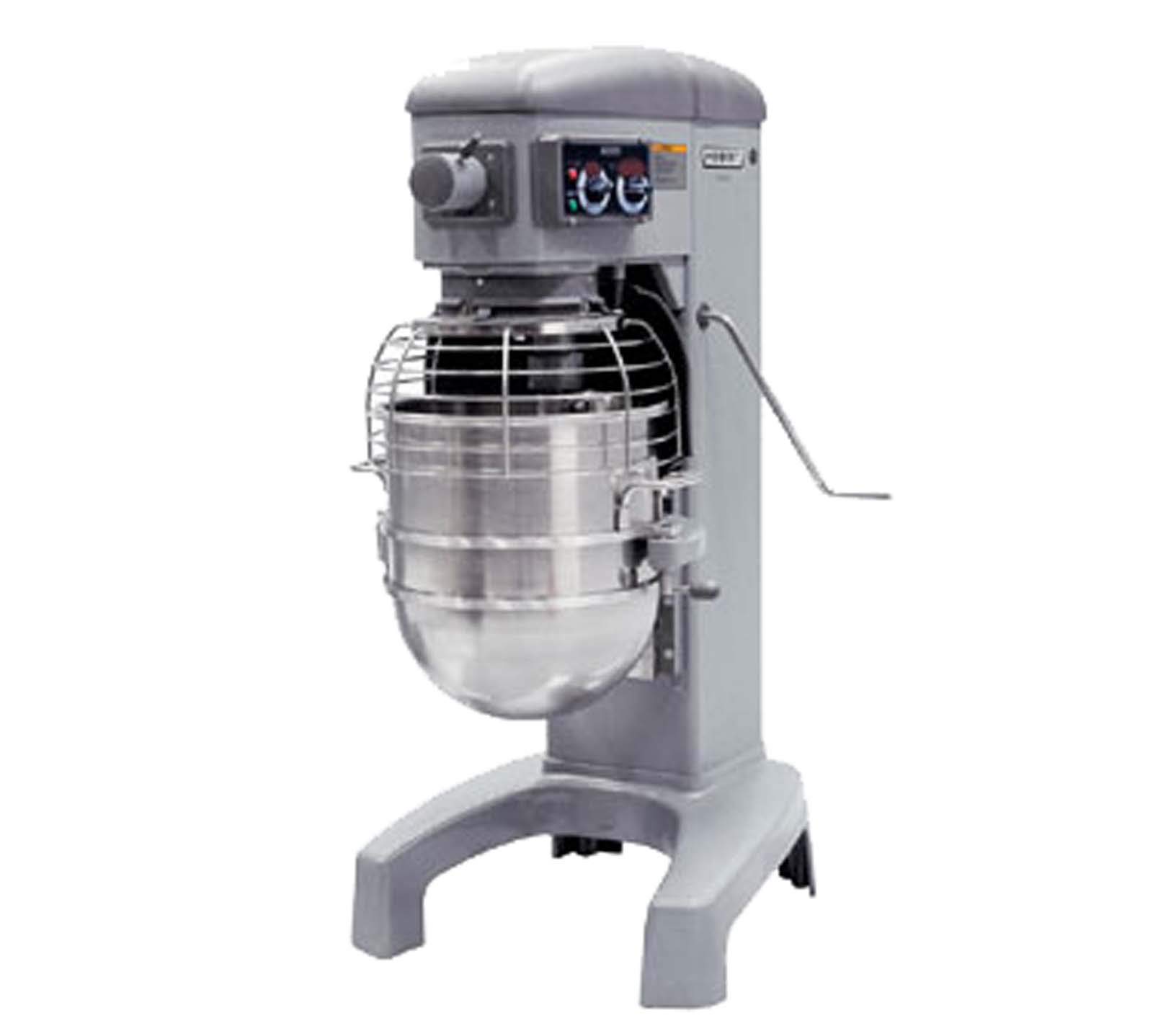
An image showing the complete Hobart HL400 Legacy Planetary Mixer, a 40-quart floor unit, with its stainless steel bowl and bowl guard in place.
- Bowl Installation: Lower the bowl support using the bowl lift handle. Place the 40-quart stainless steel bowl onto the support pins and rotate to secure. Raise the bowl to the operating position.
- Accessory Attachment: Select the appropriate accessory (B beater, D whip, or ED dough hook). Align the accessory shaft with the planetary shaft and push upwards, then rotate to lock it into place. Ensure it is securely fastened before operation.
- Bowl Guard: Always ensure the bowl guard is properly closed and secured before starting the mixer.
Operating Instructions
1. Controls Overview
- ON/OFF Switch: Located on the control panel to start and stop the mixer.
- Speed Selector: Provides three fixed speeds for various mixing tasks. Adjust only when the mixer is off or at a complete stop.
- Timer: A 20-minute timer allows for precise mixing durations. The mixer will stop automatically when the timer reaches zero.
- Bowl Lift Handle: Used to raise and lower the mixing bowl.
2. Mixing Procedure
- Ensure the bowl and desired accessory are correctly installed and the bowl guard is closed.
- Add ingredients to the mixing bowl.
- Select the appropriate speed for your recipe.
- Set the timer if a specific mixing duration is required.
- Press the ON switch to start the mixer.
- Monitor the mixing process. If necessary, stop the mixer to scrape down the sides of the bowl or add more ingredients.
- Once mixing is complete, press the OFF switch. Wait for the accessory to come to a complete stop before lowering the bowl or removing the accessory.
Maintenance
1. Cleaning
Regular cleaning is crucial for hygiene and longevity.
- Daily Cleaning: After each use, disconnect the mixer from power. Remove the bowl and accessories. The stainless steel bowl and accessories are dishwasher safe. Wipe down the exterior of the mixer, including the bowl guard and planetary head, with a damp cloth and mild detergent. Dry thoroughly.
- Deep Cleaning: Periodically, perform a more thorough cleaning, paying attention to crevices and hard-to-reach areas. Ensure no food particles accumulate.
- Do Not Hose Down: Never use a high-pressure hose or immerse the mixer base in water.
2. General Care
- Regularly inspect the power cord for any signs of damage.
- Ensure all moving parts operate smoothly. If you notice unusual resistance or noise, contact service personnel.
- Keep the mixer in a clean, dry environment when not in use.
Troubleshooting
This section addresses common issues you might encounter. For problems not listed here, contact Hobart customer support.
| Problem | Possible Cause | Solution |
|---|---|---|
| Mixer does not start | No power supply; ON/OFF switch not engaged; Bowl guard open; Timer not set. | Check power connection; Ensure switch is ON; Close bowl guard; Set timer. |
| Unusual noise during operation | Accessory not properly installed; Overloaded bowl; Internal mechanical issue. | Re-install accessory; Reduce batch size; Discontinue use and contact service. |
| Poor mixing performance | Incorrect accessory for task; Insufficient mixing time; Worn accessory. | Select correct accessory; Increase mixing time; Inspect and replace worn accessories. |
Specifications
- Model: HL400-4STD
- Brand: Hobart
- Motor: 1.5 Hp
- Electrical Rating: 200-240V, 50/60Hz, 1-phase
- Capacity: 40 Quarts
- Speeds: Three fixed speeds
- Transmission: Gear-driven
- Timer: 20-minute
- Attachment Hub: #12 Taper
- Standard Accessories: 'B' Beater, 'D' Whip, 'ED' Dough Hook
- Material: Aluminum, Stainless Steel
- Item Weight: Approximately 453 pounds
- Dishwasher Safe Parts: Bowl and accessories
- Date First Available: March 29, 2013
Warranty and Support
For information regarding product warranty, service, or technical support, please refer to the official Hobart website or contact Hobart customer service directly. Keep your purchase receipt and model number (HL400-4STD) handy when contacting support.
Visit the Hobart Store for more information.