
Eagle 0360A19EA
Eagle B-608 Safety Bench Cans User Manual
Model: 0360A19EA | Brand: Eagle
Introduction
The Eagle B-608 Safety Bench Can is engineered for the safe and efficient cleaning of small parts or for swabbing larger components. Its robust metal construction and integrated safety features make it an essential tool for industrial and laboratory environments.
Key features include a dasher screen that functions as a fire baffle, enhancing safety during use. This product is FM approved and meets OSHA standards, ensuring compliance with critical safety regulations.
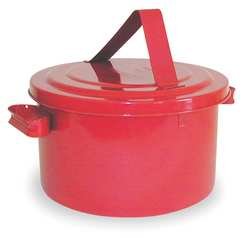
Figure 1: The Eagle B-608 Safety Bench Can, a red metal container with a lid and carrying handle, designed for safe liquid handling.
Safety Information
Always adhere to the following safety guidelines when using the Eagle B-608 Safety Bench Can:
- Use only with compatible liquids. Verify chemical compatibility before filling.
- Ensure the dasher screen is properly seated before use. This screen acts as a fire baffle to prevent flashback ignition.
- Do not overfill the can. Maintain adequate headspace for liquid expansion and safe operation.
- Always use in a well-ventilated area, especially when handling flammable or volatile liquids.
- Wear appropriate personal protective equipment (PPE), such as gloves and eye protection, when handling chemicals.
- Keep the can away from ignition sources, open flames, and excessive heat.
- Store the can in a secure, designated area when not in use, in accordance with local regulations for hazardous materials.
- This product is FM approved and meets OSHA standards for hazardous material handling.
Setup
- Unpacking: Carefully remove the safety bench can from its packaging. Inspect for any signs of damage during transit.
- Initial Inspection: Before first use, check all components, including the lid, dasher screen, and body, for any defects or foreign objects. Ensure the dasher screen moves freely and seats correctly.
- Placement: Place the can on a stable, level surface in a designated work area, away from high traffic and potential ignition sources.
- Filling: Open the lid and carefully pour the cleaning or swabbing liquid into the can. Do not fill above the level of the dasher screen to allow for proper operation and safety.
Operating Instructions
The Eagle B-608 Safety Bench Can is designed for simple and safe operation:
- Prepare for Cleaning: Ensure the can is filled with the appropriate cleaning solution. The dasher screen should be submerged in the liquid.
- Submerge Parts: Place the small parts to be cleaned onto the dasher screen. For larger parts, use the screen for swabbing.
- Depress Dasher: Gently press down on the dasher screen. This action will raise the liquid, allowing it to wash over the parts or saturate a swab.
- Release Dasher: Release the dasher screen. Excess liquid will drain back into the can, leaving the parts on the screen to dry or be removed. The spring-loaded dasher returns to its original position, sealing the opening and minimizing vapor exposure.
- Optional Basket: If using an optional parts cleaning basket (e.g., with B-602 model), place parts inside the basket before submerging.
Maintenance
Regular maintenance ensures the longevity and safe operation of your safety bench can:
- Cleaning: Periodically empty the can and clean it thoroughly, especially when changing liquids or if residue builds up. Use a compatible cleaning agent.
- Inspection: Regularly inspect the can for any signs of corrosion, dents, or damage. Pay close attention to the integrity of the lid seal and the functionality of the dasher screen.
- Dasher Screen: Ensure the dasher screen moves smoothly and returns to its sealed position without obstruction. Clean any debris that might impede its movement.
- Storage: When not in use, store the can in a clean, dry environment, preferably with the lid securely closed to prevent contamination and evaporation.
- Disposal of Liquids: Dispose of used or contaminated liquids according to local environmental regulations.
Troubleshooting
While the Eagle B-608 Safety Bench Can is a simple and robust device, here are some common issues and their solutions:
| Problem | Possible Cause | Solution |
|---|---|---|
| Dasher screen sticks or does not return smoothly. | Debris or residue buildup; damaged spring mechanism. | Clean the dasher screen and its housing thoroughly. If damaged, contact Eagle Manufacturing for replacement parts or service. |
| Liquid does not rise sufficiently when dasher is depressed. | Insufficient liquid in the can; dasher screen not fully submerged. | Add more liquid to the can, ensuring it covers the dasher screen. Do not overfill. |
| Can leaks. | Damage to the can body or lid seal; improper lid closure. | Inspect the can for cracks or punctures. Ensure the lid is securely closed. If damaged, discontinue use and replace the unit. |
Specifications
| Attribute | Detail |
|---|---|
| Model Number | 0360A19EA |
| Capacity | 8 Quarts |
| Height | 7 inches |
| Material | Metal |
| Color | Red |
| Approvals | FM Approved, Meets OSHA Standards |
| Package Dimensions | 13.03 x 12.87 x 11.81 inches |
| Item Weight | 7.74 Pounds |
| Manufacturer | Eagle Manufacturing Company |
Warranty and Support
Specific warranty information for the Eagle B-608 Safety Bench Can is not provided within this manual. For details regarding warranty coverage, technical support, or to inquire about replacement parts, please contact Eagle Manufacturing Company directly.
You can typically find contact information on the manufacturer's official website or through your product supplier.
Ask a question about this manual
Ask about setup, troubleshooting, compatibility, parts, safety, or missing instructions. Manuals+ will review the question and use this page’s manual context to help answer it.