
1. Introduction
The Pentair IntelliChem 521357 Water Chemistry Controller is designed to automate the monitoring and management of pH and sanitizing levels in your pool or spa. This system helps maintain optimal water chemistry, contributing to a clearer, safer, and more enjoyable swimming environment. The IntelliChem controller can operate independently or integrate with other Pentair automation systems for comprehensive pool management.
2. Safety Information
WARNING: Read and follow all instructions carefully. Failure to do so can result in serious injury, death, or property damage.
- Always disconnect power to the unit before performing any service or maintenance.
- Installation and servicing must be performed by a qualified pool professional and must conform to all local codes and ordinances.
- Handle pool chemicals with extreme care. Always wear appropriate personal protective equipment (PPE) such as gloves and eye protection. Refer to chemical manufacturer's safety data sheets (SDS) for specific handling instructions.
- Ensure proper ventilation when working with pool chemicals.
- Keep all chemicals and equipment out of reach of children and pets.
- This product is intended for use with swimming pools and spas only.
3. Package Contents
Verify that all components are present before beginning installation. The Pentair IntelliChem 521357 package typically includes:
- IntelliChem Controller Unit
- Installation and User Guide (this document)
- Mounting hardware
Note: This model is supplied without chemical feed pumps. External feed pumps, IntelliChlor, or CO2 systems, along with chemical containers, must be purchased separately and integrated with the controller.
4. Setup and Installation
Proper installation is crucial for the safe and effective operation of your IntelliChem controller. It is highly recommended that installation be performed by a qualified pool professional.
4.1 Site Selection
Choose a location that is:
- Protected from direct sunlight and harsh weather conditions.
- Easily accessible for maintenance and viewing.
- Within reach of power supply and plumbing connections.
- Away from chemical storage areas to prevent corrosion.
4.2 Mounting the Controller
Mount the IntelliChem controller securely to a vertical surface using the provided mounting hardware. Ensure the unit is level and at a height that allows for easy access to the display and connections.
4.3 Plumbing Connections
The IntelliChem controller requires a flow cell for its pH and ORP probes. Install the flow cell according to the manufacturer's instructions, ensuring proper water flow through the cell. Connect the chemical injection points from your external feed pumps to the pool plumbing after the main filtration system and before any heaters.
4.4 Electrical Connections
All electrical wiring must comply with local electrical codes. Connect the IntelliChem controller to a dedicated power supply. If integrating with other Pentair automation systems (e.g., EasyTouch, IntelliTouch, SunTouch), follow their specific wiring diagrams for communication and power. The IntelliChem features an auto setup/configuration wizard to simplify the initial startup process once power is applied.
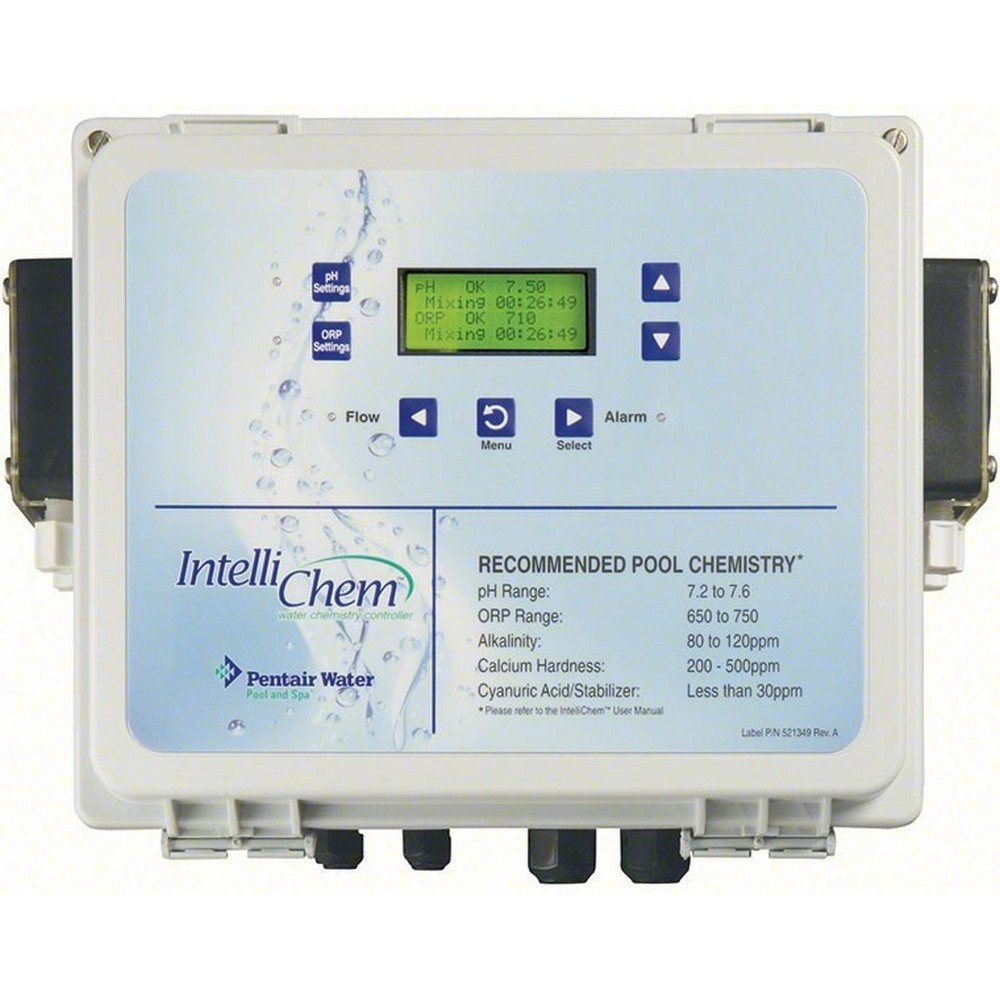
Figure 1: Pentair IntelliChem 521357 Water Chemistry Controller unit. This image shows the front panel of the controller with its display and control buttons, designed for monitoring and adjusting pool chemical levels.
5. Operating Instructions
The IntelliChem controller is designed for automated operation, continuously monitoring and adjusting your pool's water chemistry.
5.1 Initial Configuration
Upon initial power-up, the IntelliChem controller will guide you through an auto setup/configuration wizard. This wizard helps set up basic parameters such as desired pH and sanitizer set points, and calibrate the probes. Follow the on-screen prompts carefully.
5.2 Monitoring Water Chemistry
The controller's display provides real-time readings of your pool's pH and sanitizing (ORP) levels. It automatically dispenses chemicals as needed to maintain the programmed set points. The system also includes a built-in Langelier Saturation Index (LSI) calculator, which helps indicate if your pool water is balanced, preventing issues like scaling or corrosion.
5.3 Adjusting Set Points
You can adjust the desired pH and ORP set points through the controller's menu. Refer to your pool chemistry guidelines for recommended ranges. Changes to set points should be made gradually to avoid over-dosing or rapid chemical fluctuations.
5.4 Integration with Automation Systems
For enhanced control and convenience, the IntelliChem controller can be paired with Pentair's EasyTouch, IntelliTouch, or SunTouch Control Systems. Adding the ScreenLogic2 Interface allows for remote monitoring and control via a PC, Mac, iPad, iPhone, iPod touch, or Android device.
6. Maintenance
Regular maintenance ensures the accuracy and longevity of your IntelliChem controller.
6.1 Probe Cleaning and Calibration
The pH and ORP probes are critical for accurate readings. They should be cleaned and calibrated regularly according to the schedule outlined in the full manual (typically monthly or quarterly, depending on pool usage and water conditions). Use only Pentair-approved calibration solutions and cleaning kits. Probes are proprietary to Pentair and require specific replacement parts.
6.2 Flow Sensor Inspection
Periodically inspect the flow sensor within the flow cell to ensure it is free of debris and operating correctly. A malfunctioning flow sensor can prevent chemical dispensing, leading to imbalanced water chemistry. Ensure the flow switch is not stuck, which could lead to improper chemical dosing.
6.3 General Cleaning
Keep the controller unit clean and free of dust and chemical residue. Use a soft, damp cloth for cleaning. Do not use abrasive cleaners or solvents.
7. Troubleshooting
This section addresses common issues you might encounter with your IntelliChem controller.
- Inaccurate Readings: If pH or ORP readings appear incorrect, first clean and recalibrate the probes. Ensure probes are properly seated in the flow cell and that there is adequate water flow. Worn-out probes may need replacement.
- No Chemical Dispensing: Check that the external feed pumps are powered and operational. Verify that the flow sensor is detecting water flow; if the flow switch is stuck or not detecting flow, the system will not dispense chemicals as a safety measure. Ensure chemical containers are not empty.
- Chemical Imbalance Persists: Confirm that the desired set points are appropriate for your pool. Check for any blockages in the chemical injection lines. Ensure probes are calibrated and functioning correctly. Significant bather loads or environmental factors can temporarily impact chemistry, requiring manual adjustment or increased run times.
- Error Messages: Refer to the controller's display for specific error codes. Consult the full Pentair IntelliChem manual or contact Pentair technical support for detailed explanations and solutions for specific error messages.
If troubleshooting steps do not resolve the issue, contact a qualified pool professional or Pentair customer support.
8. Specifications
| Model Number | 521357 |
| Product Dimensions | 57.15 x 35.56 x 20.32 inches (22.5 x 14 x 8 inches) |
| Item Weight | 1 pounds |
| ASIN | B007E4VXK6 |
| Manufacturer | Pentair - Distribution |
9. Warranty and Support
For warranty information, please refer to the documentation provided with your purchase or visit the official Pentair website. For technical support, parts, or service, contact Pentair Customer Service or your authorized Pentair dealer. Have your model number (521357) and serial number ready when contacting support.


