
1. Introduction and Overview
This manual provides essential information for the safe and efficient operation of your Sharp AX-1100 Multi-Function Microwave Oven. This appliance combines microwave, grill, and pure steam cooking methods, offering versatile culinary options. Please read this manual thoroughly before using the appliance and keep it for future reference.
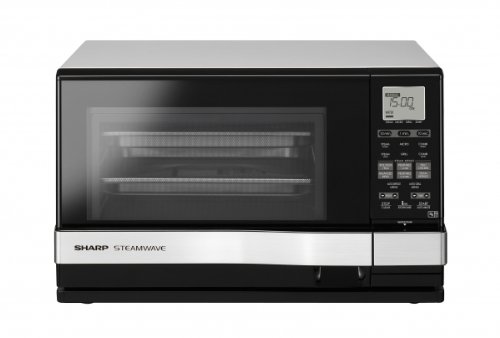
Figure 1: Front view of the Sharp AX-1100 Multi-Function Microwave Oven, showcasing its sleek design and control panel.
2. Important Safety Instructions
To reduce the risk of fire, electric shock, injury to persons, or exposure to excessive microwave energy when using your appliance, follow basic precautions, including the following:
- Read all instructions before using the appliance.
- Do not attempt to operate this oven with the door open as this can result in harmful exposure to microwave energy.
- Do not heat liquids or other foods in sealed containers since they are liable to explode.
- Only allow children to use the oven without supervision when adequate instructions have been given so that the child is able to use the oven in a safe way and understands the hazards of improper use.
- Do not use corrosive chemicals or vapors in this appliance.
- Do not operate this appliance if it has a damaged cord or plug, if it is not working properly, or if it has been damaged or dropped.
- Ensure the appliance is properly grounded.
3. Product Features
The Sharp AX-1100 is designed with advanced features to enhance your cooking experience:
- 100% Pure Steam Cooking: Utilizes a dedicated steam generator for healthy cooking without microwave power.
- Touch Control Operation: Intuitive and easy-to-clean touch panel for all settings.
- LCD Screen: Clear display for program selection, time, and settings.
- 26 Automatic Programs: Includes 4 dedicated "full meal" menus for convenience.
- High and Low Steam Option: Adjustable steam intensity for various dishes.
- Two-Layer Cooking Option: Allows for simultaneous cooking of different items with high steam.
- 430cc Water Tank: Sufficient capacity for extended steam cooking sessions.
- 900W Microwave Output Power: Efficient heating and cooking.
- Stainless Steel Interior: Durable and easy to clean.
4. Setup
Follow these steps to set up your microwave oven:
- Unpacking: Carefully remove the oven and all packing materials. Check for any damage. Do not operate if damaged.
- Placement: Place the oven on a flat, stable surface that can support its weight. Ensure adequate ventilation around the oven (at least 10 cm at the back, 20 cm at the top, and 5 cm on the sides). Do not block air vents.
- Power Connection: Plug the power cord into a grounded electrical outlet. Ensure the voltage matches the appliance's requirements.
- Initial Cleaning: Before first use, wipe the interior and exterior surfaces with a damp cloth.
- Water Tank (for Steam Function): For steam cooking, fill the 430cc water tank with distilled or filtered water before use. Refer to the 'Operating Instructions' for detailed steps.
5. Operating Instructions
Your Sharp AX-1100 offers multiple cooking modes. Familiarize yourself with the touch control panel and LCD screen for optimal use.
5.1 Basic Microwave Cooking
- Place food in a microwave-safe container inside the oven.
- Close the oven door securely.
- Select the 'Microwave' function on the touch control panel.
- Adjust the power level (if applicable) and cooking time using the controls.
- Press 'Start' to begin cooking.
5.2 Steam Cooking
- Fill the water tank with distilled or filtered water. Ensure it is properly inserted.
- Place food in a steam-safe container or directly on the provided rack.
- Close the oven door.
- Select the 'Steam' function. Choose 'High Steam' or 'Low Steam' as required.
- Set the desired cooking time.
- Press 'Start'. The oven will generate pure steam for cooking.
5.3 Grill Cooking
- Place food on the grill rack provided.
- Close the oven door.
- Select the 'Grill' function.
- Set the grilling time.
- Press 'Start'. Monitor food closely to prevent overcooking or burning.
5.4 Automatic Programs
The oven features 26 automatic programs, including 4 "full meal" menus. These programs are pre-set for specific food types and quantities.
- Place food in the oven.
- Select the 'Auto Menu' button.
- Rotate the dial or use the touch controls to select the desired program number.
- Confirm the selection and press 'Start'. The oven will automatically adjust cooking time and power.
6. Maintenance and Cleaning
Regular cleaning and maintenance ensure the longevity and optimal performance of your oven.
- Exterior: Wipe the exterior with a damp cloth and mild detergent. Avoid abrasive cleaners.
- Interior: Clean the interior cavity, especially after steam cooking, to prevent mineral buildup. Use a damp cloth with mild soap. For stubborn stains, place a bowl of water with lemon juice inside and microwave for a few minutes to loosen residue.
- Door and Seals: Keep the door seals clean to ensure proper closure.
- Water Tank: Regularly empty and clean the water tank, especially if using tap water, to prevent limescale buildup.
- Grill Rack: Wash the grill rack with warm, soapy water.
- Power Off: Always unplug the oven before cleaning.
7. Troubleshooting
If you encounter issues with your oven, refer to the following common problems and solutions:
| Problem | Possible Cause | Solution |
|---|---|---|
| Oven does not start | Door not closed properly; Power cord unplugged; Fuse blown/circuit breaker tripped. | Ensure door is firmly closed; Check power cord connection; Check household fuse/circuit breaker. |
| Food not heating evenly | Food not stirred/rotated; Incorrect power level/time. | Stir or rotate food during cooking; Adjust power level and time as needed. |
| Steam function not working | Water tank empty or improperly inserted; Limescale buildup. | Fill water tank and ensure it is correctly seated; Clean water tank and steam generator if limescale is present. |
| Display shows error code | Internal malfunction. | Unplug the oven for a few minutes, then plug it back in. If the error persists, contact customer support. |
If the problem persists after attempting these solutions, please contact Sharp customer support.
8. Specifications
Detailed technical specifications for the Sharp AX-1100 Multi-Function Microwave Oven:
- Brand Name: Sharp
- Model Name: AX-1100
- Part Number: AX1100SLM
- ASIN: B007BNH156
- Power Consumption: 900 Watts (Microwave Output)
- Frequency: 50 Hz
- Control Type: Touch Control
- Material: Stainless Steel (Interior)
- Included Components: Grill Rack
- Timer Function: Available
- Defrost System Type: Automatic Defrost
- Number of Programs: 26
- Water Tank Capacity: 430cc (for Steam Function)
9. Warranty and Support
For warranty information, please refer to the warranty card included with your product or visit the official Sharp website. For technical support, service, or to order replacement parts, please contact Sharp customer service through their official channels. Keep your purchase receipt as proof of purchase for warranty claims.


