
1. Introduction
This manual provides essential instructions for the proper installation and use of the Phonocar 4732 Vehicle Connector Cable. This cable is designed to facilitate the connection of an aftermarket car radio to specific vehicle models, ensuring compatibility with the vehicle's existing wiring harness.
2. Safety Information
- Always disconnect the vehicle's battery before performing any electrical work to prevent short circuits or electrical shock.
- Ensure all connections are secure and properly insulated to avoid electrical hazards.
- If you are unsure about any step, consult a qualified automotive technician.
- Do not modify the cable or its connectors. Unauthorized modifications can lead to damage or malfunction.
3. Package Contents
The Phonocar 4732 package includes:
- 1x Phonocar 4732 Vehicle Connector Cable (ISO adapter)

Image 1: Phonocar 4732 ISO Vehicle Connector Cable. This image shows the multi-colored wires and the black and brown ISO connectors.
4. Setup and Installation
The Phonocar 4732 cable is designed to adapt the vehicle's wiring harness to an ISO standard connector for car radio installation. This cable is specifically compatible with Opel Corsa, Astra, and Vectra models.
- Prepare the Vehicle: Ensure the vehicle's ignition is off and the battery is disconnected. Remove the existing car radio or access the radio compartment.
- Identify Vehicle Connector: Locate the vehicle's original wiring harness connector.
- Connect the Adapter: Plug the vehicle-specific end of the Phonocar 4732 cable into the vehicle's wiring harness. Ensure a firm and secure connection.
- Connect to New Radio: Connect the ISO end of the Phonocar 4732 cable to the corresponding ISO connector on your new car radio.
- Secure Wiring: Route and secure all cables to prevent pinching or interference.
- Reconnect Battery: Once all connections are made and secured, reconnect the vehicle's battery.
- Test Functionality: Turn on the vehicle's ignition and test the new car radio's functionality (power, audio, etc.).
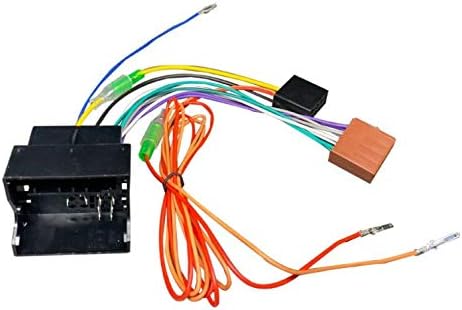
Image 2: Detailed view of the Phonocar 4732 cable showing the various colored wires and connectors for proper installation.
5. Operating Instructions
Once correctly installed, the Phonocar 4732 cable acts as a passive adapter, allowing your aftermarket car radio to receive power and audio signals from the vehicle's electrical system. Operation of the car radio will follow the instructions provided with the radio itself.
6. Maintenance
The Phonocar 4732 cable requires minimal maintenance. Ensure that the cable remains free from excessive tension, sharp bends, or exposure to extreme temperatures or moisture. Periodically check connections for looseness, especially if experiencing intermittent issues with the car radio.
7. Troubleshooting
- No Power to Radio:
- Check if the vehicle's battery is properly reconnected and charged.
- Verify all connections of the Phonocar 4732 cable are secure.
- Inspect the car radio's fuse.
- No Audio Output:
- Ensure the audio connections from the Phonocar 4732 to the radio are correct.
- Check the car radio's settings and volume levels.
- Intermittent Functionality:
- Re-check all connections for looseness.
- Ensure the cable is not damaged or pinched.
8. Specifications
| Brand: | Phonocar |
| Model: | 04732 |
| Product Type: | Vehicle Connector Cable (ISO Adapter) |
| Connector Type: | ISO |
| Compatibility: | Opel Corsa, Astra, Vectra (for car radio installation) |
| Dimensions (LxWxH): | 30 x 20 x 10 cm (approximate packaging/product dimensions) |
| Weight: | 40.8 g |
9. Warranty and Support
The Phonocar 4732 Vehicle Connector Cable comes with a manufacturer's warranty of 1 year from the date of purchase. For warranty claims or technical support, please contact your retailer or Phonocar customer service with your proof of purchase.


