
1. Introduction
This manual provides comprehensive instructions for the proper installation, operation, and maintenance of your TEMPCO Type K HD Magnet Thermocouple. This device is engineered for accurate and reliable temperature measurement in various industrial applications, utilizing a magnetic attachment for convenient surface temperature sensing.
2. Product Overview
The TEMPCO Type K HD Magnet Thermocouple is a robust temperature sensing device. It features a spring-loaded thermocouple element attached to a 6-pole magnet, ensuring consistent contact with ferromagnetic surfaces for precise temperature readings. The thermocouple utilizes Type K insulation (PTFE) and comes with a 12-foot lead length, terminating in fork terminals for easy connection.
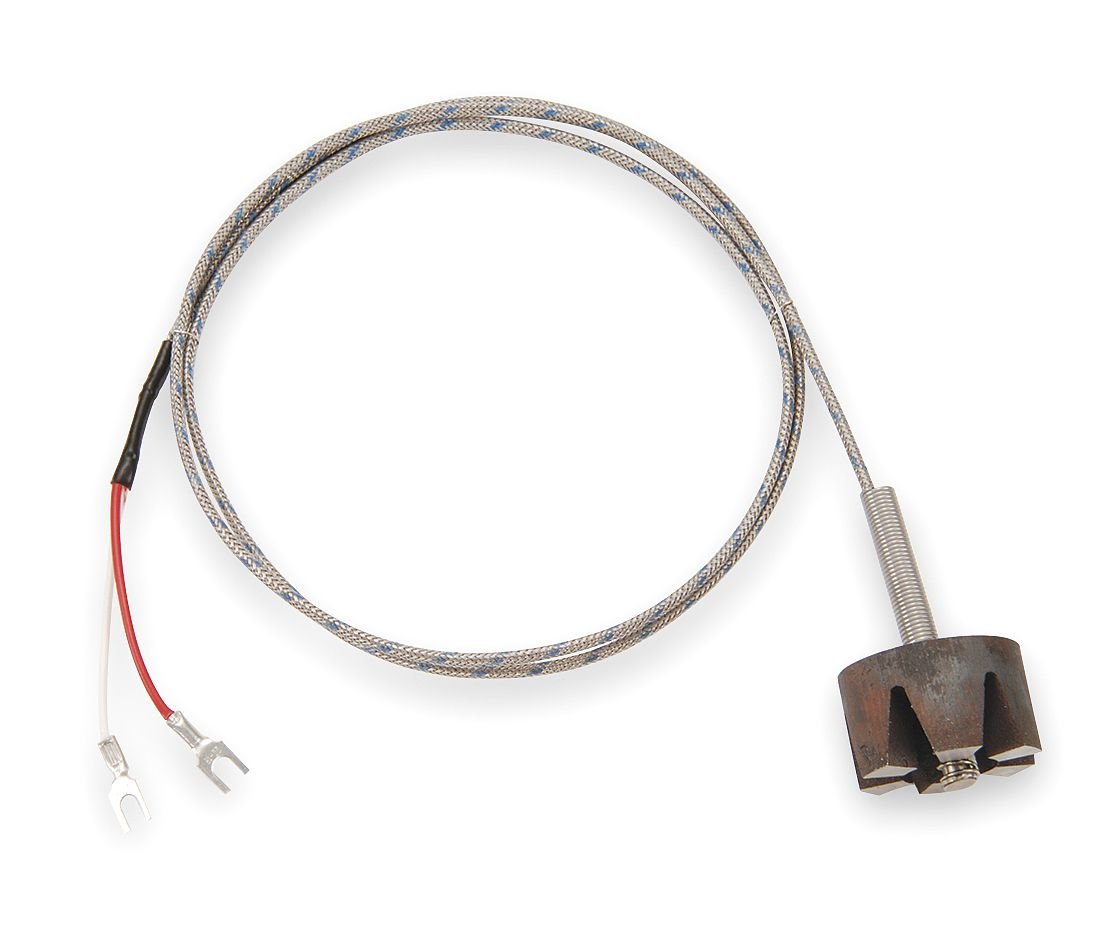
Figure 1: TEMPCO Type K HD Magnet Thermocouple. This image displays the complete thermocouple assembly, including the magnetic probe head, the braided lead wire, and the fork terminal connectors.
Key Features:
- Thermocouple Type: K
- Insulation: PTFE
- Lead Length: 12 ft (144 inches)
- Error Accuracy: +/-2.2 °C, +/-0.75 %
- Temperature Limit: 400 °F
- Thermocouple Element: 20 AWG
- Construction: Spring-loaded thermocouple attached to a 6-pole magnet
- Probe Length: 1.25 inches
- Material: 304 Stainless Steel
- Grounded / Ungrounded: Grounded
- Connector Type: Fork Terminal
3. Safety Information
Adherence to safety guidelines is crucial for preventing injury and equipment damage. Please read and understand all safety instructions before installing or operating the thermocouple.
- Always disconnect power to the measurement system before making any electrical connections or disconnections.
- Do not exceed the specified temperature limit of 400 °F (204 °C). Exceeding this limit can damage the thermocouple and lead to inaccurate readings.
- Ensure proper electrical polarity when connecting the thermocouple to a temperature controller or data acquisition system. Incorrect polarity will result in inaccurate readings.
- Avoid placing the thermocouple in direct contact with live electrical circuits unless specifically designed and rated for such applications.
- Handle the lead wire carefully to prevent damage to the insulation or internal conductors.
- Consult local electrical codes and safety regulations for proper installation and operation.
4. Setup
4.1 Unpacking
Carefully remove the thermocouple from its packaging. Inspect the device for any visible damage that may have occurred during shipping. If any damage is observed, do not proceed with installation and contact your supplier.
4.2 Installation
Follow these steps to properly install your TEMPCO Type K HD Magnet Thermocouple:
- Prepare the Connection Point: Ensure the temperature controller or data acquisition system is powered off and ready to receive a Type K thermocouple input.
- Connect the Fork Terminals: Connect the red fork terminal to the positive (+) input and the white fork terminal to the negative (-) input of your temperature monitoring device. Type K thermocouples use specific color codes for polarity.
- Select Measurement Surface: Identify a clean, ferromagnetic surface where temperature measurement is required. Ensure the surface is free from debris, rust, or paint that could impede good thermal contact.
- Attach the Magnet: Firmly place the magnetic probe head onto the selected ferromagnetic surface. The 6-pole magnet and spring-loaded design will ensure optimal contact for accurate temperature transfer.
- Secure the Lead Wire: Route the 12-foot lead wire away from potential hazards, excessive heat, or moving parts. Use appropriate cable management techniques to prevent strain or damage to the wire.
5. Operating Instructions
Once installed, operating the TEMPCO Type K HD Magnet Thermocouple is straightforward:
- Verify Attachment: Ensure the magnetic probe is securely attached to the measurement surface and that the lead wire connections are firm.
- Power On System: Power on your temperature controller or data acquisition system.
- Monitor Readings: Observe the temperature readings on your connected device. Allow a few moments for the thermocouple to stabilize and provide an accurate reading of the surface temperature.
- Adjust Placement (if needed): If readings appear inconsistent or inaccurate, temporarily power off your system, re-evaluate the probe's placement, and ensure optimal surface contact.
6. Maintenance
Regular maintenance ensures the longevity and accuracy of your thermocouple.
- Inspect Lead Wire: Periodically inspect the entire length of the lead wire for any signs of fraying, cuts, or damage to the PTFE insulation. Replace the thermocouple if significant damage is found.
- Clean Magnet Surface: Keep the magnetic probe head clean and free of dust, grease, or metallic particles. A clean contact surface is essential for accurate temperature transfer. Use a soft, dry cloth for cleaning.
- Check Connections: Ensure the fork terminals remain securely fastened to your monitoring device. Loose connections can lead to intermittent or inaccurate readings.
- Avoid Excessive Bending: Do not bend the thermocouple probe or lead wire sharply, as this can damage the internal conductors or insulation.
7. Troubleshooting
If you encounter issues with your thermocouple, refer to the following troubleshooting guide:
| Problem | Possible Cause | Solution |
|---|---|---|
| No temperature reading or 'Open Circuit' error | Loose or incorrect wiring; Damaged lead wire; Faulty thermocouple element. | Check all connections for tightness and correct polarity (red to +, white to -). Inspect the lead wire for visible damage. If damage is present, replace the thermocouple. |
| Inaccurate or inconsistent readings | Poor contact with the measurement surface; Incorrect thermocouple type selected on monitoring device; Electromagnetic interference (EMI); Exceeding temperature limits. | Ensure the magnet is firmly attached to a clean, flat ferromagnetic surface. Verify that your monitoring device is configured for a Type K thermocouple. Route lead wires away from power cables or sources of EMI. Confirm the measured temperature is within the 400 °F limit. |
| Readings are reversed (e.g., temperature decreases when it should increase) | Incorrect polarity of connections. | Reverse the connections of the red and white fork terminals at your monitoring device. |
8. Technical Specifications
Detailed specifications for the TEMPCO Type K HD Magnet Thermocouple:
| Specification | Value |
|---|---|
| Thermocouple Type | K |
| Insulation | PTFE |
| Lead Length | 12 ft (144 inches) |
| Error Accuracy | +/-2.2 °C, +/-0.75 % |
| Temperature Limit | 400 °F (204 °C) |
| Thermocouple Element | 20 AWG |
| Construction | Spring-loaded thermocouple attached to 6-pole Magnet |
| Probe Length | 1.25 inches |
| Material | 304 Stainless Steel |
| Grounded / Ungrounded | Grounded |
| Plug or Connector Type | Fork Terminal |
| Product Dimensions (L x W x H) | 10 x 7 x 1.5 inches |
| Manufacturer | Tempco Electric Heater Corp |
| ASIN | B0078RSFRI |
| UPC | 094705296110 |
9. Contact and Support
For technical assistance, warranty information, or further support regarding your TEMPCO Type K HD Magnet Thermocouple, please contact TEMPCO customer service through their official website or designated support channels. Provide your model number (Type K HD) and ASIN (B0078RSFRI) when seeking assistance.