1. Introduction
Thank you for choosing the Grundig UM9140 Stand Mixer & Kitchen Machine. This manual provides essential information for the safe and efficient operation, maintenance, and troubleshooting of your appliance. Please read these instructions carefully before first use and keep them for future reference.
2. Important Safety Instructions
- Always ensure the voltage indicated on the rating label matches your mains supply voltage before connecting the appliance.
- Do not immerse the motor unit, cord, or plug in water or any other liquid.
- Unplug the appliance from the power outlet when not in use, before assembling or disassembling parts, and before cleaning.
- Keep hands, hair, clothing, and utensils away from moving parts during operation to prevent injury.
- Never operate the appliance with a damaged cord or plug, or after the appliance malfunctions or has been damaged in any manner.
- This appliance is not intended for use by persons (including children) with reduced physical, sensory or mental capabilities, or lack of experience and knowledge, unless they have been given supervision or instruction concerning use of the appliance by a person responsible for their safety.
- Children should be supervised to ensure that they do not play with the appliance.
- Use only original Grundig accessories and attachments.
- Do not use the appliance outdoors.
- Avoid contact with moving parts.
3. Product Overview
The Grundig UM9140 Stand Mixer is designed for various kitchen tasks, including mixing, kneading, and whisking. It features a robust motor and multiple attachments for versatile use.
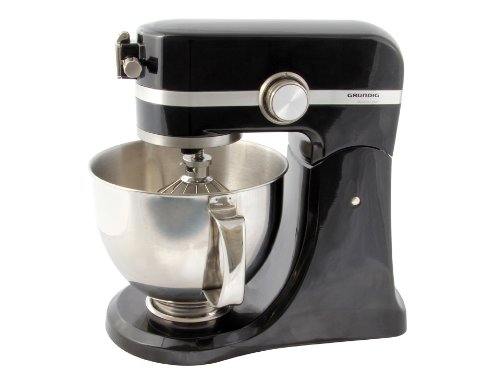
Figure 1: Grundig UM9140 Stand Mixer. This image shows the main unit in black, with a stainless steel mixing bowl attached and a whisk accessory inserted into the mixer head.
Components:
- Motor Unit: The main body housing the motor and controls.
- Mixing Bowl: Stainless steel bowl for ingredients.
- Whisk Attachment: For whipping cream, egg whites, and light batters.
- Dough Hook Attachment: For kneading heavy doughs like bread or pizza.
- Beater Attachment: For mixing cakes, cookies, and general batters.
- Speed Control Dial: To select desired mixing speed.
- Head Release Button: To tilt the mixer head for attachment changes or bowl removal.
4. Setup
- Unpacking: Carefully remove all packaging materials. Ensure all components listed in the "Product Overview" section are present.
- Cleaning: Before first use, wash the mixing bowl and all attachments (whisk, dough hook, beater) in warm, soapy water, then rinse and dry thoroughly. The motor unit should be wiped with a damp cloth.
- Placement: Place the mixer on a stable, flat, and dry surface. Ensure there is adequate space around the appliance for ventilation and operation.
- Attaching the Mixing Bowl: Place the mixing bowl onto the base and turn it clockwise until it locks securely into position.
- Attaching an Accessory:
- Press the head release button to tilt the mixer head upwards.
- Insert the desired attachment (whisk, dough hook, or beater) into the accessory port. Push upwards and turn counter-clockwise until it clicks into place.
- Lower the mixer head by pressing the head release button again and gently pushing the head down until it locks.
5. Operating Instructions
- Ensure the appliance is properly assembled and the mixing bowl and desired attachment are securely in place.
- Add your ingredients to the mixing bowl. Do not overfill the bowl.
- Plug the appliance into a suitable power outlet.
- Turn the speed control dial to the desired speed setting. Start with a low speed and gradually increase to prevent splashing.
- Allow the mixer to operate until the desired consistency is achieved.
- Once mixing is complete, turn the speed control dial to the "0" (off) position and unplug the appliance from the power outlet.
- Press the head release button to tilt the mixer head upwards.
- Remove the attachment by pushing it upwards and turning clockwise, then gently pull it out.
- Unlock and remove the mixing bowl by turning it counter-clockwise.
Recommended Speed Settings:
- Speed 1-2: For kneading heavy doughs (e.g., bread, pizza). Use the dough hook.
- Speed 3-4: For mixing batters (e.g., cakes, cookies, mashed potatoes). Use the beater.
- Speed 5-6: For whisking and whipping (e.g., egg whites, cream, light batters). Use the whisk.
6. Cleaning and Maintenance
Regular cleaning ensures the longevity and optimal performance of your Grundig Stand Mixer.
- Always unplug the appliance before cleaning.
- Motor Unit: Wipe the exterior of the motor unit with a soft, damp cloth. Do not use abrasive cleaners or immerse the unit in water.
- Mixing Bowl and Attachments: The stainless steel mixing bowl, whisk, dough hook, and beater are dishwasher safe. Alternatively, they can be washed by hand in warm, soapy water. Rinse thoroughly and dry immediately to prevent water spots or corrosion.
- Storage: Store the appliance and its accessories in a clean, dry place when not in use. Ensure the power cord is neatly wrapped and not kinked.
7. Troubleshooting
If you encounter any issues with your Grundig UM9140, please refer to the following common problems and solutions:
| Problem | Possible Cause | Solution |
|---|---|---|
| Appliance does not turn on. | Not plugged in; power outlet faulty; speed dial not set to a speed. | Check power cord connection; test outlet with another appliance; turn speed dial to a setting other than "0". |
| Attachments do not reach ingredients in the bowl. | Attachment not fully inserted or bowl not locked correctly. | Ensure attachment is pushed up and twisted until it clicks; ensure mixing bowl is locked clockwise into the base. |
| Motor sounds strained or appliance stops during operation. | Overloading the bowl; mixture too thick; prolonged continuous operation. | Reduce ingredient quantity; add liquid to thin mixture; allow appliance to cool down before resuming. |
| Excessive vibration or noise. | Appliance not on a stable surface; bowl or attachment not secured. | Place on a flat, stable surface; ensure bowl and attachment are correctly locked. |
If the problem persists after attempting these solutions, please contact Grundig customer support or your retailer for assistance.
8. Technical Specifications
- Brand: GRUNDIG
- Model Number: UM9140D
- Color: Black
- Dimensions (L x W x H): 22.5 x 39 x 35.5 cm
- Item Weight: 8 Kilograms
- Voltage: 230 Volts
- Power: 450 Watts
- Dishwasher Safe Parts: Yes (Mixing bowl, whisk, dough hook, beater)
9. Warranty and Customer Support
For information regarding the warranty period and conditions, please refer to the warranty card included with your purchase or the terms and conditions provided by your retailer. Keep your proof of purchase for any warranty claims.
For technical assistance, spare parts, or service, please contact Grundig customer support through their official website or the contact details provided in your purchase documentation. Please have your model number (UM9140D) and serial number (if applicable) ready when contacting support.