
1. Introduction
This manual provides instructions for the proper installation, operation, and maintenance of your Absolute S16500 16 Gauge Speaker Wire. Please read this manual thoroughly before use to ensure optimal performance and longevity of the product. This speaker wire is designed for various audio applications, including home, car, theater, and DJ setups.
2. Product Overview
The Absolute S16500 is a high-quality 16 gauge speaker wire supplied on a 500-foot spool. It is engineered to deliver clear audio signals for a wide range of sound systems. The wire features durable insulation and is suitable for various audio environments where appropriate protection is provided.
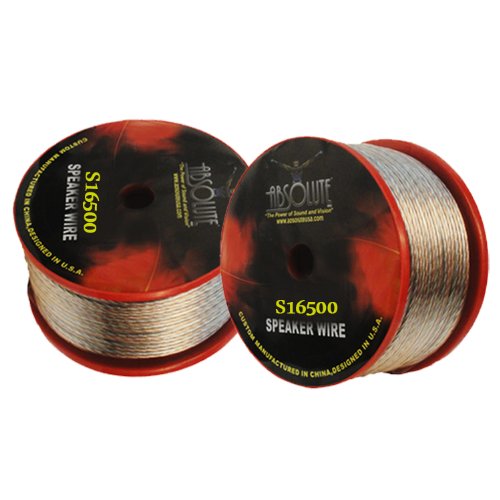
Figure 2.1: Absolute S16500 500-Feet Spool of 16 Gauge Speaker Wire. This image shows the speaker wire wound on a spool, ready for deployment in various audio setups.
Key Features:
- Length: 500 feet (152.4 meters)
- Gauge: 16 Gauge
- Applications: Ideal for home audio, car audio, home theater systems, and DJ equipment.
- Quality: High-quality construction for reliable audio signal transmission.
3. Setup and Installation
Proper setup of speaker wire is crucial for optimal sound quality and system safety. Follow these steps for installation:
- Measure and Cut: Determine the required length of wire for each speaker connection. Cut the wire using a suitable wire cutter, ensuring clean, even ends.
- Strip Insulation: Carefully strip approximately 0.5 to 0.75 inches (1.2 to 1.9 cm) of insulation from both ends of the wire. Be cautious not to cut or nick the copper strands.
- Twist Strands: Gently twist the exposed copper strands of each conductor to prevent fraying and ensure a solid connection.
- Identify Polarity: Speaker wire typically has markings (e.g., a stripe, ribbing, or different colored insulation) on one conductor to indicate polarity (positive and negative). It is critical to connect the positive (+) terminal on your amplifier/receiver to the positive (+) terminal on your speaker, and the negative (-) terminal on your amplifier/receiver to the negative (-) terminal on your speaker. Inconsistent polarity will result in poor sound quality.
- Connect to Components:
- Spring Clips: Press the clip, insert the twisted wire, and release.
- Binding Posts: Unscrew the post, insert the twisted wire through the hole or wrap it around the post, and tighten securely.
- Banana Plugs (Optional): If using banana plugs, attach them to the stripped wire ends according to the plug's instructions, then insert the plugs into the binding posts.
- Secure Wiring: Route the speaker wire neatly and securely, avoiding sharp bends, kinks, or placement where it could be pinched or damaged. Use cable ties or clips if necessary.
Important: Always ensure your audio equipment is powered off before making or changing any speaker connections to prevent damage to your components.
4. Operating Instructions
Once the speaker wire is correctly installed and connected, operating your audio system is straightforward:
- Verify Connections: Double-check all speaker wire connections at both the amplifier/receiver and speaker ends to ensure they are secure and that polarity is consistent.
- Power On: Turn on your amplifier/receiver and other audio components.
- Test Audio: Play a familiar audio source at a low volume. Listen carefully to ensure sound is coming from all connected speakers and that the audio quality is as expected.
- Adjust Volume: Gradually increase the volume to your desired listening level.
Note: If you experience no sound or distorted sound, refer to the Troubleshooting section of this manual.
5. Maintenance
The Absolute S16500 speaker wire requires minimal maintenance to ensure long-term performance:
- Regular Inspection: Periodically inspect the wire for any signs of physical damage, such as cuts, abrasions, or kinks in the insulation.
- Connection Check: Ensure that all connections remain tight and free from corrosion. Loose connections can degrade sound quality.
- Cleaning: If necessary, gently wipe the exterior of the wire with a dry, soft cloth to remove dust or dirt. Do not use harsh chemicals or abrasive cleaners.
- Storage: If storing unused wire, keep it neatly spooled in a cool, dry place away from direct sunlight and extreme temperatures. Avoid sharp bends or crushing the wire.
6. Troubleshooting
If you encounter issues with your audio system after installing the speaker wire, consider the following common problems and solutions:
| Problem | Possible Cause | Solution |
|---|---|---|
| No sound from a speaker. | Loose or incorrect connection; damaged wire; amplifier/receiver issue; speaker issue. |
|
| Distorted or weak sound. | Incorrect polarity; loose connections; damaged wire; amplifier overload. |
|
| Humming or buzzing noise. | Ground loop; interference from other electronics; unshielded wire (less common for speaker wire). |
|
If these steps do not resolve the issue, consult the user manual for your amplifier/receiver and speakers, or contact Absolute USA customer support.
7. Specifications
| Feature | Detail |
|---|---|
| Model | S16500 |
| Brand | Absolute USA |
| Wire Gauge | 16 AWG |
| Length | 500 Feet (approx. 152.4 meters) |
| Conductor Material | Silver (typically copper with silver plating or appearance) |
| Strand Count | 16 strands (per conductor) |
| UPC | 847169005459 |
| GTIN | 847169005459 |
8. Warranty and Support
Warranty Information:
The Absolute S16500 speaker wire is covered by a 3-year factory warranty. This warranty covers defects in materials and workmanship under normal use. It does not cover damage resulting from misuse, abuse, accident, unauthorized modification, or improper installation.
For warranty claims, please retain your proof of purchase. Contact Absolute USA customer support for assistance.
Customer Support:
If you have any questions, require technical assistance, or need to report an issue with your Absolute S16500 speaker wire, please contact Absolute USA customer support. Refer to the official Absolute USA website for the most current contact information, including phone numbers and email addresses.
Please have your product model number (S16500) and purchase details ready when contacting support.