1. Introduction
This manual provides essential information for the safe and efficient operation of your Panasonic VIERA TC-P55ST50 55-Inch 1080p 600Hz Full HD 3D Plasma TV. Please read these instructions thoroughly before using your television and retain them for future reference.

Image 1: Front view of the Panasonic VIERA TC-P55ST50 Plasma TV.
2. Setup
2.1 Unpacking and Contents
Carefully unpack your television and ensure all components are present. The package should include:
- Remote Control
- Power Cable
- Stand
- HDMI cable
- 2 AA batteries (for remote control)
2.2 Physical Installation
The TV without its stand measures approximately 51 inches (Width) x 30.5 inches (Height) x 1.8 inches (Depth). With the stand, it measures 51 inches (Width) x 32.5 inches (Height) x 14.1 inches (Depth). The item weighs 61.8 pounds. Ensure a stable surface or wall mount is used for installation.
2.3 Connectivity
Your Panasonic VIERA TC-P55ST50 offers various connectivity options:
- 3 x HDMI input (19 pin HDMI Type A) - Side
- 2 x USB (4 pin USB Type A)
- 1 x Composite video / component video input (RCA phono x 3)
- 1 x Audio line-in (Mini-phone stereo 3.5 mm)
- 1 x Network (RJ-45)
- 1 x Digital audio output (optical)
- SD Card Slot
The TV features built-in Wi-Fi, eliminating the need for an external wireless LAN adapter for network connectivity.
3. Operating Instructions
3.1 Basic Operation
Use the included remote control to power on/off, adjust volume, change channels, and navigate menus. Refer to the remote control diagram in the separate quick start guide for button functions.
3.2 VIERA Connect and Smart Features
VIERA Connect is a cloud service providing access to various applications including video, music, social networking, games, news, lifestyle, sports, health, and fitness. The TV includes a web browser and built-in Wi-Fi for seamless internet access. Popular apps like Netflix, Amazon Instant Video, Facebook, Twitter, Wall Street Journal, and HuluPlus are optimized for the best user experience. Apps are stored in the cloud, allowing for an unlimited number of installations.
VIERA Remote App
The VIERA remote app transforms your smartphone or tablet into a remote control. It supports tap and flick-based commands, can act as a gamepad for VIERA Connect games, and allows you to control the TV screen via a touch pad. You can also share photos, music, and videos from your smartphone to your VIERA TV with a simple 'swipe'.
Video 1: This video demonstrates the Panasonic VIERA Remote App for Android, showcasing how a smartphone or tablet can control the TV, act as a keyboard, and stream media files to the TV screen.
Amazon Instant Video
Access Amazon Instant Video directly from your TV. If you are an Amazon Prime member, you can enjoy unlimited instant streaming of thousands of movies and TV shows.
Video 2: This video explains how to access and stream content from Amazon Instant Video on Panasonic VIERA TVs.
Skype Communication
Connect a USB camera (not included) to your TV to make video calls via Skype. You can communicate with friends and family while simultaneously watching TV. Answering voice messages can be recorded onto an SD Memory Card (minimum 512MB required).
Video 3: This video demonstrates the Panasonic VIERA Skype Application, showing how to make video calls directly from your TV.
Social Networking TV
Access social network sites and communicate with others while watching TV. This feature allows for real-time interaction, such as chatting with friends during live sports events.
Video 4: This video highlights the social networking applications available on Panasonic VIERA Connect, enabling interaction while watching TV.
3.3 2D to 3D Conversion
The TV features unique Panasonic technology that converts 2D images into high-quality 3D images. This allows you to enjoy Blu-ray movies, DVDs, and TV broadcasts in 3D, even if they were originally 2D. The Super Resolution function ensures sharp, clear 3D images after conversion.
Video 5: This video demonstrates Panasonic's 2D-3D Conversion Technology, explaining how it transforms standard 2D content into a 3D viewing experience.
3.4 Media Playback (DLNA, USB, SD Card)
Connect DLNA-compatible devices to your home network to stream movies, music, and photos to your TV. You can also play media directly from USB drives or SD cards using the respective ports.
3.5 VIERA Link
VIERA Link allows you to operate all VIERA Link compatible AV components using only the TV's remote control. The signal travels over HDMI wires to control connected Panasonic Blu-ray or DVD players and Home Cinema Surround Systems.
4. Maintenance
4.1 Eco Mode and Power Saving
The TV includes Eco Mode and Power Save settings to reduce power consumption. These settings adjust screen brightness and can be configured via VIERA Tools to optimize energy efficiency based on the TV's operating status.
4.2 Panel Longevity
Panasonic Plasma Display panels are designed for a long lifespan, up to 100,000 hours before brightness decreases by half. This is equivalent to over 30 years of viewing 8 hours a day. The panels are also free of lead or mercury.
5. Troubleshooting
If you encounter issues with your TV, please check the following:
- Ensure all power cables are securely connected.
- Verify that all input sources (HDMI, component, etc.) are correctly connected and selected.
- Check your home network connection for internet-related features.
- Consult the on-screen help options available through VIERA Connect for common issues.
For further assistance, please refer to the support section.
6. Specifications
| Feature | Detail |
|---|---|
| Model Name | TC-P55ST50 |
| Screen Size | 55 Inches |
| Display Technology | Plasma |
| Resolution | 1080p Full HD |
| Refresh Rate | 600 Hz |
| Panel Type | Infinite Black Pro Panel |
| Connectivity Technology | HDMI, RCA, SD Card, USB, Wi-Fi |
| HDMI Ports | 3 |
| USB Ports | 2 |
| Supported Internet Services | HuluPlus, Pandora, MLB.TV, Fox Sports, Netflix, YouTube, SHOUTcast Radio |
| Product Dimensions (with stand) | 51" (W) x 32.5" (H) x 14.1" (D) |
| Product Dimensions (without stand) | 51" (W) x 30.5" (H) x 1.8" (D) |
| Item Weight | 61.8 Pounds |
| Included Components | Remote Control, Power Cable, Stand, HDMI cable |
| Batteries | 2 AA batteries required (included) |
| Manufacturer | Panasonic |
| Date First Available | February 24, 2012 |
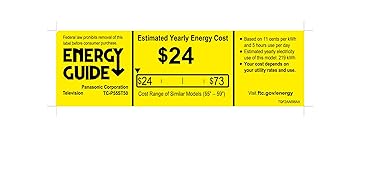
Image 2: Energy Efficiency Product Fiche for the Panasonic VIERA TC-P55ST50 Plasma TV.
7. Warranty and Support
7.1 Warranty Information
Your Panasonic VIERA TC-P55ST50 Plasma TV comes with a 1 Year Manufacturer's Warranty. Please retain your proof of purchase for warranty claims.
7.2 Customer Support
For technical assistance, troubleshooting, or service inquiries, please contact Panasonic Customer Support. Refer to the official Panasonic website or your product registration card for contact details.


