
Memorex ML310BK
Memorex ML310 Portable Speaker Case User Manual
Model: ML310BK
Introduction
Welcome to your new Memorex ML310 Portable Speaker Case. This manual provides essential information for setting up, operating, and maintaining your device, ensuring you get the best audio experience while protecting your music player or smartphone.
Product Overview
The Memorex ML310 is a portable speaker solution designed to protect your music player or smartphone while delivering quality stereo sound. Its robust design makes it ideal for on-the-go use, providing both audio playback and device protection.
Key Features
- Integrated speaker case compatible with iPhone, iPod, and Android devices.
- Shock-resistant exterior material and soft interior lining for enhanced device protection.
- High-quality stereo sound output for an immersive listening experience.
- Convenient external control buttons for easy volume adjustment.
- Battery-powered for ultimate portability (requires 4 AAA batteries).
Product Image
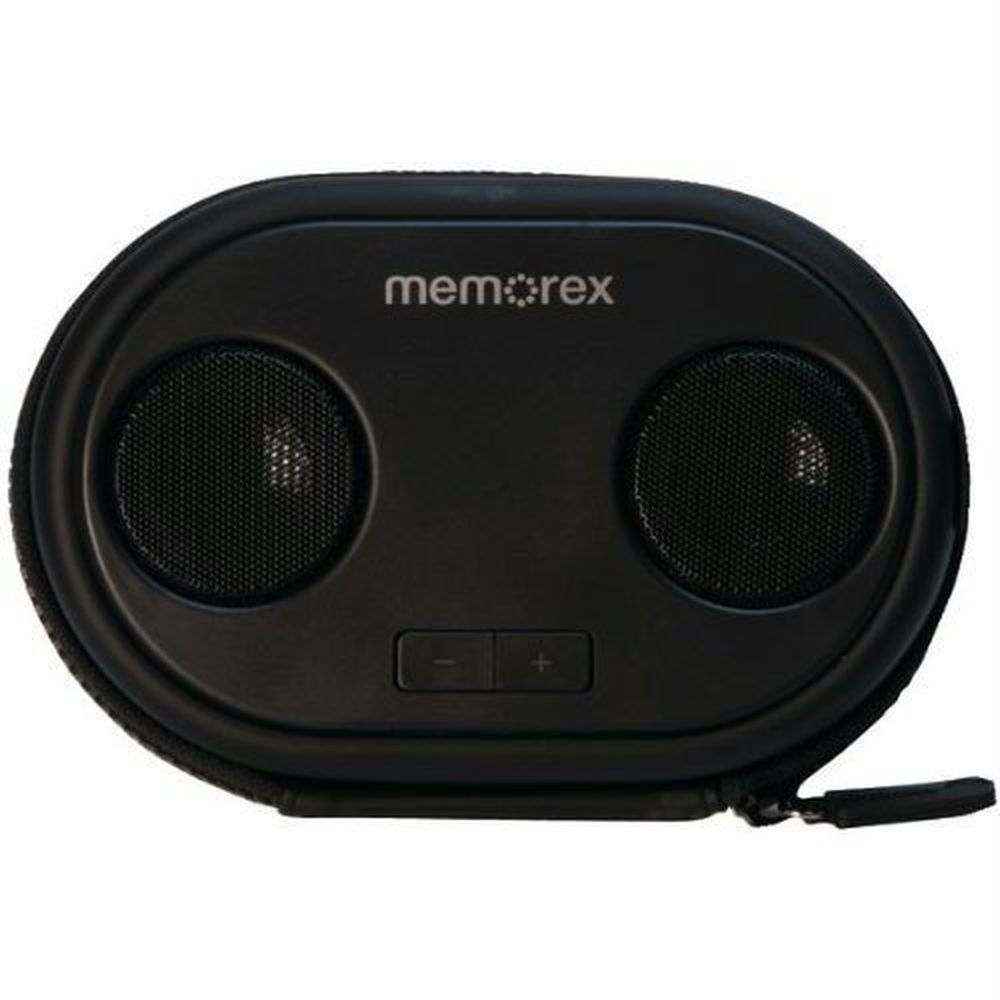
This image displays the Memorex ML310 Portable Speaker Case. It features two circular speaker grilles on the front, with "memorex" branding above them. Below the speakers, there are two rectangular buttons for volume control, marked with '-' and '+'. The case itself is black, with a zippered closure visible around the edge.
Package Contents
Please check the package for the following items:
- Memorex ML310 Portable Speaker Case
- Built-in 3.5mm audio cable
- User Manual (this document)
Setup
Battery Installation
The Memorex ML310 requires 4 AAA batteries for operation. Ensure you have fresh batteries available.
- Locate the battery compartment on the device.
- Open the battery compartment cover.
- Insert 4 AAA batteries, ensuring correct polarity (+ and -) as indicated inside the compartment.
- Close the battery compartment cover securely.
Important Note: Some AAA batteries with shorter positive terminals may not make proper contact. If the unit does not power on, try different brand batteries with standard-sized positive terminals.
Connecting Your Device
The speaker case features a built-in 3.5mm audio cable for easy connection to your media device.
- Open the main compartment of the speaker case.
- Place your smartphone or music player inside the protective interior.
- Connect the built-in 3.5mm audio cable from the speaker case to the headphone jack of your device.
- Securely close the zipper of the case to protect your device.
Operating Instructions
Powering On/Off
The unit powers on automatically when a connected device is playing audio and batteries are installed. There is no dedicated power button.
Volume Control
Use the external '+' and '-' buttons located on the front of the speaker case to adjust the volume.
- Press the '+' button to increase the volume.
- Press the '-' button to decrease the volume.
You may also need to adjust the volume directly on your connected smartphone or music player for optimal sound levels.
Playing Audio
Once your device is connected and the speaker case is powered, simply start playing audio from your device (e.g., music, podcasts, videos). The sound will be routed through the Memorex ML310 speakers.
Maintenance
Cleaning
To clean the exterior of the speaker case, use a soft, dry cloth. Do not use liquid cleaners, solvents, or abrasive materials, as these may damage the finish.
Storage
When not in use for extended periods, remove the batteries to prevent leakage and potential damage to the device. Store the speaker case in a cool, dry place away from direct sunlight and extreme temperatures.
Troubleshooting
| Problem | Possible Cause | Solution |
|---|---|---|
| No sound | Batteries are dead or incorrectly installed. | Replace batteries with new AAA batteries, ensuring correct polarity. Try a different brand of AAA batteries if the positive terminal seems too short. |
| No sound | Audio cable not fully connected. | Ensure the 3.5mm audio cable is securely plugged into your device's headphone jack. |
| No sound | Device volume is too low or muted. | Increase the volume on your connected smartphone or music player. |
| Distorted sound | Volume is too high on either the speaker case or the connected device. | Reduce the volume on both the speaker case and your connected device until distortion is eliminated. |
| External volume buttons unresponsive | Buttons may be stuck or damaged. | Gently press the buttons to ensure they are not stuck. If the issue persists, contact customer support. |
If you encounter issues not listed here, please refer to the support section for further assistance.
Specifications
| Feature | Detail |
|---|---|
| Model | ML310BK |
| Speaker Type | Portable Stereo Speakers |
| Audio Output Mode | Stereo |
| Channel Configuration | 2.0 |
| Connectivity | Wired (3.5mm audio jack) |
| Power Source | 4 x AAA Batteries (not included) |
| Compatible Devices | Smartphones, MP3 Players (iPhone, iPod, Android devices) |
| Control Type | Button (Volume +/-) |
| Color | Black |
| Dimensions (L x W x H) | 5.72 x 16.51 x 10.8 cm (2.25 x 6.5 x 4.25 inches) |
| Weight | 330 g (0.73 lbs) |
| Manufacturer | Imation Enterprises Corp |
Specifications are subject to change without notice.
Safety Information
- Do not expose the device to water or excessive moisture. It is not waterproof.
- Do not disassemble or attempt to repair the device yourself. This will void the warranty and may cause damage.
- Keep batteries out of reach of children.
- Dispose of used batteries properly according to local regulations.
- Avoid extreme temperatures and direct sunlight, which can damage the device and batteries.
- Do not block the speaker grilles during operation to ensure optimal sound quality and prevent overheating.
Warranty and Support
For warranty information and technical support, please refer to the documentation included with your original purchase or visit the official Memorex website. Keep your proof of purchase for any warranty claims.
Related documentsML310BK


Ask a question about this manual
Ask about setup, troubleshooting, compatibility, parts, safety, or missing instructions. Manuals+ will review the question and use this page’s manual context to help answer it.