
1. Overview
The Shure ULXD4 is a half-rack, networkable wireless receiver designed for professional sound reinforcement applications. It is part of the ULX-D Digital Wireless Systems, offering robust and high-fidelity audio transmission. This receiver must be paired with a compatible Shure ULXD transmitter (sold separately) operating within the same frequency band for proper system functionality.

Figure 1: Front panel of the Shure ULXD4 Single Channel Receiver, showing the display, control knob, and various indicators.
Key Features:
- Digital Audio Quality: Delivers pristine 24-bit / 48 kHz digital audio, ensuring accurate sound reproduction.
- Efficient RF Performance: Optimized for reliable radio frequency transmission, supporting high channel counts.
- AES 256-bit Encryption: Provides secure transmission for sensitive applications, generating a randomized key for each use.
- Networkable: Features Ethernet networking for streamlined setup across multiple receivers and integration with Shure Wireless Workbench 6, SystemOn, and AMX/Crestron control systems.
- High Density Mode: Optimizes the system to operate significantly more channels simultaneously in applications up to 30 meters.
- Intelligent Scanning: Automatically finds and deploys the cleanest frequencies to transmitters via IR sync.
- Interference Detection: Provides alerts on both the receiver and Wireless Workbench 6 for potential signal interference.
- Front Panel Controls: Includes gain adjustment buttons offering up to 60 dB of additional gain.
- Predictive Switching Diversity: Enhances signal stability and reliability.
2. Setup
Proper setup is crucial for optimal performance of your Shure ULXD4 receiver. Ensure all components are compatible and connected correctly.
2.1 Unpacking and Inspection
- Carefully remove the receiver and all accessories from the packaging.
- Inspect the unit for any signs of damage that may have occurred during shipping.
- Verify that all listed components are present.
2.2 Connecting the Receiver
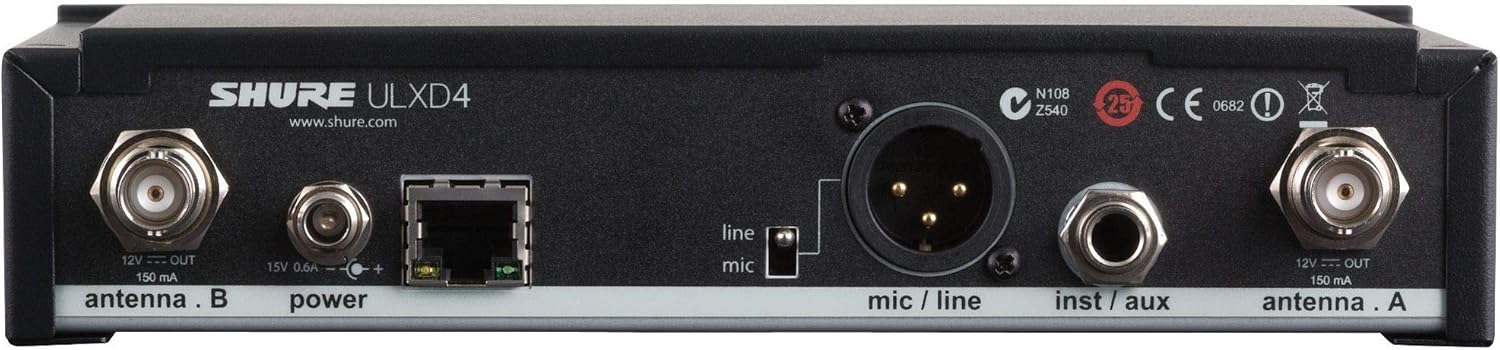
Figure 2: Rear panel of the Shure ULXD4 receiver, illustrating antenna, power, Ethernet, and audio output connections.
- Antenna Connection: Connect the supplied antennas to the ANTENNA A and ANTENNA B coaxial connectors on the rear panel. Ensure they are securely tightened.
- Power Connection: Connect the power supply to the 15V DC input on the rear panel. Plug the power supply into an appropriate AC outlet.
- Audio Output: Connect the XLR audio output (mic/line) to your mixer or audio system. Ensure the switch next to the XLR port is set to the appropriate level (mic or line).
- Network Connection (Optional): For network control and monitoring, connect an Ethernet cable from the receiver's Ethernet port to your network switch or router.
- Transmitter Pairing: Ensure you have a compatible Shure ULXD transmitter (e.g., ULXD1, ULXD2) operating in the same frequency band as your receiver.
2.3 Initial Power-On and Frequency Scan
- Press the Power button on the front panel to turn on the receiver. The display will illuminate.
- Use the SCAN button to initiate an automatic frequency scan. The receiver will identify and deploy the cleanest available frequencies.
- Once a clean frequency is found, use the IR Sync feature to synchronize the frequency with your ULXD transmitter. Align the IR windows on both the receiver and transmitter and press the sync button on the receiver.
- Confirm that the transmitter and receiver are linked and displaying the same frequency and channel information.
3. Operation
The Shure ULXD4 receiver offers intuitive controls and advanced features for managing your wireless microphone system.

Figure 3: Angled view of the Shure ULXD4 receiver, highlighting the front panel controls and display.
3.1 Front Panel Controls
- Display: Shows current frequency, channel, gain settings, transmitter battery status, and other system information.
- Control Knob (Push): Rotate to navigate menus and adjust settings. Push to select an option or confirm a setting.
- ENTER Button: Confirms selections and enters menu options.
- EXIT Button: Returns to the previous menu or exits the current menu without saving changes.
- SCAN Button: Initiates a frequency scan to find clear channels.
- Gain Buttons (Up/Down Arrows): Adjust the audio output gain of the receiver.
- RF/Audio LEDs: Indicate RF signal strength and audio input level.
3.2 Advanced Features
- High Density Mode: Activate this mode through the receiver menu to increase the number of active channels in challenging RF environments. Refer to the full user guide for detailed instructions on enabling and optimizing this mode.
- AES 256-bit Encryption: Ensure secure communication by enabling encryption. This feature is critical for applications requiring confidentiality.
- Network Monitoring: Utilize Shure's Wireless Workbench 6 software, SystemOn, or the ShurePlus Channels mobile app to remotely monitor and control receiver settings, battery life of associated transmitters, and overall system performance.
4. Maintenance
Regular maintenance helps ensure the longevity and reliable performance of your Shure ULXD4 receiver.
4.1 Cleaning
- Use a soft, dry cloth to clean the exterior of the receiver.
- Do not use abrasive cleaners, solvents, or chemical sprays, as these can damage the finish or internal components.
- Keep the ventilation openings clear of dust and debris to prevent overheating.
4.2 Firmware Updates
- Periodically check the Shure website for available firmware updates for your ULXD4 receiver.
- Firmware updates can provide new features, performance enhancements, and bug fixes.
- Follow the instructions provided by Shure for performing firmware updates, typically done via the network connection using Wireless Workbench software.
5. Troubleshooting
This section addresses common issues you might encounter with your Shure ULXD4 receiver. For more detailed troubleshooting, refer to the comprehensive user guide available on the Shure website.
| Problem | Possible Cause | Solution |
|---|---|---|
| No Audio Output |
|
|
| Interference/Dropouts |
|
|
| Receiver Not Powering On |
|
|
| IR Sync Failure |
|
|
6. Specifications
Detailed technical specifications for the Shure ULXD4 Single Channel Receiver.
| Specification | Value |
|---|---|
| Model Number | ULXD4=-V50 |
| Item Weight | 4.3 pounds |
| Product Dimensions | 18.4 x 14.5 x 3.7 inches |
| Compatible Devices | Shure ULX-D digital transmitters of the same frequency band |
| Connector Type | XLR |
| Signal Format | Digital |
| Size (Frequency Band) | V50: 174-216 MHz |
| Power Source | Battery Powered (for associated transmitters, receiver is AC powered) |
| Connectivity Technology | XLR, Ethernet |
| Audio Output Mode | Stereo, Mono |
| Number of Channels | 1 |
| Audio Output Type | XLR |
| Wireless Communication Technology | Dante (for networked audio) |
| Manufacturer | Shure |
| First Available Date | January 27, 2012 |
7. Warranty and Support
For detailed warranty information and customer support, please refer to the official Shure resources.
7.1 Warranty Information
The Shure ULXD4 Single Channel Receiver comes with a manufacturer's warranty. For specific terms, conditions, and duration of the warranty, please consult the official warranty document:
View Official Warranty Document (PDF)
7.2 Customer Support
If you require further assistance, technical support, or have questions not covered in this manual, please contact Shure customer support or visit their official website for comprehensive resources, FAQs, and contact information.


