
Perfect Aire 4PMC5000
PerfectAire 4PMC5000 Window Air Conditioner User Manual
Model: 4PMC5000
Introduction
This manual provides essential information for the safe and efficient operation, installation, and maintenance of your PerfectAire 4PMC5000 Window Air Conditioner. Please read this manual thoroughly before using your air conditioner and retain it for future reference.
The PerfectAire 4PMC5000 is a 5,000 BTU window air conditioner designed to cool rooms ranging from 100 to 150 square feet. It features an EER of 11.1, ensuring efficient cooling. Key features include adjustable temperature settings, a slide-out washable filter, 2-speed rotary dials, and 2-way air direction control.

Figure 1: Front view of the PerfectAire 4PMC5000 Window Air Conditioner, showing the control dials and air vents.
Safety Information
To prevent injury to the user or other people and property damage, the following instructions must be followed. Incorrect operation due to ignoring instructions may cause harm or damage.
- Always connect to a grounded power outlet. Do not use extension cords or adapter plugs.
- Ensure the electrical supply matches the specifications of the unit (115V, 15 Amp outlet configuration).
- Do not operate the air conditioner with wet hands or when standing in water.
- Do not block air inlets or outlets.
- Keep flammable materials away from the unit.
- Unplug the unit before cleaning or servicing.
- Do not attempt to repair or modify the unit yourself. Contact qualified service personnel.
Setup and Installation
The PerfectAire 4PMC5000 is designed for window installation and comes with a window mounting kit. Proper installation is crucial for optimal performance and safety.
Choosing the Right Location:
- Select a window that can securely support the weight of the unit (approximately 40 lbs).
- Ensure the window opening dimensions are suitable. The unit dimensions are approximately 15.5 x 16 x 12 inches (Width x Depth x Height).
- The window should be free from obstructions that could block airflow.
- Ensure a grounded 115V, 15 Amp electrical outlet is nearby.
Installation Steps:
Refer to the detailed instructions provided in the window mounting kit for specific installation procedures. The general steps include:
- Prepare the window opening by cleaning the area.
- Install the top rail and side panels according to the kit instructions.
- Carefully lift and place the air conditioner into the prepared window opening.
- Secure the unit using the provided screws and brackets.
- Extend the accordion panels to fill the window gap and seal them.
- Ensure the unit is slightly tilted outwards to allow for proper condensate drainage.

Figure 2: Diagram illustrating window measurement and installation considerations for the PerfectAire 4PMC5000.
Operating Instructions
Familiarize yourself with the control panel for efficient operation of your air conditioner.
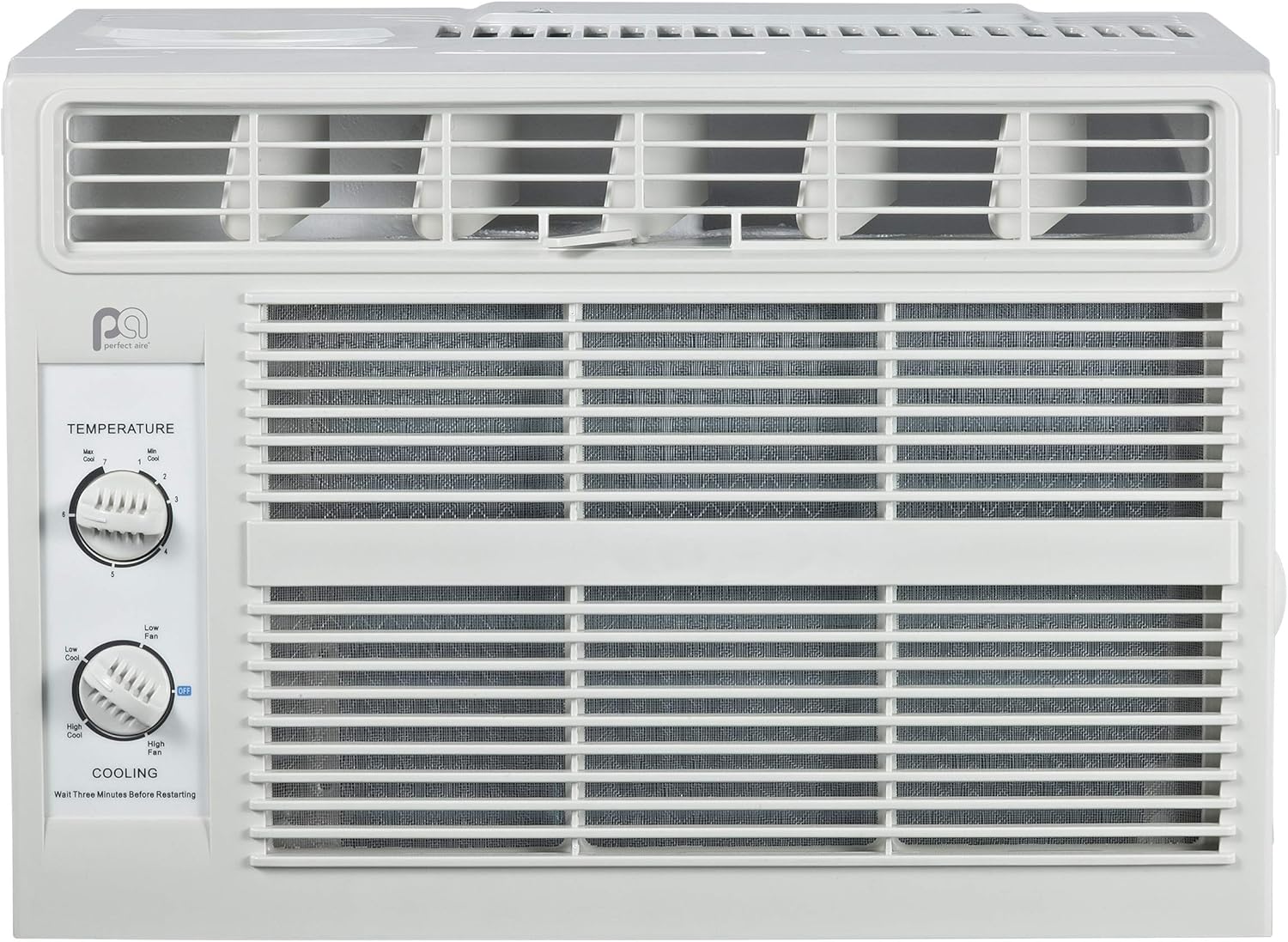
Figure 3: Close-up view of the control panel on the PerfectAire 4PMC5000, showing temperature and fan speed dials.
Control Dials:
- Temperature Dial: Adjusts the desired cooling temperature. Rotate the dial to select a temperature setting from 1 (least cool) to 7 (most cool).
- Cooling/Fan Speed Dial: This 2-speed rotary dial controls both the fan speed and the cooling mode.
- Low Fan: Operates the fan at a low speed without cooling.
- High Fan: Operates the fan at a high speed without cooling.
- Low Cool: Activates cooling with the fan at a low speed.
- High Cool: Activates cooling with the fan at a high speed.
Air Direction Control:
The unit features 2-way air direction control. Adjust the horizontal louvers to direct airflow left or right as desired for optimal room coverage.
Important Note:
Wait Three Minutes Before Restarting:
If you turn off the air conditioner or switch from cooling to fan mode, wait at least three minutes before restarting the cooling function. This allows the compressor to stabilize and prevents damage to the unit.
Maintenance
Regular maintenance ensures the longevity and efficient operation of your PerfectAire air conditioner.
Air Filter Cleaning:
The unit is equipped with a slide-out washable filter. Clean the air filter every two weeks, or more frequently depending on usage and air quality, to maintain optimal performance.
- Unplug the air conditioner from the power outlet.
- Gently slide out the air filter from its slot.
- Wash the filter with warm, soapy water. Rinse thoroughly.
- Allow the filter to air dry completely before reinserting it. Do not use hot water or dry with direct heat.
- Slide the dry filter back into its original position.
General Cleaning:
- Wipe the exterior of the unit with a soft, damp cloth. Do not use harsh chemicals or abrasive cleaners.
- Ensure the drainage area at the back of the unit is clear of debris.
- For long-term storage, clean the unit thoroughly, allow it to dry, and cover it to protect from dust.
Troubleshooting
Before contacting customer support, please refer to the following common issues and their solutions:
| Problem | Possible Cause | Solution |
|---|---|---|
| Air conditioner does not turn on. | No power, tripped circuit breaker, unit unplugged. | Check power cord connection, reset circuit breaker, ensure outlet is functional. |
| Unit not cooling effectively. | Dirty air filter, blocked airflow, room too large, temperature setting too high. | Clean air filter, ensure no obstructions, verify room size is within 100-150 sq. ft. range, lower temperature setting. |
| Water dripping from unit (indoors). | Unit not tilted properly, drain blocked. | Ensure unit is slightly tilted outwards for drainage. Check and clear any blockages in the drain pan/hose. |
| Unusual noise. | Loose parts, unit not level, foreign object inside. | Check for loose screws, ensure unit is level, unplug and inspect for foreign objects. If noise persists, contact support. |
Specifications
| Feature | Specification |
|---|---|
| Model Name | 4PMC5000 |
| Cooling Capacity | 5,000 BTU |
| Energy Efficiency Ratio (EER) | 11.1 |
| Coverage Area | 100-150 sq. ft. |
| Voltage | 115 Volts |
| Amps | 4.0 |
| Watts | 446 |
| Decibels (Hi/Lo) | 55/51 |
| Product Dimensions (L x W x H) | 39.37 x 40.64 x 30.48 cm (approx. 15.5 x 16 x 12 inches) |
| Item Weight | 40 Pounds (18.14 kg) |
| Special Feature | Dehumidifier function |
| Filter Type | Slide-Out Washable Filter |
| Certifications | C/UL/us Listed, EER Certified |
Warranty and Support
Your PerfectAire 4PMC5000 Window Air Conditioner comes with a Limited Warranty. Please refer to the warranty card included with your product for specific terms and conditions.
For product support, technical assistance, or warranty inquiries, please contact Perfect Aire customer service:
- Phone: 866-996-9255
- Email: supportatperfectaire.US
When contacting support, please have your model number (4PMC5000) and purchase information ready.
Related documents4PMC5000


Ask a question about this manual
Ask about setup, troubleshooting, compatibility, parts, safety, or missing instructions. Manuals+ will review the question and use this page’s manual context to help answer it.