
Cen-Tech CT-750-12
Cen-Tech 750W Continuous/1500W Peak Power Inverter User Manual
Model: CT-750-12 | Brand: Cen-Tech
1. Introduction
This manual provides essential information for the safe and efficient operation of your Cen-Tech 750W Continuous/1500W Peak Power Inverter. This device converts 12V DC battery power into 115V AC household power, allowing you to operate various electronics and small appliances from your vehicle or other 12V power sources. Please read this manual thoroughly before installation and use, and retain it for future reference.
2. Important Safety Information
WARNING: Failure to follow these instructions may result in electric shock, fire, serious injury, or death. Always exercise extreme caution when working with electrical equipment.
- Electrical Shock Hazard: Do not open the inverter casing. There are no user-serviceable parts inside. Contact qualified service personnel for repairs.
- Fire Hazard: Do not operate the inverter near flammable materials, gases, or vapors. Ensure adequate ventilation around the inverter.
- Proper Ventilation: The inverter generates heat during operation. Ensure it is placed in a well-ventilated area, away from direct sunlight or heat sources.
- Correct Polarity: Always connect the inverter to a 12V DC battery with the correct polarity (red to positive, black to negative). Incorrect connection can damage the inverter and battery.
- Overload Protection: Do not exceed the inverter's continuous power rating (750W) or peak power rating (1500W). Overloading can cause damage and fire.
- Moisture Exposure: Do not expose the inverter to rain, moisture, or water. This can cause electric shock or damage.
- Children and Pets: Keep the inverter out of reach of children and pets.
- Medical Devices: This inverter is not designed for use with life-support systems or other medical devices.
3. Product Features
The Cen-Tech 750W Power Inverter is designed for reliable performance and includes the following key features:
- Continuous Power: Provides up to 750 watts of continuous power.
- Peak Power: Capable of handling up to 1500 watts for starting products with high surge requirements.
- Modified Sine Wave Output: Efficiently converts 12V DC to 115V AC with up to 87% efficiency.
- Multiple Outlets: Features two 115V AC power outlets for connecting various devices.
- USB Charging Port: Includes a 5V/500mA USB port for charging compatible devices.
- Comprehensive Protection: Built-in safeguards against low/high voltage, low/high temperatures, low/high currents, short circuits, and overloads.
- Easy Connection: Comes with heavy-duty input cables equipped with alligator clips for direct battery connection.
- Status Indicator: An LED indicator light provides operational status.
4. Package Contents
Please check the package for the following items:
- Cen-Tech 750W Continuous/1500W Peak Power Inverter
- Heavy-duty input cables with alligator clips
- User Manual (this document)
5. Setup and Installation
Follow these steps to properly set up your power inverter:
- Choose a Location: Select a dry, well-ventilated area for the inverter. Ensure it is away from direct sunlight, heat sources, and flammable materials. The inverter should be placed on a stable, flat surface.
- Prepare the Battery: Ensure the 12V DC battery is fully charged and in good condition. Turn off any loads connected to the battery.
- Connect Input Cables:
- Connect the RED alligator clip cable to the POSITIVE (+) terminal of the 12V battery.
- Connect the BLACK alligator clip cable to the NEGATIVE (-) terminal of the 12V battery.
IMPORTANT: Ensure connections are secure and correct polarity is observed to prevent damage to the inverter or battery. A loose connection can cause overheating.
- Power On: Once the battery connections are secure, turn on the inverter using its power switch (if applicable). The LED indicator light should illuminate.
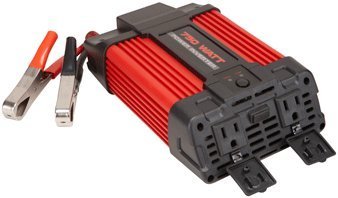
Image 1: Cen-Tech 750W Power Inverter connected to a 12V battery using the provided alligator clips. The image shows the compact design and the input/output ports.
6. Operating Instructions
After successful setup, you can begin using your power inverter:
- Turn On Inverter: Ensure the inverter's power switch is in the "ON" position. The LED indicator should confirm it is powered.
- Connect AC Devices: Plug your 115V AC devices into the inverter's AC outlets. Ensure the total wattage of all connected devices does not exceed 750 watts continuously or 1500 watts peak.
- Connect USB Devices: For charging USB-powered devices, plug them into the 5V/500mA USB port.
- Monitor Battery Level: Keep an eye on your 12V battery's charge level. Prolonged use can drain the battery. The inverter has low voltage protection and will shut down if the battery voltage drops too low.
- Power Off: When finished, first disconnect all AC and USB devices from the inverter. Then, turn off the inverter's power switch. Finally, disconnect the alligator clips from the battery, starting with the black (negative) clip, then the red (positive) clip.
Note: Some sensitive electronic devices may not operate correctly with a modified sine wave inverter. Consult your device's manufacturer for compatibility if issues arise.
7. Maintenance
Regular maintenance ensures optimal performance and longevity of your inverter:
- Cleaning: Keep the inverter clean and free of dust and debris. Use a dry cloth to wipe the exterior. Do not use liquid cleaners.
- Ventilation: Periodically check that the ventilation openings are not blocked. Clear any obstructions to ensure proper airflow.
- Cable Connections: Regularly inspect the input cables and alligator clips for any signs of wear, damage, or corrosion. Ensure connections remain tight and secure.
- Storage: When not in use for extended periods, store the inverter in a cool, dry place, away from direct sunlight and extreme temperatures. Disconnect it completely from the battery.
8. Troubleshooting
If you encounter issues with your inverter, refer to the following common problems and solutions:
| Problem | Possible Cause | Solution |
|---|---|---|
| No power output / Inverter not turning on |
|
|
| Inverter shuts down unexpectedly |
|
|
| AC devices not working correctly |
|
|
9. Specifications
| Feature | Detail |
|---|---|
| Model Number | CT-750-12 |
| Continuous Power | 750 Watts |
| Peak Power | 1500 Watts |
| Input Voltage | 12V DC |
| Output Voltage | 115V AC |
| Output Waveform | Modified Sine Wave |
| Efficiency | Up to 87% |
| AC Outlets | 2 |
| USB Port | 5V / 500mA |
| Protection Features | Low/High Voltage, Low/High Temperature, Low/High Current, Short Circuit, Overload |
| Item Weight | 2.11 pounds |
| Dimensions (Approx.) | Not specified in provided data |
10. Warranty and Support
Information regarding product warranty and customer support was not provided in the available product data. For warranty details or technical assistance, please refer to the product packaging or contact the manufacturer directly.
Related documentsCT-750-12


Ask a question about this manual
Ask about setup, troubleshooting, compatibility, parts, safety, or missing instructions. Manuals+ will review the question and use this page’s manual context to help answer it.