
1. Introduction
This manual provides instructions for the OM SYSTEM OLYMPUS SZ-12 14MP Digital Camera. The SZ-12 is an ultra-compact long zoom camera designed for capturing high-quality photos and videos. It features a powerful 24x optical zoom, 3D Photo Mode, and various creative Magic Art Filters.
For optimal performance and to ensure safe operation, please read this manual thoroughly before using the camera and keep it for future reference.
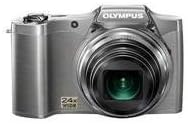
Figure 1: Front view of the Olympus SZ-12 Digital Camera in silver.
2. Setup
2.1. Battery Installation
The camera requires one Lithium Metal battery (included). To install the battery:
- Locate the battery compartment cover on the bottom of the camera.
- Slide the latch to open the cover.
- Insert the battery according to the polarity indicators (+/-) inside the compartment.
- Close the battery compartment cover securely until it clicks into place.
2.2. Memory Card Insertion (Sold Separately)
The camera uses SD/SDHC/SDXC memory cards. To insert a memory card:
- Open the battery/memory card compartment cover.
- Insert the memory card into the slot with the label facing the correct direction (usually towards the front of the camera). Push gently until it clicks into place.
- Close the compartment cover.
2.3. Initial Charging
Before first use, ensure the battery is fully charged. Connect the camera to a power source using the supplied USB cable and AC adapter. The charging indicator will show the charging status.
3. Operating the Camera
3.1. Power On/Off
Press the POWER button located on the top of the camera to turn it on or off.
3.2. Basic Photography
To take a photo:
- Turn on the camera.
- Frame your shot using the 3-inch LCD screen.
- Press the shutter button halfway down to focus. The focus frame will turn green when focus is achieved.
- Press the shutter button all the way down to capture the image.
3.3. Zoom Function
The camera features a 24x wide-angle optical zoom. Use the zoom lever around the shutter button to adjust the focal length. Push the lever towards W for wide-angle shots and towards T for telephoto (zoom in) shots.
Video 1: Demonstration of Wide Angle Lens Technology and Magic Art Filters. This video highlights the camera's ability to capture broad scenes and apply creative effects directly in-camera.
3.4. HD Video Recording
The SZ-12 supports HD video recording. To start recording, press the dedicated movie record button. Press it again to stop recording. Playback on an HD television is possible via HDMI output (cable sold separately).
3.5. Magic Art Filters
Enhance your photos and videos with various in-camera Magic Art Filters. These filters are applied directly by the camera, eliminating the need for external software or additional editing time. Available filters include Pop Art, Pin Hole, Drawing, Fish Eye, Soft Focus, Punk, Watercolor, Sparkle, Miniature, and Reflection. Note that some filters may restrict the maximum image size.
3.6. Dual Image Stabilization
The camera features Dual Image Stabilization, which combines Sensor-Shift Image Stabilization with high ISO sensitivity and fast shutter speeds. This technology helps to reduce blur and produce crisp, clear images, even in challenging shooting conditions.
3.7. Intelligent Auto Mode
Intelligent Auto mode automatically identifies the scene you are shooting from up to 30 different scene modes (e.g., Portrait, Landscape, Night + Portrait, Macro, Sports). It then adjusts the camera settings for optimal results, simplifying the photography process.
4. Maintenance
4.1. Cleaning the Camera
- Use a soft, lint-free cloth to clean the camera body.
- For the lens, use a lens brush or a blower to remove dust, then gently wipe with a lens cleaning cloth. Avoid touching the lens surface with your fingers.
- Do not use organic solvents or strong cleaning agents.
4.2. Battery Care
- Store the battery in a cool, dry place when not in use.
- Avoid fully discharging the battery frequently to prolong its lifespan.
- If the camera will not be used for an extended period, remove the battery.
4.3. Storage
Store the camera in a dry, well-ventilated area, away from direct sunlight, high temperatures, and humidity. Use a camera bag to protect it from dust and scratches.
5. Troubleshooting
| Problem | Possible Cause | Solution |
|---|---|---|
| Camera does not turn on. | Battery is dead or incorrectly inserted. | Charge the battery or reinsert it correctly. |
| Images are blurry. | Camera shake; out of focus. | Hold the camera steady; ensure proper focus before shooting. Utilize Dual Image Stabilization. |
| Memory card error. | Card is full, corrupted, or incompatible. | Delete unnecessary files, format the card (this will erase all data), or try a different compatible card. |
6. Specifications
- Model: SZ-12 Silver
- Megapixels: 14 MP
- Optical Zoom: 24x Wide-Angle Zoom
- LCD Screen: 3-inch
- Video Recording: HD Video
- Image Stabilization: Dual Image Stabilization (Sensor-shift)
- Dimensions: 4.17 x 1.57 x 2.72 inches
- Item Weight: 8 ounces
- Battery: 1 Lithium Metal battery (included)
- Supported File Format: JPEG
- Photo Sensor Technology: CMOS
- Aspect Ratio: 16:9
- Compatible Mountings: Micro Four Thirds
- First Available Date: January 18, 2012
7. Warranty and Support
For warranty information and technical support, please refer to the official Olympus website or contact their customer service. Keep your proof of purchase for warranty claims.
Online resources and FAQs may also be available on the Olympus Store on Amazon.


