
1. Introduction
The Manfrotto MVH502AH Video Head is engineered for precise and smooth camera movements, ideal for compact video cameras, DSLR, and mirrorless cameras. Its innovative design combines robust construction with advanced fluid drag and counterbalance systems to ensure stability and responsive control during filming.
Key features include:
- Professional Construction: Robust design with a maximum payload capacity of 10 kg (22 lbs).
- Wide Compatibility: Designed for compact video cameras, DSLR, and mirrorless cameras, featuring a sliding plate for easy camera connection.
- Fluid Movements: Variable fluid drag system on both pan and tilt axes ensures smooth and adjustable operation.
- Accessory Integration: Built-in Easy Link connectors offer flexibility for attaching external accessories.
2. Setup
2.1 Attaching the Video Head to a Tripod
The MVH502AH features a flat base with a 3/8-inch threaded hole, allowing it to be mounted on various tripods or supports. Ensure your tripod has a compatible mounting screw.
- Align the 3/8-inch threaded hole on the base of the video head with the mounting screw on your tripod.
- Rotate the video head clockwise until it is securely fastened to the tripod.
- Tighten any locking mechanisms on your tripod to ensure the head is stable.
2.2 Attaching a Camera to the Quick Release Plate
The video head utilizes a quick release plate system for fast and secure camera attachment.
- Locate the quick release plate on the top of the video head.
- Loosen the quick release plate locking lever (typically on the side of the head).
- Press the red safety button (if present) and slide the quick release plate out from the head.
- Attach the quick release plate to the bottom of your camera using the appropriate screw (1/4-inch or 3/8-inch). Ensure it is tightly secured to the camera.
- Slide the camera with the attached quick release plate back into the video head until it clicks into place.
- Securely tighten the quick release plate locking lever to prevent any movement.
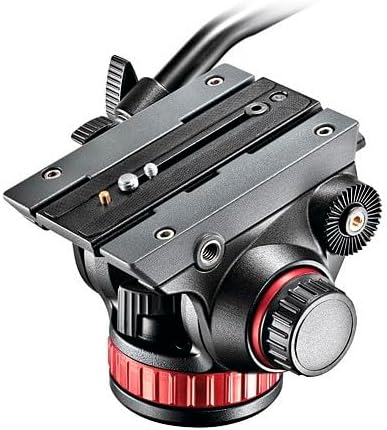
Figure 1: Top view of the Manfrotto MVH502AH Video Head showing the quick release plate mechanism.
2.3 Attaching the Pan Bar
The pan bar provides ergonomic control over pan and tilt movements.
- Identify the pan bar attachment points on either side of the video head.
- Insert the pan bar into the desired attachment point.
- Tighten the locking knob on the pan bar to secure it in place. The pan bar can be extended or retracted for comfortable operation.
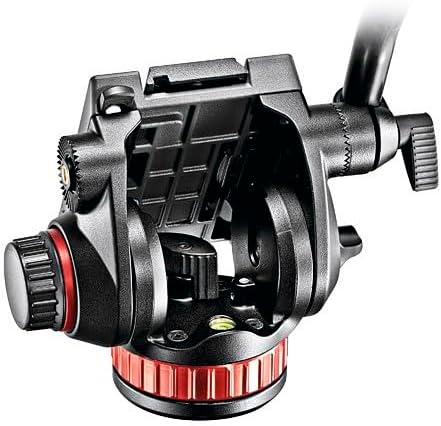
Figure 2: Side view of the Manfrotto MVH502AH Video Head with the pan bar attached.
2.4 Easy Link Connectors
The video head features 3/8-inch Easy Link connectors on the sides for attaching external accessories like monitors, lights, or microphones.
- Screw your accessory arm or adapter into the Easy Link connector.
- Attach your desired accessory to the arm.
3. Operating the Video Head
3.1 Adjusting Fluid Drag (Pan and Tilt)
The MVH502AH features variable fluid drag systems for both pan and tilt movements, allowing you to customize the resistance for smooth operation.
- Pan Drag: Use the dedicated knob on the base of the head to adjust the horizontal panning resistance. Turn clockwise for more resistance, counter-clockwise for less.
- Tilt Drag: Use the dedicated knob on the side of the head (opposite the pan bar attachment) to adjust the vertical tilting resistance. Turn clockwise for more resistance, counter-clockwise for less.
3.2 Counterbalance System
The video head includes a fixed counterbalance system designed to support cameras up to 8.8 lbs (4 kg) at a 55mm center of gravity, preventing accidental camera drops and aiding in smooth tilting.
- Ensure your camera setup (camera + lens + accessories) does not exceed the counterbalance capacity for optimal performance.
- Adjust the camera's position on the sliding plate to achieve proper balance, minimizing strain on the tilt mechanism.
3.3 Leveling the Head
A built-in leveling bubble helps ensure your shots are perfectly horizontal.
- Adjust your tripod legs until the bubble in the leveling indicator is centered.

Figure 3: Front view of the Manfrotto MVH502AH Video Head, highlighting the leveling bubble.
3.4 Official Product Video
Video 1: An official overview of the Manfrotto Video Head with Flat Base, demonstrating its features and functionality.
4. Maintenance
To ensure the longevity and optimal performance of your Manfrotto MVH502AH Video Head, follow these general maintenance guidelines:
- Cleaning: Regularly wipe down the head with a soft, dry cloth to remove dust and debris. Avoid using harsh chemicals or abrasive materials.
- Lubrication: The fluid drag system is factory-sealed and does not require user lubrication. Do not attempt to open or lubricate internal components.
- Storage: Store the video head in a clean, dry environment, away from extreme temperatures and humidity.
- Inspection: Periodically check all knobs, levers, and screws to ensure they are tight and functioning correctly.
5. Troubleshooting
If you encounter issues with your video head, consider the following:
- Stiff Movements: Ensure that all locking knobs for pan and tilt are fully disengaged. Adjust the fluid drag settings to a lower resistance.
- Camera Instability: Verify that the quick release plate is securely attached to both the camera and the video head. Re-balance the camera on the sliding plate to ensure the center of gravity is correctly aligned with the counterbalance system.
- Accessory Issues: Check that accessories are properly screwed into the Easy Link connectors and that their own locking mechanisms are secure.
6. Specifications
| Feature | Specification |
|---|---|
| Product Dimensions | 15.7 x 8.5 x 8.5 inches |
| Item Weight | 3.75 pounds |
| Item Model Number | MVH502AH |
| Weight Limit | 8.8 Pounds (4 kg) |
| Maximum Height | 5.1 Inches |
| Tripod Head Type | Pan Heads |
| Material | Aluminum |
| Color | Black |
| Date First Available | October 15, 2011 |

Figure 4: Dimensional view of the Manfrotto MVH502AH Video Head.
7. Important Information
Product is sold as is, brand new, no returns, no refunds.