1. Introduction
This manual provides essential instructions for the safe and effective use of your Fujifilm FinePix SL300 Digital Camera. Please read this manual thoroughly before using the camera and keep it in a safe place for future reference.
2. Product Overview
The Fujifilm FinePix SL300 is a versatile digital camera featuring a 14-megapixel CCD sensor, a high-quality Fujinon 30x optical zoom lens, and a 3.0-inch LCD display. It is designed to capture both high-resolution still images and 720p HD videos.
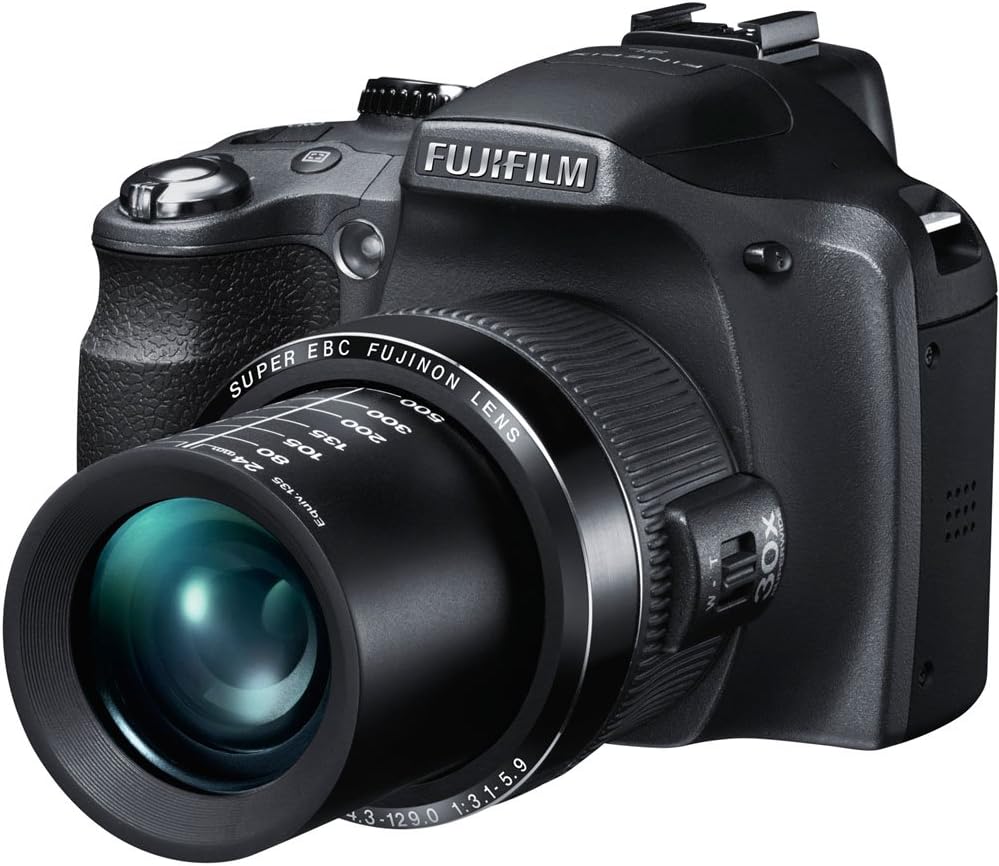
Image 1: A detailed view of the Fujifilm FinePix SL300 digital camera in black, showcasing its extended Fujinon lens with 30x optical zoom markings and the ergonomic grip.
Key Features:
- 14 Megapixel CCD Sensor for detailed images.
- High Quality Fujinon 30x Optical Zoom Lens (24mm wide-angle to 720mm telephoto equivalent).
- 3.0-inch LCD Display for clear viewing and menu navigation.
- TTL Hot Shoe for external flash compatibility.
- 720p HD Movie Recording.
- Super EBC (Electron Beam Coating) on lens elements to reduce ghosting and flare.
3. Setup
3.1. Charging and Installing the Battery
- Insert the Li-ion battery NP-85 into the battery charger BC-85.
- Connect the charger to a power outlet using the provided plug adapter. The charging indicator will illuminate.
- Once charging is complete, remove the battery from the charger.
- Open the battery compartment cover on the camera and insert the charged battery, ensuring correct orientation. Close the cover securely.
3.2. Inserting a Memory Card
The camera supports SD memory cards. Ensure you use a Class 10 or higher SD card for optimal performance, especially for HD video recording.
- Open the memory card slot cover.
- Insert the memory card with the contacts facing the correct direction until it clicks into place.
- Close the memory card slot cover securely.
3.3. Attaching the Shoulder Strap and Lens Cap
- Attach the shoulder strap to the camera's strap lugs for secure carrying.
- Secure the lens cap to the lens using the provided lens cap cord to prevent loss.
4. Basic Operation
4.1. Powering On/Off
Press the power button to turn the camera on or off. The LCD monitor will display the shooting information.
4.2. Taking Still Photos
- Select your desired shooting mode using the mode dial. For automatic settings, choose SR AUTO.
- Frame your shot using the LCD monitor or electronic viewfinder.
- Press the shutter button halfway down to focus. The focus indicator will light up when focus is achieved.
- Press the shutter button fully down to take the picture.
4.3. Using the Zoom
The camera features a 30x optical zoom lens. Use the zoom lever located on the lens barrel to adjust the focal length. Move the lever towards 'W' for wide-angle (zooming out) and 'T' for telephoto (zooming in).
4.4. Recording HD Movies
To record a movie, set the mode dial to movie mode. Press the movie recording button to start and stop recording. The camera records in 720p HD resolution.
4.5. SR AUTO (Scene Recognition Auto)
In SR AUTO mode, the camera automatically detects the scene type (e.g., Portrait, Landscape, Night, Macro) and optimizes settings for the best possible image. It also includes detection functions for faces, blinks, and smiles.
5. Advanced Features
5.1. Motion Panorama
Capture stunning panoramic photos by simply sweeping the camera across the scene. The camera automatically stitches three consecutive shots together, providing in-frame guidance for alignment.
5.2. Natural Light and with Flash
This mode captures two images simultaneously: one with natural light at high sensitivity and another with Intelligent Flash, allowing you to choose the preferred result.
5.3. Tracking Auto Focus
Ideal for moving subjects, Tracking AF keeps the subject in focus even when it moves within the frame or when using high zoom settings.
5.4. Instant Zoom
This function helps track moving subjects at high zoom ratios. With a single button press, the camera captures the subject within a selected frame on the LCD at a digitally zoomed ratio (1.4x or 2.0x).
5.5. Zoom Bracketing Mode
Take three shots with a single press, each at a different magnification (original, 1.4x, and 2.0x), allowing for immediate selection of the best crop without post-processing on a computer.
5.6. 2cm Super Macro
For extreme close-up photography, the Super Macro mode allows focusing on subjects as close as 2cm, capturing intricate details.
5.7. TTL Hot Shoe
The built-in hot shoe allows for the attachment of an auxiliary TTL flash unit, expanding lighting capabilities beyond the integrated flash.
6. Connectivity and Sharing
The Fujifilm FinePix SL300 supports easy image and video transfer and sharing.
6.1. USB-A/V Cable
Use the provided USB-A/V cable to connect your camera to a computer for transferring photos and videos, or to a television for viewing content.
6.2. Social Networking Integration
Tag photos and movie clips directly in the camera for easy upload to social media platforms like Facebook and YouTube. When connected to your computer, the tagged content will automatically upload via MyFinePix Studio software.
7. Maintenance
Proper care ensures the longevity and performance of your camera.
- Keep the lens clean using a soft, lint-free cloth designed for optical surfaces.
- Avoid exposing the camera to extreme temperatures, humidity, or dust.
- Clean the camera body with a dry, soft cloth. Do not use solvents or abrasive cleaners.
- When not in use, store the camera with the lens cap attached in a protective bag.
8. Troubleshooting
If you encounter issues with your camera, refer to the following general troubleshooting tips. For more detailed solutions, consult the full owner's manual on the included CD-ROM.
- Camera does not power on: Ensure the battery is fully charged and correctly inserted.
- Images are blurry: Check focus settings, ensure adequate lighting, and hold the camera steady. Use image stabilization if available.
- Memory card error: Ensure the memory card is inserted correctly and is not full or corrupted. Try reformatting the card (this will erase all data).
- Flash not firing: Check flash mode settings. Ensure the flash is not set to 'Off'.
9. Specifications
| Feature | Specification |
|---|---|
| Model Name | FinePix SL300 |
| Sensor Type | 1/2.3-inch CCD |
| Effective Still Resolution | 14 Megapixels |
| Optical Zoom | 30x (24-720mm equivalent) |
| Digital Zoom | Up to 6.7x |
| Display | 3.0-inch LCD (460,000 dots) |
| Video Resolution | HD 720p |
| Image Stabilization | Sensor-shift |
| Storage Media | SD/SDHC/SDXC Memory Card |
| Battery Type | Li-ion NP-85 rechargeable battery |
| Battery Life (Approx.) | 300 photos per charge |
| Connectivity | USB, HDMI |
| Dimensions (Approx.) | Item Height: 3.66 inches |
| Weight (Approx.) | 470 Grams |
10. Warranty and Support
10.1. Warranty Information
The Fujifilm FinePix SL300 Digital Camera comes with a limited 1-year warranty covering parts and labor from the date of purchase. Please retain your proof of purchase for warranty claims.
10.2. Further Support
For detailed information, advanced settings, and comprehensive troubleshooting, refer to the full owner's manual provided on the included CD-ROM. You can also visit the official Fujifilm website for support resources.
11. What's in the Box
The following items are included with your Fujifilm FinePix SL300 Digital Camera:
- Li-ion battery NP-85
- Battery charger BC-85
- Plug adapter
- Shoulder strap
- USB-A/V cable
- Lens cap and Lens cap cord
- CD-ROM (containing full owner's manual in multiple languages)
- Owner's manual (basic printed version in English, Spanish, and French)