
1. Introduction
This manual provides essential information for the proper installation, use, and maintenance of your Trident AEGIS Protective Case. Designed to offer robust protection, the AEGIS case combines a shock-absorbing silicone lining with a hardened polycarbonate plastic shell to safeguard your device.
2. Product Features
- Dual-Layer Protection: Features a shock-absorbing silicone lining complemented by a rigid polycarbonate plastic outer shell for enhanced durability.
- Integrated Screen Protection: Includes a re-applicable screen protector designed to prevent scratches and maintain screen clarity.
- Port and Jack Protection: Equipped with silicone plugs to cover and protect all power ports and audio jacks from dust and debris.
- Precise Fit: Custom-engineered to fit the Samsung Galaxy S II and Epic 4G Touch (SPH-D710) models.
- Color: Red finish.
3. Compatibility
The Trident AEGIS case (Model AG-EPIC-RD) is specifically designed for the Samsung Galaxy S II and Epic 4G Touch, model number SPH-D710. This includes devices sold by carriers such as Sprint, Virgin Mobile USA, and Boost Mobile.
Important Note:
This case is NOT compatible with Samsung Galaxy S II models from other carriers (e.g., T-Mobile, AT&T) or the unlocked international version, as these models may have slightly different dimensions or camera opening shapes. Please verify your phone's model number (SPH-D710) to ensure proper fit and functionality.
4. Setup and Installation
- Prepare Your Device: Ensure your Samsung Galaxy S II / Epic 4G Touch (SPH-D710) is clean and free of dust or debris.
- Apply Screen Protector: Carefully apply the included re-applicable screen protector to your device's screen, ensuring no air bubbles are trapped underneath. Use a soft card or cloth to smooth out any bubbles.
- Install Silicone Lining: Gently fit the soft silicone inner layer around your phone, making sure all edges and corners are properly seated and the port plugs align with the device's openings.
- Attach Hard Shell: Place the phone with the silicone lining into the rigid polycarbonate outer shell. Ensure the shell snaps securely around the silicone layer, providing a snug and protective fit.
- Verify Fit: Check that all buttons are accessible and functional, and that the port plugs can be easily opened and closed.
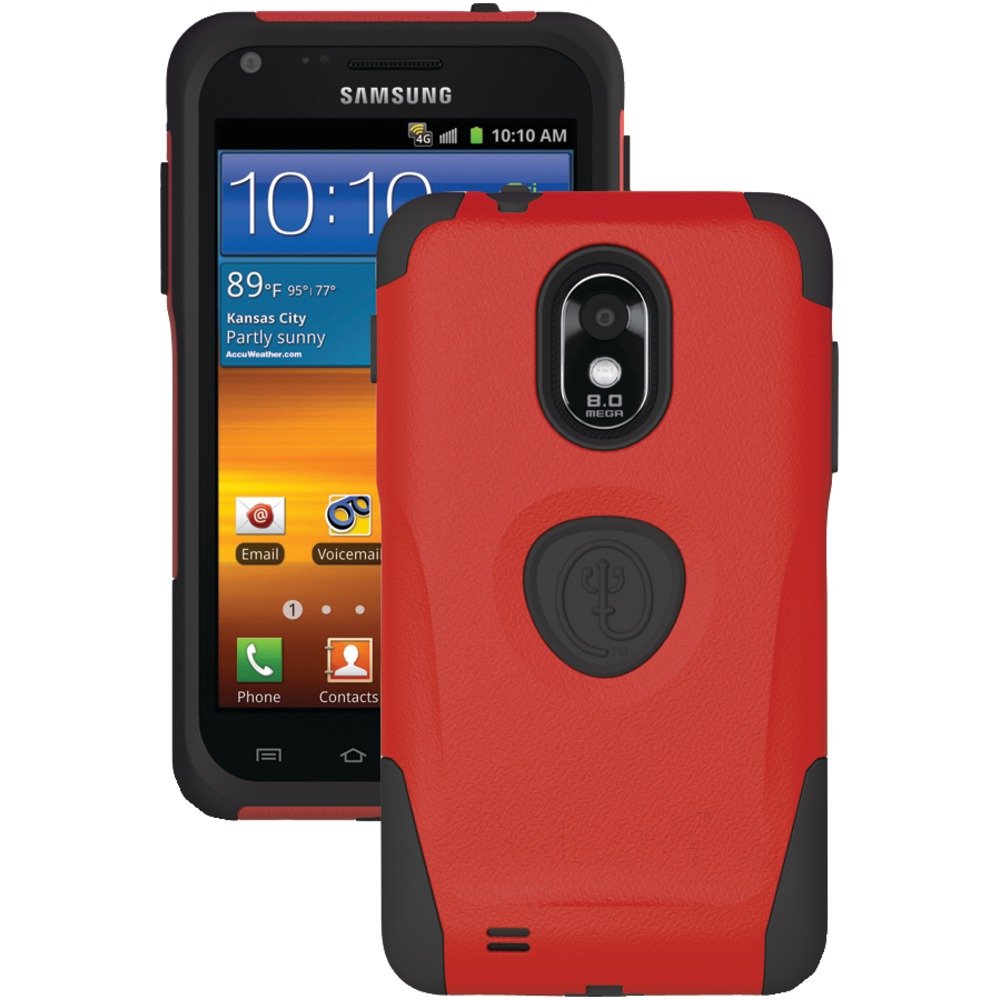
Front view of the Trident AEGIS case, showcasing its red color and protective design.
5. Operating the Case
Once installed, the Trident AEGIS case allows full access to all device functions. The silicone plugs for ports and jacks can be opened when needed for charging or connecting headphones, and then securely closed to protect against dust and moisture.
The case is designed to maintain the tactile feel of your phone's buttons while providing protection.
6. Maintenance
To keep your Trident AEGIS case in optimal condition:
- Cleaning: Wipe the case regularly with a soft, damp cloth to remove dirt and smudges. For stubborn stains, a mild soap solution can be used. Avoid harsh chemicals or abrasive cleaners.
- Screen Protector Care: If the screen protector becomes dirty or loses adhesion, it can be carefully removed, cleaned, and re-applied.
- Inspection: Periodically inspect the case for any signs of wear or damage, especially the silicone lining and port plugs, to ensure continued protection.
7. Troubleshooting
- Case Does Not Fit: Double-check your phone's model number to confirm it is a Samsung Galaxy S II / Epic 4G Touch (SPH-D710). Refer to the Compatibility section for details.
- Buttons Are Stiff: Ensure the silicone lining is correctly aligned with your phone's buttons before attaching the hard shell. Re-adjust if necessary.
- Screen Protector Bubbles: If bubbles appear after application, gently lift a corner of the screen protector and re-apply, using a soft card to push out air as you lay it down.
8. Specifications
| Feature | Detail |
|---|---|
| Product Dimensions | 7.9 x 5.1 x 0.6 inches |
| Item Weight | 1.6 ounces |
| Model Number | AG-EPIC-RD |
| Color | Red |
| Manufacturer | Trident Case |
| Material | Bio-enhanced resin (Polycarbonate and Silicone) |
9. Environmental Information (Green Protection)
Trident is committed to environmental responsibility. This case is manufactured using a bio-enhanced resin, which significantly reduces the degradation time compared to traditional plastics. While traditional plastics can take 500-1000 years to degrade, Trident's bio-enhanced resin is designed to degrade in approximately 25 years when disposed of in a landfill environment. The degradation process yields carbon dioxide, water, and methane, which are naturally occurring substances.
This approach helps address the issue of plastic waste and toxic byproducts associated with conventional plastics.
Video explaining Trident's Green Protection initiative, detailing the biodegradability of their bio-enhanced resin and its environmental benefits.
10. Warranty and Support
For warranty information, product support, or to inquire about replacement parts, please refer to the official Trident website or contact their customer service directly. Keep your purchase receipt for warranty claims.


