
TYT TYT-TH-9000D
TYT TH-9000D VHF Mobile Transceiver User Manual
Model: TYT-TH-9000D
Introduction
The TYT TH-9000D is a robust VHF mono-band mobile transceiver designed for amateur radio use. It offers high output power, extensive channel capacity, and a wide range of features for reliable communication. This manual provides detailed instructions for the proper setup, operation, and maintenance of your TH-9000D transceiver.
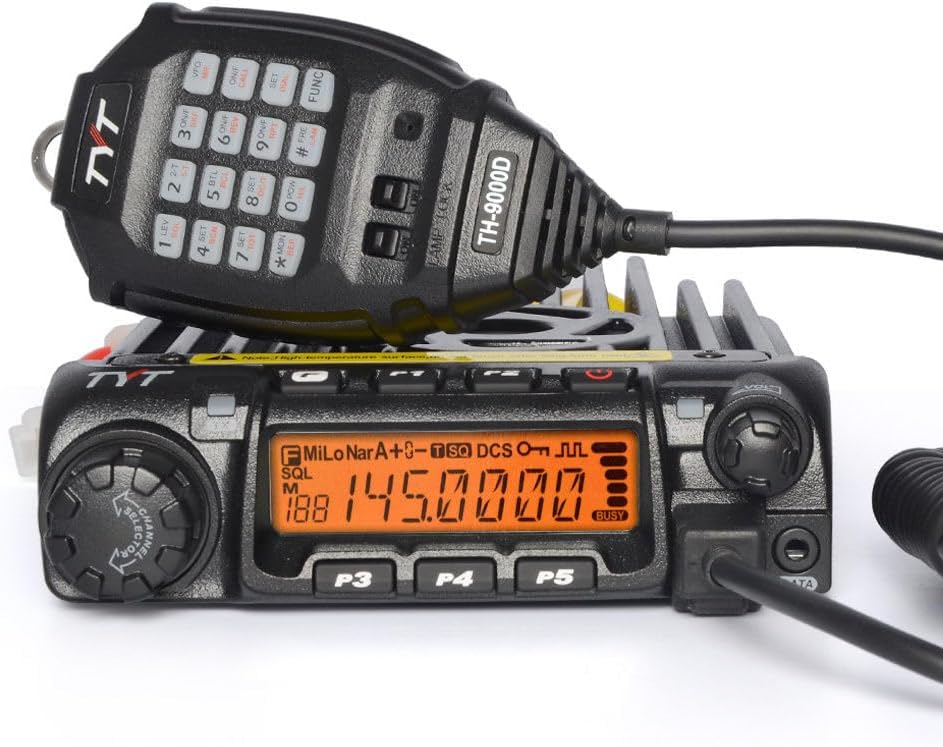
Figure 1: TYT TH-9000D Mobile Transceiver with its handheld microphone.
Safety Information
Please read and understand all safety precautions before operating the transceiver. Failure to do so may result in injury or damage to the equipment.
- Power Supply: Use only a stable 13.8V DC power supply with sufficient current capacity (minimum 15A recommended for full power operation).
- Antenna: Always connect a suitable VHF antenna before transmitting. Transmitting without an antenna or with a mismatched antenna can damage the transceiver.
- Heat: The transceiver's heatsink can become hot during prolonged transmission. Ensure adequate ventilation and avoid touching the heatsink during or immediately after operation.
- Vehicle Installation: When installing in a vehicle, ensure the mounting location does not obstruct airbags or driver's view. Secure all cables to prevent interference with vehicle controls.
- FCC Compliance: This device complies with FCC rules. Operation is subject to the condition that this device does not cause harmful interference.
Package Contents
Verify that all items listed below are included in your package:
- 1x TYT TH-9000D VHF Mobile Transceiver
- 1x Handheld Microphone
- 1x DC Power Cable with Fused Connector
- 1x Fixed Mounting Bracket
- 1x Set of Screws and Accessories for Mounting
- 1x User's Manual (this document)
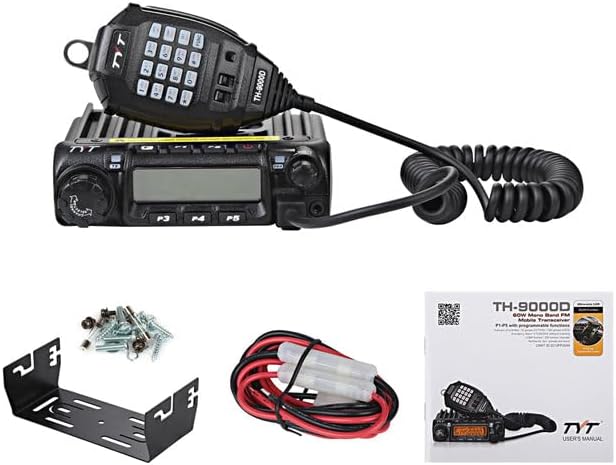
Figure 2: All components included in the TYT TH-9000D package.
Setup
1. Physical Installation
Choose a stable and well-ventilated location for the transceiver. Use the provided fixed mounting bracket to secure the unit. Ensure there is sufficient space around the heatsink for airflow.

Figure 3: Top view of the TH-9000D, highlighting the heatsink for heat dissipation.
2. Power Connection
Connect the supplied DC power cable to the power input port on the rear of the transceiver. Ensure the red wire connects to the positive (+) terminal and the black wire to the negative (-) terminal of your 13.8V DC power supply. The power cable includes an inline fuse for protection.
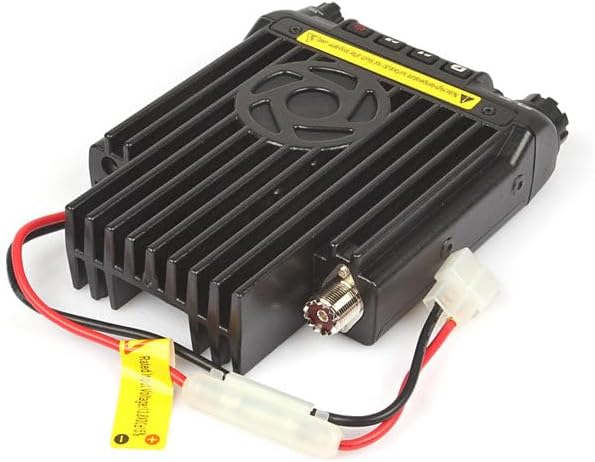
Figure 4: Rear connections of the TH-9000D, including the power cable and antenna port.
3. Antenna Connection
Connect a suitable 50-ohm VHF antenna to the SO-239 connector on the rear of the transceiver. Ensure the connection is secure. Never transmit without an antenna connected.
4. Microphone Connection
Plug the handheld microphone's RJ45 connector into the microphone port on the front panel of the transceiver. Ensure it clicks into place securely.
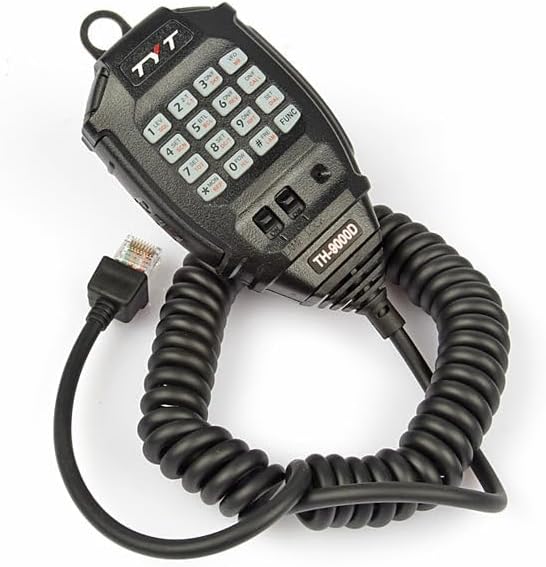
Figure 5: The handheld microphone for the TH-9000D, featuring a full keypad.
Operating Instructions
1. Power On/Off and Volume
- Power On: Press and hold the PWR button (usually integrated with the volume knob) for a few seconds until the display illuminates.
- Power Off: Press and hold the PWR button again until the display turns off.
- Volume Adjustment: Rotate the VOL knob clockwise to increase volume and counter-clockwise to decrease it.
2. Frequency and Channel Selection
- Frequency Range: The transceiver operates within the VHF frequency range: RX: 136-174MHz; TX: 144-148MHz.
- Channel Capacity: The TH-9000D supports up to 200 alphanumeric channels.
- Frequency/Channel Mode: Use the VFO/MR button on the microphone or front panel to switch between Frequency (VFO) mode and Memory (MR) channel mode.
- Tuning: In VFO mode, use the main rotary encoder (CHANNEL selector) or the microphone's up/down buttons to adjust the frequency. In MR mode, rotate the encoder to select a stored channel.
3. Output Power Selection
The transceiver offers High, Mid, and Low power output settings. The maximum output power is 65W (VHF). Refer to the user manual for specific button presses to cycle through power levels (often a dedicated POWER or HI/LO button).
4. CTCSS/DCS (PL & DPL) Settings
Continuous Tone-Coded Squelch System (CTCSS) and Digital Coded Squelch (DCS) are used to filter out unwanted signals. The TH-9000D supports 1750Hz tone, CTCSS/DCS setting, and scanning. Consult the full user manual for detailed programming steps.
5. Squelch Level (SQL) Setting
Adjust the squelch level from 0 to 9 to control the receiver's sensitivity to background noise. A higher squelch level requires a stronger signal to open the receiver.
6. Keypad Lock Function
To prevent accidental changes, activate the keypad lock. This function typically locks the microphone keypad and some front panel buttons. Refer to the manual for the specific key combination to activate/deactivate.
7. Scanning Modes
The transceiver supports frequency and channel scanning. This allows you to monitor multiple frequencies or channels for activity. Activate scanning via the dedicated SCAN button or menu option.
8. Advanced Features
- DTMF/2 Tone/5 Tone: For selective calling and control functions.
- ANI ID: Automatic Number Identification for caller identification.
- Remote Kill/Stun/Activate/Revive: Functions for remote control of another transceiver (requires compatible setup).
- Emergency Alarm: Activates an audible alarm and transmits a distress signal.
- Wide/Narrow Band Setting: Adjusts the modulation bandwidth for different communication requirements.
- TX Inhibit: Prevents accidental transmission.
- Busy Channel Lock-Out (BCLO): Prevents transmission on an occupied channel.
- Channel Name Editing: Customize channel names for easier identification.
- Reverse Frequency: Swaps transmit and receive frequencies, useful for repeater operation.
- Talk Around: Allows direct communication on a repeater's output frequency, bypassing the repeater.
- Scrambler (Optional): Encrypts voice for private communication (if equipped).
- Voice Prompt: Provides audible feedback for operations.
- Time-out Timer (TOT): Limits continuous transmission time to prevent overheating.
- Auto Power Off (APO): Automatically turns off the transceiver after a period of inactivity.
- Battery Voltage Display: Shows the current operating voltage.
Maintenance
- Cleaning: Use a soft, dry cloth to clean the transceiver's exterior. Do not use abrasive cleaners or solvents.
- Connections: Periodically check all cable connections (power, antenna, microphone) for security and signs of wear.
- Ventilation: Ensure the heatsink fins are free from dust and debris to maintain optimal cooling.
- Storage: If storing the transceiver for an extended period, disconnect it from the power supply and store it in a dry, cool place.
Troubleshooting
| Problem | Possible Cause | Solution |
|---|---|---|
| No Power | Power cable disconnected; Blown fuse; Power supply issue. | Check power cable connection; Inspect and replace fuse if necessary; Verify power supply operation. |
| No Audio from Speaker | Volume too low; Squelch level too high; Speaker damaged. | Increase volume; Decrease squelch level; Test with external speaker if available. |
| Cannot Transmit | Antenna not connected; TX Inhibit active; Busy Channel Lock-Out active; Frequency out of TX range. | Connect antenna; Deactivate TX Inhibit; Wait for channel to clear or disable BCLO; Ensure frequency is within 144-148MHz. |
| Poor Receive Sensitivity | Antenna issue; High squelch level; Interference. | Check antenna connection and condition; Lower squelch level; Identify and mitigate interference sources. |
Specifications
| Category | Parameter | Value |
|---|---|---|
| General | Channel Capacity | 200 |
| Frequency Stability | 2.5ppm | |
| Operating Temperature | -20℃ ~ +60℃ | |
| Operating Voltage | 13.8V DC ± 15% | |
| Dimensions (HxWxD) | 145mm x 190mm x 47mm | |
| Weight (with bracket) | 1200g | |
| Receiver | Reference Sensitivity | 0.2μV @ 12dB SINAD |
| Operating Bandwidth | 60dB @ 12.5KHz | |
| Adjacent Channel Selectivity | 60dB @ 12.5KHz | |
| Inter-modulation Rejection | ≥60dB / ≥65dB | |
| Spurious Response Rejection | ≥70dB | |
| Rated Audio Distortion | <5% | |
| Transmitter | Frequency Modulation | 11kΦF3E |
| Output Power | VHF: 65W | |
| Adjacent Channel Power | ≥60dB @ 12.5KHz | |
| Audio Distortion | <5% |
Warranty and Support
For warranty information and technical support, please refer to the warranty card included with your product or visit the official TYT website. Keep your purchase receipt as proof of purchase.
Manufacturer: SAIN-Import
Related documentsTYT-TH-9000D


Ask a question about this manual
Ask about setup, troubleshooting, compatibility, parts, safety, or missing instructions. Manuals+ will review the question and use this page’s manual context to help answer it.