
Introduction
This manual provides detailed instructions for the safe installation, operation, and maintenance of your Kichler Rivetta II 42-Inch Ceiling Fan, Model 300147WH. Please read all instructions carefully before beginning installation to ensure proper function and safety. Retain this manual for future reference.
Safety Information
- Always disconnect power at the circuit breaker before installation or servicing.
- All wiring must be in accordance with national and local electrical codes. If you are unfamiliar with wiring, consult a qualified electrician.
- Ensure the installation site can support the fan's weight.
- Do not bend blade holders during installation or cleaning.
- This fan is UL listed for indoor, dry locations only.
Setup and Installation
Package Contents
Verify that all components are present before beginning installation:
- Motor housing
- Fan blades (Clear White/Silver)
- Blade holders
- Downrod and canopy
- Mounting bracket
- Integrated light kit
- 100W JDE base halogen bulb
- Hardware pack
Tools Required
- Phillips screwdriver
- Flathead screwdriver
- Adjustable wrench
- Wire strippers
- Electrical tape
- Step ladder
Mounting the Fan
- Secure the mounting bracket to the ceiling outlet box. Ensure the outlet box is securely fastened to the building structure and can support the fan's weight.
- Attach the downrod to the motor housing, feeding the wires through the downrod.
- Carefully lift the fan assembly and hang it from the mounting bracket using the provided hook.
- This fan can be mounted on a maximum 7/12 pitch, or 30-degrees slope.
Wiring Instructions
- Connect the fan's ground wire (green or bare copper) to the household ground wire.
- Connect the fan's neutral wire (white) to the household neutral wire.
- Connect the fan's hot wire (black) to the household hot wire.
- Secure all wire connections with wire nuts and electrical tape.
- Tuck all wires neatly into the outlet box.
Attaching Fan Blades
- Attach each blade to a blade holder using the screws provided.
- Secure the blade holders to the motor housing. Ensure all screws are tightened firmly.
Installing the Light Kit
- Connect the light kit wires to the corresponding wires from the fan motor.
- Secure the light kit assembly to the bottom of the fan motor housing.
- Install the included 100W JDE base halogen bulb into the light kit socket.
- Attach the light kit glass or cover.
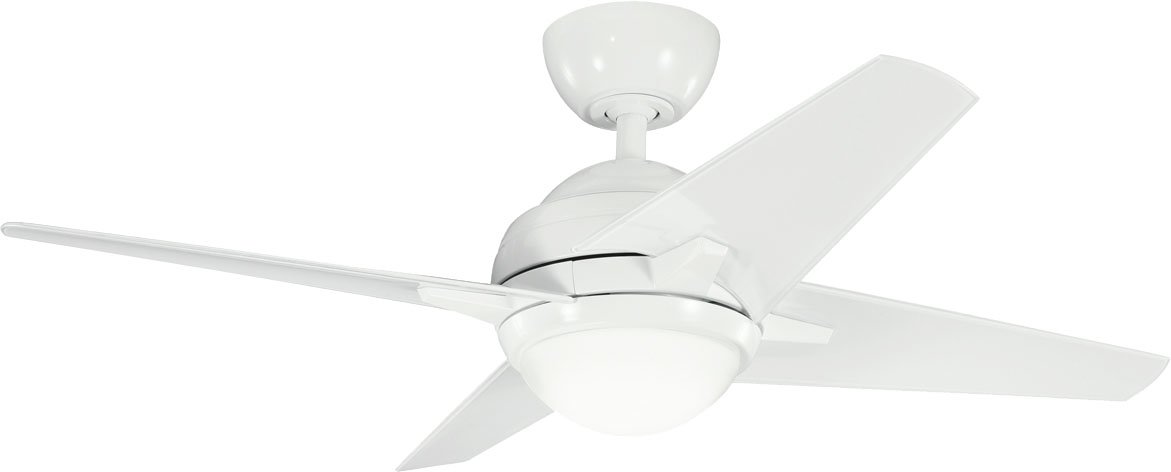
Image: Kichler Rivetta II 42-Inch Ceiling Fan. This image displays the fan's overall design, featuring a white powder coat finish on the motor housing and clear white/silver blades. The integrated light kit is visible at the bottom of the fan.
Operating Instructions
Fan Speed Control
Your ceiling fan is equipped with a multi-speed control system. Depending on your specific installation, this may be controlled via a pull chain, wall control, or remote control. Refer to the specific control device's instructions for detailed operation.
- High Speed: For maximum airflow.
- Medium Speed: For moderate airflow.
- Low Speed: For gentle airflow.
- Off: To turn the fan off.
Light Operation
The integrated light kit can be operated independently of the fan. This is typically controlled by a separate pull chain, wall switch, or remote button.
- On: To turn the light on.
- Off: To turn the light off.
Directional Switch (Seasonal Use)
A slide switch on the fan motor housing controls the direction of blade rotation. This allows for seasonal optimization:
- Downward Airflow (Summer): Set the switch to move air downward, creating a cooling effect.
- Upward Airflow (Winter): Set the switch to move air upward, circulating warm air near the ceiling.
Note: Always turn off the fan and wait for the blades to stop completely before changing the directional switch.
Maintenance
Cleaning
Regular cleaning will help maintain the appearance and performance of your fan.
- Always disconnect power at the circuit breaker before cleaning.
- Use a soft, damp cloth to wipe down the motor housing and blades.
- Do not use abrasive cleaners or solvents, as these can damage the finish.
- Periodically check all screws for tightness.
Bulb Replacement
The integrated light kit uses one 100W JDE base halogen bulb.
- Disconnect power at the circuit breaker.
- Allow the bulb to cool completely if it has been recently used.
- Carefully remove the light kit glass or cover.
- Unscrew the old bulb and replace it with a new 100W JDE base halogen bulb.
- Reattach the light kit glass or cover.
- Restore power.
Troubleshooting
| Problem | Possible Cause | Solution |
|---|---|---|
| Fan does not start | No power to fan; Loose wire connections; Motor issue | Check circuit breaker; Verify all wire connections are secure; Contact a qualified electrician. |
| Light does not work | Bulb loose or burned out; Loose wire connection; Light switch issue | Tighten or replace bulb; Check light kit wiring; Test light switch. |
| Fan wobbles | Loose blade screws; Unbalanced blades; Loose mounting bracket | Tighten all blade screws; Use a balancing kit (not included); Ensure mounting bracket is secure. |
| Noisy operation | Loose screws; Motor bearings; Blades hitting an obstruction | Check and tighten all screws; Ensure blades are clear of obstructions; If noise persists, contact support. |
Specifications
- Model: 300147WH
- Brand: Kichler
- Fan Size: 42-Inch
- Motor: 125MM x 65MM high efficiency DC motor
- Finish: White Powder Coat
- Blades: Clear White/Silver
- Light Kit: Integrated, uses one 100W JDE base halogen bulb
- Mounting: Mounts on a maximum 7/12 pitch, or 30-degrees slope
- Listing: UL listed for indoor, dry locations
- Material: Alloy Steel
- Style: Mission
- Room Type: Dining Room (recommended)
Warranty and Support
Warranty Information
Kichler products are manufactured to high-quality standards. For specific warranty details regarding your Rivetta II 42-Inch Ceiling Fan, please refer to the warranty card included with your product or visit the official Kichler website. Keep your proof of purchase for warranty claims.
Customer Support
If you have any questions, require technical assistance, or need to order replacement parts, please contact Kichler customer support:
- Website: www.kichler.com (for product information, FAQs, and contact details)
- Phone: Refer to the Kichler website for the most current contact numbers.