
Introduction
This instruction manual provides essential information for the safe and effective use of your rastar Porsche RC Car 42800. Please read this manual thoroughly before operating the product and retain it for future reference. This remote-controlled car is a 1:14 scale replica of the Porsche GT3 RS, designed for recreational use.

Image: The rastar Porsche RC Car 42800 in white, featuring red wheels and racing stripes.
Safety Information
- Age Recommendation: This product is not suitable for children under 3 years of age due to small parts that may present a choking hazard. The manufacturer recommends an age of 6 years and older.
- Battery Safety:
- Do not mix old and new batteries.
- Do not mix alkaline, standard (carbon-zinc), or rechargeable (nickel-cadmium) batteries.
- Insert batteries with correct polarity (+ and -).
- Remove exhausted batteries promptly.
- Do not recharge non-rechargeable batteries.
- Remove batteries if the product will not be used for an extended period.
- Operating Environment: Operate the RC car on flat, smooth surfaces. Avoid operating on carpets, uneven terrain, or wet surfaces to prevent damage and ensure optimal performance.
- Supervision: Adult supervision is recommended, especially for younger users.
- Avoid Obstacles: Do not operate the car near people, pets, or fragile objects.
Package Contents
The package for the rastar Porsche RC Car 42800 typically includes:
- 1 x rastar Porsche RC Car 42800 (1:14 scale)
- 1 x Radio Remote Control
Note: Batteries are not included and must be purchased separately.
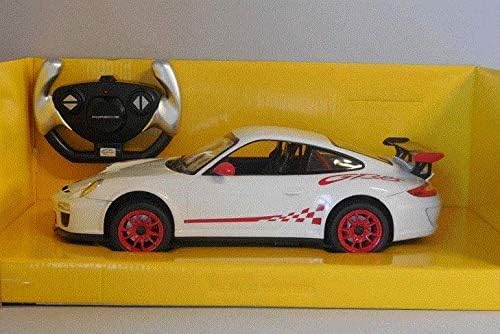
Image: The rastar Porsche RC Car 42800 and its steering wheel-style remote control, displayed within its retail packaging.
Setup
1. Battery Installation for the RC Car
- Locate the battery compartment on the underside of the RC car.
- Using a screwdriver (not included), open the battery compartment cover.
- Insert 3 x AA 1.5V batteries into the compartment, ensuring correct polarity (+/-).
- Replace the battery compartment cover and secure it with the screw.
2. Battery Installation for the Remote Control
- Locate the battery compartment on the back of the remote control.
- Using a screwdriver (not included), open the battery compartment cover.
- Insert 2 x AA 1.5V batteries into the compartment, ensuring correct polarity (+/-).
- Replace the battery compartment cover and secure it with the screw.
Operating Instructions
1. Power On
- Turn on the RC car by sliding the power switch (usually located on the underside of the car) to the "ON" position.
- Turn on the remote control by sliding its power switch to the "ON" position. The indicator light on the remote should illuminate.
- Allow a few seconds for the car and remote to establish a connection.
2. Driving the RC Car
The remote control offers full-function control:
- Forward: Push the forward lever/button on the remote.
- Reverse: Push the reverse lever/button on the remote.
- Turn Left: Rotate the steering wheel on the remote to the left.
- Turn Right: Rotate the steering wheel on the remote to the right.
The car has an operating range of approximately 30-40 meters and can reach speeds of 8-10 km/h.
3. Power Off
When finished playing, turn off both the RC car and the remote control to conserve battery life.
Maintenance
- Cleaning: Wipe the car and remote control with a soft, dry cloth. Do not use water or chemical cleaners, as this may damage the electronic components.
- Storage: Store the RC car and remote in a cool, dry place away from direct sunlight and moisture. Remove batteries if storing for extended periods to prevent leakage.
- Avoid Impact: Do not drop or subject the car to strong impacts, as this can damage internal components or the bodywork.
Troubleshooting
| Problem | Possible Cause | Solution |
|---|---|---|
| Car does not move or respond to remote. |
|
|
| Poor control range or intermittent response. |
|
|
| Car moves slowly. |
|
|
Specifications
| Brand | rastar |
| Model | 42800 (Porsche GT3 RS) |
| Scale | 1:14 |
| Product Dimensions (L x W x H) | 31.9 x 9.7 x 13.9 cm |
| Weight | 1.26 kilograms |
| Recommended Age | 6 years and up (Manufacturer's recommendation) |
| Car Batteries Required | 3 x AA 1.5V (not included) |
| Remote Batteries Required | 2 x AA 1.5V (not included) |
| Material | Plastic |
| Radio Control Type | Funkfernsteuerung (Radio Remote Control) |
| Channels | 4 |
| Operating Range | 30-40 meters |
| Speed | 8-10 km/h |
Warranty and Support
Specific warranty information for the rastar Porsche RC Car 42800 is not provided in the product details. For warranty claims, technical support, or inquiries regarding spare parts, please contact the retailer where the product was purchased or refer to the official rastar website for customer service contact information.
Please retain your proof of purchase for any warranty-related issues.


