
1. Introduction
This manual provides essential instructions for the proper setup, operation, and maintenance of your ESYLUX EP10425899 Remote Control. Please read this manual thoroughly before using the device to ensure optimal performance and longevity. This remote control is designed for use with compatible motion detectors and lighting control systems.
2. Product Overview
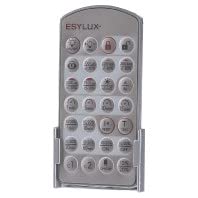
Image 1: ESYLUX EP10425899 Remote Control. This image shows the compact, rectangular remote control, likely with several buttons for various functions.
The ESYLUX EP10425899 is a durable and robust remote control specifically designed to interface with ESYLUX motion detectors and lighting control systems. It allows for convenient adjustment of settings from a distance, enhancing the flexibility and user-friendliness of your security and lighting installations.
Key Features:
- Model Number: EP10425899
- Compatible with ESYLUX motion detectors and lighting controls
- Robust construction for durability
- Wireless operation for remote adjustments
3. Setup
3.1 Battery Installation
- Locate the battery compartment cover on the back of the remote control.
- Slide or unclip the cover to open the compartment.
- Insert the required alkaline batteries, ensuring correct polarity (+ and - terminals match the markings inside the compartment).
- Replace the battery compartment cover securely.
3.2 Pairing with a Motion Detector
The ESYLUX EP10425899 remote control typically operates via infrared (IR) or radio frequency (RF) signals. For IR remotes, direct line of sight to the motion detector is required. For RF remotes, pairing might be necessary. Refer to the specific instructions for your ESYLUX motion detector for detailed pairing procedures. Generally, this involves:
- Placing the motion detector in pairing mode (often indicated by a flashing LED).
- Pressing a specific button or sequence of buttons on the remote control to initiate pairing.
- Confirming successful pairing, usually indicated by a change in the motion detector's LED status.
4. Operating Instructions
The ESYLUX EP10425899 remote control allows for various adjustments to your connected motion detector and lighting system. While specific button functions may vary slightly depending on the detector model, common operations include:
- Sensitivity Adjustment: Use designated buttons to increase or decrease the motion detector's sensitivity to movement.
- Time Delay Setting: Adjust the duration for which the light remains on after motion is no longer detected.
- Light Level Threshold: Set the ambient light level at which the motion detector will activate the lights.
- Manual Override: Some remotes offer a function to manually turn lights on or off, bypassing the motion detection for a set period.
- Test Mode: Activate a test mode to quickly check the detection area and functionality.
Always point the remote control directly at the motion detector if it uses infrared technology. Ensure there are no obstructions between the remote and the detector.
5. Maintenance
5.1 Cleaning
To clean the remote control, use a soft, dry cloth. For stubborn dirt, a slightly damp cloth with mild soap can be used, followed by a dry cloth. Do not use abrasive cleaners, solvents, or excessive moisture, as these can damage the device.
5.2 Battery Replacement
Replace batteries when the remote's range decreases or it becomes unresponsive. Follow the battery installation steps in Section 3.1. Always dispose of used batteries according to local regulations.
5.3 Storage
Store the remote control in a cool, dry place away from direct sunlight and extreme temperatures. If storing for an extended period, it is recommended to remove the batteries to prevent leakage.
6. Troubleshooting
| Problem | Possible Cause | Solution |
|---|---|---|
| Remote not responding | Dead or incorrectly inserted batteries. Obstruction between remote and detector. Remote out of range. | Check and replace batteries. Ensure correct polarity. Remove any obstructions. Move closer to the motion detector (within 10 meters). |
| Limited operating range | Low batteries. Interference. | Replace batteries. Ensure no strong electromagnetic fields or other wireless devices are causing interference. |
| Settings not changing on detector | Remote not paired correctly. Incorrect button pressed. | Refer to your motion detector's manual for pairing instructions. Ensure you are pressing the correct function button. |
7. Specifications
| Brand | ESYLUX |
| Model Number | EP10425899 |
| Color | Multicolored |
| Compatible Devices | Motion detector, lighting controls |
| Power Source | Alkaline Batteries |
| Maximum Range | 10 Meters |
| Recommended Use | Residential and commercial security |
8. Warranty and Support
8.1 Manufacturer Warranty
The ESYLUX EP10425899 Remote Control comes with a 2-year manufacturer warranty. This warranty covers defects in materials and workmanship under normal use. Please retain your proof of purchase for warranty claims.
8.2 Customer Support
For technical assistance, warranty claims, or further information regarding your ESYLUX product, please contact your retailer or visit the official ESYLUX website for customer support details. Ensure you have your model number (EP10425899) available when contacting support.