
1. Product Overview
The ADAX NEO NL is a modern and elegant electric convector heater designed for efficient space heating. It features a slim profile, measuring only 90 mm in depth, making it suitable for various indoor environments. This heater is equipped with an advanced digital programmable thermostat, ensuring precise temperature control and energy-efficient operation.
Key features include a 24-hour, 7-day programmable timer, comfort and economy temperature settings, open window detection, and adaptive start functionality. The heating element is an X-shaped aluminum design, which heats the room quickly and efficiently without burning oxygen or dust. The ADAX NEO NL complies with Eco-design directive requirements, promoting energy savings.

Image 1.1: The ADAX NEO NL 1000W Electric Convector Heater, showcasing its sleek white design and integrated digital display.
2. Safety Information
Please read all safety instructions carefully before installation and use. Failure to follow these instructions may result in electric shock, fire, or injury.
- Ensure the power supply voltage matches the rating label on the heater.
- Do not cover the heater or obstruct its air vents, as this can lead to overheating and fire.
- Keep flammable materials (curtains, furniture, etc.) at a safe distance from the heater.
- Do not install the heater directly below a power outlet.
- This appliance is not intended for use by persons (including children) with reduced physical, sensory or mental capabilities, or lack of experience and knowledge, unless they have been given supervision or instruction concerning use of the appliance by a person responsible for their safety.
- Children should be supervised to ensure that they do not play with the appliance.
- If the supply cord is damaged, it must be replaced by the manufacturer, its service agent, or similarly qualified persons to avoid a hazard.
- The heater is rated IP20, meaning it is protected against solid objects larger than 12.5mm but has no protection against water. Do not use in bathrooms or other areas where it may come into contact with water.
3. Setup and Installation
The ADAX NEO NL heater is designed for wall mounting. Mounting brackets are included in the package. Optional feet can be purchased separately for floor standing installation.
3.1 Wall Mounting
- Unpack: Carefully remove the heater and all components from the packaging.
- Choose Location: Select a suitable wall location, ensuring adequate clearance from furniture and curtains. Do not install directly under an electrical outlet.
- Mark Drill Holes: Use the provided mounting bracket as a template to mark the drill holes on the wall. Ensure the bracket is level.
- Drill and Secure: Drill holes and insert appropriate wall plugs (if necessary). Secure the mounting bracket to the wall using the screws provided.
- Attach Heater: Carefully hang the heater onto the secured mounting bracket. Ensure it clicks into place securely.
- Connect Power: Plug the 1.2m connection cable into a suitable electrical outlet.

Image 3.1: An ADAX NEO NL heater discreetly installed under a window, demonstrating typical wall-mounted placement.
3.2 Optional Floor Standing Installation
If you wish to use the heater as a portable unit, optional floor standing feet (e.g., ADAX L-Sono supports) can be purchased separately. Follow the instructions provided with the feet for proper attachment.

Image 3.2: Example of optional ADAX L-Sono supports for floor standing installation, compatible with Neo NL heaters.
4. Operating Instructions
The ADAX NEO NL features a user-friendly digital thermostat for precise temperature control and programming.
4.1 Digital Thermostat
The digital display on the right side of the heater shows the current or set temperature. Buttons located next to the display allow for easy adjustment and programming.

Image 4.1: Close-up of the ADAX NEO NL digital thermostat display, showing a set temperature of 20 degrees.
4.2 Setting Temperature
- Use the '+' and '-' buttons to adjust the desired temperature. The display will show the set temperature.
- The thermostat maintains the set temperature with an accuracy of ±0.3°C.
4.3 Programmable Timer (24-hour, 7-day)
The heater can be programmed for different temperature settings throughout the day and week. Refer to the detailed programming instructions in the full manual for specific steps on setting comfort and economy periods.
- Comfort Mode: Set a higher temperature for periods when you are typically at home.
- Economy Mode: Set a lower temperature for periods when you are away or sleeping, to save energy.
4.4 Eco-Design Features
- Open Window Detection: The heater automatically detects a sudden drop in temperature (e.g., when a window is opened) and temporarily switches to economy mode to prevent energy waste. It resumes normal operation once the window is closed and the temperature stabilizes.
- Adaptive Start: This feature learns how long it takes to heat your room and automatically adjusts the heating start time to reach your desired comfort temperature exactly when programmed, avoiding unnecessary heating.
5. Maintenance
Regular maintenance ensures optimal performance and longevity of your ADAX NEO NL heater.
- Cleaning: Disconnect the heater from the power supply before cleaning. Use a soft, damp cloth to wipe the exterior surfaces. Do not use abrasive cleaners or solvents.
- Dust Removal: Periodically vacuum or wipe the air intake and outlet grilles to remove dust accumulation, which can affect heating efficiency.
- No Internal Maintenance: The heater contains no user-serviceable parts inside. Do not attempt to open or repair the unit yourself.
6. Troubleshooting
If you encounter issues with your ADAX NEO NL heater, refer to the following common troubleshooting steps:
| Problem | Possible Cause | Solution |
|---|---|---|
| Heater does not turn on. | No power supply. | Check if the power cable is securely plugged in and the wall outlet is functional. Check circuit breaker. |
| Heater is on but not heating. | Temperature setting is too low. Open window detected. | Increase the set temperature. Close any open windows or doors. |
| Heater overheats and shuts off. | Air vents are blocked. | Ensure nothing is covering the heater. Clean any dust from the air vents. Allow to cool before restarting. |
| Display shows an error code. | Internal fault. | Unplug the heater for a few minutes, then plug it back in. If the error persists, contact customer support. |
For issues not listed here, or if the problem persists after attempting the solutions, please contact ADAX customer support.
7. Specifications
Detailed technical specifications for the ADAX NEO NL 1000W Electric Convector Heater.
| Feature | Specification |
|---|---|
| Model Number | 660010 |
| Power Output | 1000 Watts |
| Voltage | 230 Volts |
| Dimensions (L x W x H) | 128 x 9 x 20 cm (1280 x 90 x 200 mm) |
| Weight | 3.9 Kilograms |
| Color | White |
| Heating Method | Convection |
| Special Features | Programmable Thermostat, Open Window Detection, Adaptive Start |
| Ingress Protection (IP) Rating | IP20 |
| Power Source | Electric Corded |
| Maximum Temperature | 30 Degrees Celsius |
| Recommended Use | Space heating in domestic and office environments |
7.1 Heating Area Recommendations
The following table provides general recommendations for heating area based on heater power and insulation levels. These are approximate values for rooms with a ceiling height of up to 2.5 meters.
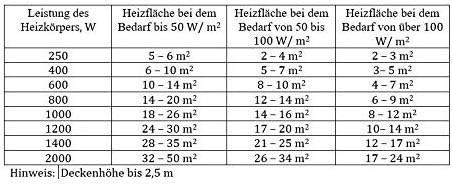
Image 7.1: Table illustrating recommended heating areas (in m²) for different heater wattages and insulation requirements (W/m²).
8. Warranty and Support
ADAX provides a manufacturer's warranty for this product. Please refer to the warranty card included with your purchase for specific terms and conditions, including the warranty period and coverage details.
8.1 Customer Support
For technical assistance, warranty claims, or any questions regarding your ADAX NEO NL heater, please contact ADAX customer support through their official website or the contact information provided in your product documentation.
- Online Support: Visit the official ADAX website for FAQs, support resources, and contact forms.
- Service Centers: Information on authorized service centers can be found on the ADAX website.


