
DEEJAY LED DJ154
DEEJAY LED A-B Box (DJ154) User Manual
Model: DJ154 | Brand: DEEJAY LED
1. Introduction and Overview
The DEEJAY LED A-B Box (DJ154) is a professional stage lighting unit designed for various applications, including parties, DJ setups, weddings, and theatrical stages. This compact and lightweight LED par light features an aluminum die-casting structure for optimal cooling and durability. It offers an infinite color mixing system and rainbow effects, providing stunning visual displays.
Key features include:
- Professional Features: Aluminum die-casting structure with an optimum cooling system. Infinite color mixing and rainbow effect LED par lights.
- Smart Appearance: Ideal for stage lighting, dance floor washing, and wedding lighting.
- Bright LED PAR: Amazing, easy-to-use color mixing effects. Compact and lightweight, supporting sound-activated, strobe effects, and static colors.
- Compact Smart Portable Design: Built-in, long-lasting cooling fan. Projects wide beams and generates eye-catching effects with automated sound-activated programs.
- Multiple Control Options: DMX, Master/Slave, and Sound-Active modes included.
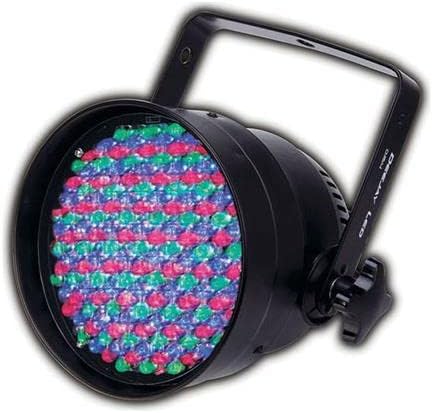
Figure 1.1: The DEEJAY LED A-B Box DJ154 stage light, featuring a black aluminum casing with a circular array of multi-colored (red, green, blue) LED lights on the front. A sturdy black mounting bracket is attached to the top, allowing for versatile positioning.
2. Setup
Follow these steps to set up your DEEJAY LED A-B Box (DJ154):
- Unpacking: Carefully remove the lighting unit and all accessories from its packaging. Inspect for any signs of damage during transit.
- Mounting: The unit comes with a handle bracket. This bracket can be used to mount the light in various configurations:
- Truss Mounting: Use appropriate clamps (not included) to attach the bracket securely to a lighting truss. Ensure all screws are tightened.
- Wall Mounting: Fix the bracket to a wall using suitable screws and anchors (not included), ensuring the surface can support the unit's weight.
- Floor/Table Placement: The bracket can also serve as a stand, allowing the unit to be placed directly on a floor or table to illuminate corners or specific areas.
- Power Connection: Connect the provided power cord to the unit's power input and then to a standard electrical outlet. The unit operates via a corded electric power source.
- Control Connection (Optional): If using DMX control, connect a DMX cable from your DMX controller to the DMX input on the DJ154 unit. For multiple units, daisy-chain them using DMX output to the next unit's DMX input.
Ensure the unit is placed in a location with adequate ventilation to allow the built-in cooling fan to operate effectively.
3. Operating Instructions
The DEEJAY LED A-B Box (DJ154) offers multiple operating modes:
3.1. DMX Control Mode
For precise control over color mixing, strobe effects, and programs, connect the DJ154 to a DMX512 controller. Refer to the unit's display or a separate DMX channel chart (if provided with the product) to understand the specific DMX channels and their functions. This mode allows for professional integration into larger lighting setups.
3.2. Master/Slave Mode
In a multi-unit setup, you can designate one DJ154 unit as the 'Master' and others as 'Slave' units. Connect the DMX output of the Master unit to the DMX input of the first Slave unit, and then daisy-chain subsequent Slave units. The Slave units will mirror the operations of the Master unit, ensuring synchronized lighting effects without a dedicated DMX controller.
3.3. Sound-Active Mode
The DJ154 can operate in a sound-active mode, where its built-in microphone detects ambient sound and triggers dynamic lighting patterns. This mode is ideal for parties and events where lighting needs to react to music. The unit can produce various effects, including color changes, strobes, and automated programs, all synchronized to the beat.
3.4. Static Color and Strobe Effects
Even without DMX or sound input, the unit can be set to display static colors (such as amber, cyan, or other desired hues) or continuous strobe effects. Consult the unit's control panel or display for navigation through these preset modes.
4. Maintenance
Proper maintenance ensures the longevity and optimal performance of your DEEJAY LED A-B Box (DJ154).
- Cleaning: Regularly clean the exterior of the unit with a soft, dry cloth. For stubborn dirt, a slightly damp cloth can be used, but ensure no moisture enters the unit. Do not use harsh chemicals or abrasive cleaners.
- Ventilation: The unit features a built-in cooling fan. Ensure that the ventilation openings are clear of dust and debris to prevent overheating. Periodically use compressed air to clear any accumulated dust from the vents.
- Cable Inspection: Periodically check all power and DMX cables for any signs of wear, cuts, or damage. Replace damaged cables immediately to prevent electrical hazards or signal loss.
- Storage: When not in use for extended periods, store the unit in a dry, dust-free environment, preferably in its original packaging or a padded case to protect it from physical damage.
No user-serviceable parts are inside. Refer all servicing to qualified service personnel.
5. Troubleshooting
If you encounter issues with your DEEJAY LED A-B Box (DJ154), try the following troubleshooting steps:
- No Power:
- Ensure the power cord is securely connected to both the unit and a working electrical outlet.
- Check the power outlet with another device to confirm it is live.
- Inspect the power cord for any damage.
- No Light Output:
- Verify the unit is receiving power.
- If using DMX, ensure the DMX cable is properly connected and the DMX controller is sending a signal. Check the DMX address settings on the unit.
- If in Master/Slave mode, ensure the Master unit is functioning correctly and DMX cables are properly daisy-chained.
- If in Sound-Active mode, ensure there is sufficient audio input for the unit to react.
- Incorrect Color/Effect:
- If using DMX, check your DMX controller's programming and the unit's DMX channel assignments.
- If in Sound-Active mode, try adjusting the sensitivity if available, or ensure the audio source is clear.
- Overheating:
- Ensure the ventilation openings are not blocked.
- Operate the unit in a well-ventilated area.
If these steps do not resolve the issue, contact DEEJAY LED customer support for further assistance.
6. Specifications
Technical specifications for the DEEJAY LED A-B Box (DJ154):
| Specification | Detail |
|---|---|
| Model Number | DJ154 |
| Color | Cyan |
| Shape | Rectangular |
| Material | Aluminum (Die-casting) |
| Finish Type | Aluminum |
| Light Source Type | Light Emitting Diode (LED) |
| Power Source | Corded Electric |
| Item Weight | 3.3 Pounds (1.5 kg) |
| Bulb Features | Sound-activated |
| Product Dimensions (L x W x H) | 8.66" x 10" x 7.6" (22 cm x 25.4 cm x 19.3 cm) |
| UPC | 886898000052 |
| Manufacturer | DJ Tech Pro USA, LLC |
| First Available Date | December 8, 2011 |
7. Warranty and Support
For information regarding the product warranty, including terms, conditions, and duration, please refer to the warranty card included with your purchase or visit the official DEEJAY LED website. Warranty details may vary by region and retailer.
For technical support, service inquiries, or to purchase replacement parts, please contact DEEJAY LED customer service through their official website or the contact information provided on your product packaging. When contacting support, please have your product model number (DJ154) and purchase details ready.
Ask a question about this manual
Ask about setup, troubleshooting, compatibility, parts, safety, or missing instructions. Manuals+ will review the question and use this page’s manual context to help answer it.