1. Introduction
This manual provides essential information for the proper use and care of your Leica V-LUX 3 digital camera. The Leica V-LUX 3 is designed for versatile photography, featuring a 24x super-telephoto zoom lens and a 12.1-megapixel CMOS image sensor. It is capable of capturing high-quality still images and recording full-HD video.
Please read this manual thoroughly before operating the camera to ensure optimal performance and longevity of the device.
2. Product Overview
2.1 Key Features
- 12.1-megapixel CMOS image sensor for high-quality imaging.
- 24x optical super-telephoto zoom lens (25-600mm equivalent) for extensive focal length range.
- Full-HD video recording capability (1920 x 1080 at 60 fps).
- Optical Image Stabilization to reduce blur.
- 3-inch articulating LCD display and electronic viewfinder.
- Fast continuous shooting up to 12 frames per second.
2.2 What's in the Box
The Leica V-LUX 3 package typically includes:
- Leica V-LUX 3 Camera Body
- Lithium-Ion Rechargeable Battery (BP-DC 9)
- Battery Charger
- Shoulder Strap
- USB Cable
- Lens Cap
- Instruction Manual (this document)
3. Setup
3.1 Charging the Battery
- Insert the battery into the provided charger.
- Connect the charger to a power outlet. The charging indicator light will illuminate.
- Once charging is complete, the indicator light will change or turn off. Disconnect the charger and remove the battery.
Note: Fully charge the battery before first use for optimal performance.
3.2 Inserting the Battery and Memory Card
Ensure the camera is turned off before inserting or removing the battery or memory card.
- Open the battery/card compartment cover located on the bottom of the camera.
- Insert the charged battery with the contacts facing the correct direction, as indicated inside the compartment. Push until it clicks into place.
- Insert an SD/SDHC/SDXC memory card into the card slot with the label facing the correct direction. Push until it clicks.
- Close the compartment cover securely.

Figure 1: Front view of the Leica V-LUX 3 camera. This image displays the lens, built-in flash, and the Leica branding on the camera body.
3.3 Initial Power On and Basic Settings
- Slide the ON/OFF switch to the 'ON' position.
- The camera's LCD screen will power on.
- Follow the on-screen prompts to set the date, time, and language. Use the directional buttons and 'MENU/SET' button to navigate and confirm selections.
4. Operating the Camera
4.1 Basic Photography
- Turn the camera on.
- Rotate the mode dial (located on the top of the camera) to select your desired shooting mode (e.g., Program AE, Aperture Priority, Shutter Priority, Manual, Scene Modes).
- Frame your shot using the LCD monitor or the electronic viewfinder.
- Press the shutter button halfway down to activate autofocus and exposure metering.
- Press the shutter button fully to capture the image.
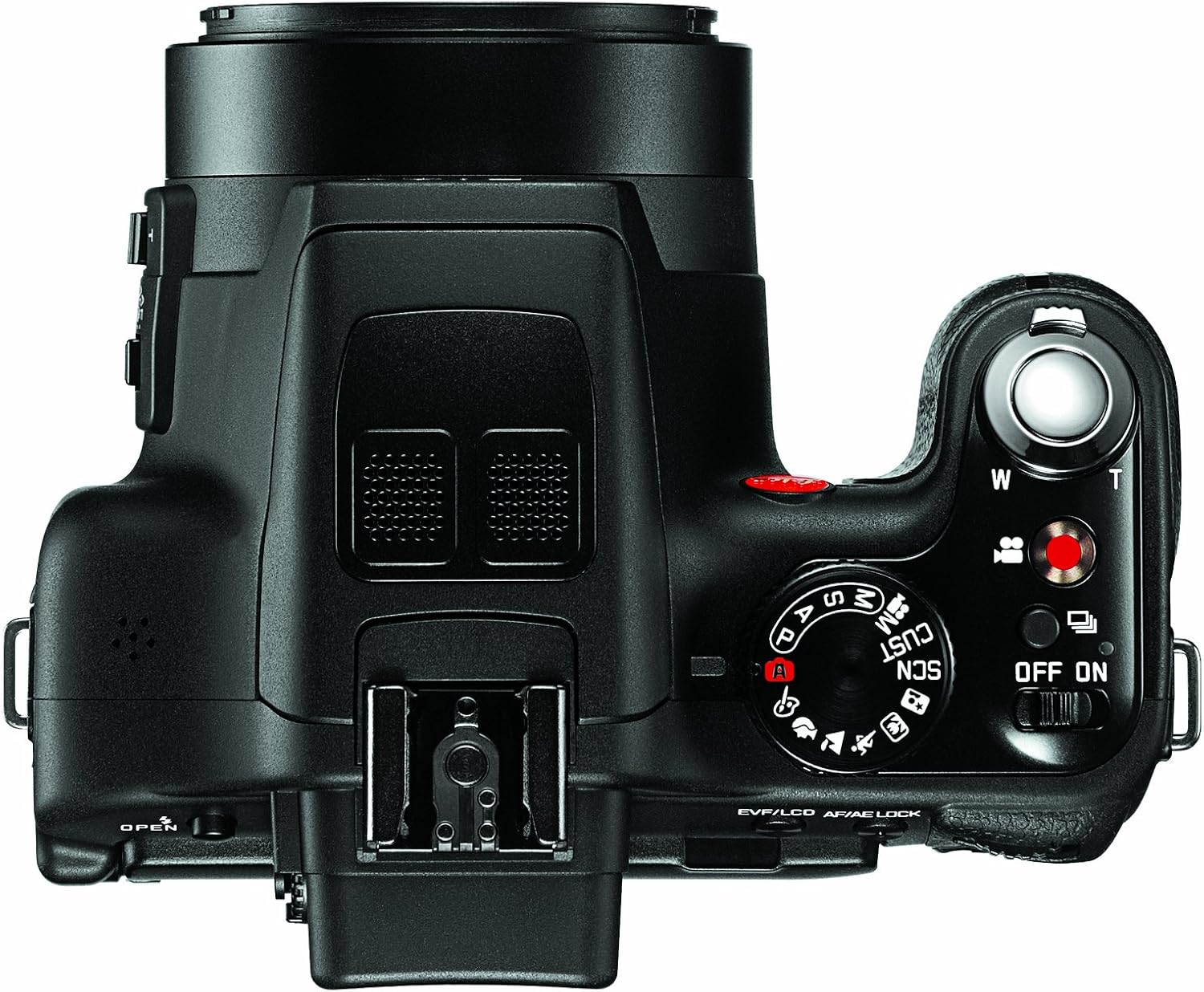
Figure 2: Top view of the Leica V-LUX 3 camera. This image highlights the mode dial, shutter button, and zoom lever.
4.2 Zoom Operation
The camera features a 24x optical zoom lens. Use the zoom lever, typically located around the shutter button, to adjust the focal length.
- Push the zoom lever towards 'W' (Wide) to zoom out.
- Push the zoom lever towards 'T' (Telephoto) to zoom in.

Figure 3: Side view of the Leica V-LUX 3 camera. This image shows the side controls, including the zoom rocker and focus mode switch.
4.3 Video Recording
To record video:
- Press the dedicated video recording button (often marked with a red dot) to start recording.
- Press the button again to stop recording.
- The camera records in AVCHD and MPEG-4 formats, with resolutions up to 1920 x 1080 at 60 frames per second.
4.4 Flash Usage
The Leica V-LUX 3 has a built-in flash. To use the flash:
- Locate the flash pop-up button or lever, typically near the flash unit.
- Press the button to raise the flash.
- In certain shooting modes (e.g., Auto), the flash may pop up automatically in low-light conditions.
- Access flash modes (Auto, Red-eye Reduction, Forced Flash, Slow Sync, Flash Off) through the camera's menu system.

Figure 4: Front view of the Leica V-LUX 3 camera with the built-in flash in the deployed (popped-up) position.
4.5 Focusing
The camera offers both autofocus and manual focus options.
- Autofocus (AF): The default setting. Press the shutter button halfway to allow the camera to automatically focus on your subject. The V-LUX 3 uses contrast detection AF with 23 autofocus points.
- Manual Focus (MF): Switch to MF mode using the dedicated switch on the lens barrel or through the menu. Rotate the focus ring on the lens to adjust focus manually.
5. Maintenance
5.1 Cleaning the Camera
- Lens: Use a soft, lint-free cloth or a lens brush to gently remove dust. For smudges, use a specialized lens cleaning solution applied to a cloth, not directly to the lens.
- Camera Body: Wipe with a soft, dry cloth. For stubborn dirt, slightly dampen the cloth with water. Avoid using strong cleaning agents.
- LCD Screen: Use a soft, dry cloth. Avoid pressing too hard.
5.2 Battery Care
- Store batteries in a cool, dry place when not in use.
- Avoid fully discharging the battery frequently.
- Do not expose batteries to extreme temperatures.
5.3 Storage
When storing the camera for extended periods, remove the battery and memory card. Store the camera in a dry, dust-free environment, preferably in a camera bag or case to protect it from impacts and moisture.
6. Troubleshooting
| Problem | Possible Cause / Solution |
|---|---|
| Camera does not power on. |
|
| Images are blurry. |
|
| Flash does not fire. |
|
| Memory card error. |
|
7. Specifications
| Feature | Detail |
|---|---|
| Model Name | VLUX 3 |
| Photo Sensor Resolution | 12.1 MP |
| Photo Sensor Technology | CMOS |
| Optical Zoom | 24x |
| Lens Type | Telephoto, Zoom (25-600mm equivalent) |
| Maximum Aperture | F2.8 |
| Image Stabilization | Optical |
| Video Resolution | 1920 x 1080 (60, 30 fps), 1280 x 720 (60, 30 fps), 640 x 480 (30 fps) |
| Supported File Format | AVCHD, MPEG-4, Motion JPEG (Video); JPEG (Still) |
| Screen Size | 3 Inches |
| Display Type | Articulating LCD |
| Viewfinder | Electronic |
| Flash Memory Type | SD/SDHC/SDXC |
| Connectivity Technology | HDMI, USB |
| Battery Type | Lithium-Ion BP-DC 9 rechargeable battery |
| Item Weight | 1.19 Pounds |
| Color | Black |
8. Warranty and Support Information
8.1 Warranty
This product is covered by a 90-day parts and labor warranty from the date of purchase. This warranty covers manufacturing defects and malfunctions under normal use. It does not cover damage caused by misuse, accidents, unauthorized repairs, or normal wear and tear.
Please retain your proof of purchase for warranty claims.
8.2 Customer Support
For technical assistance, troubleshooting beyond this manual, or warranty service, please contact Leica customer support. Refer to the official Leica website or your purchase documentation for current contact information.


