
Epson V11H398020
Epson PowerLite Home Cinema 5010 3D Home Theater Projector User Manual
Model: V11H398020
Introduction
The Epson PowerLite Home Cinema 5010 is a high-performance 3D home theater projector designed to deliver an immersive cinematic experience. Featuring Bright 3D Drive technology and full HD 1080p resolution, it offers exceptional brightness and contrast for both 2D and 3D content. This manual provides essential information for setting up, operating, maintaining, and troubleshooting your projector.

Figure 1: Front view of the Epson PowerLite Home Cinema 5010 Projector.
Box Contents
Upon unboxing your Epson PowerLite Home Cinema 5010, please verify that all the following items are included:
- PowerLite Home Cinema 5010 projector unit
- Power cord
- Two HDMI cable clamps
- Remote control with AA batteries
- CD ROM (containing documentation or software)
Setup
1. Placement and Connection
The projector supports front, rear, and ceiling mount projection methods. Choose a stable surface or a secure ceiling mount location. Ensure adequate ventilation around the projector.

Figure 2: Rear panel with input terminals.
Connect your video sources (e.g., Blu-ray player, gaming console, PC) to the appropriate input terminals on the rear of the projector. Available inputs include:
- HDMI 1
- HDMI 2
- RCA (composite)
- 3 RCA (component)
- PC (VGA)
- RS-232C (for control)
- Trigger out
- External 3D IR
After connecting all cables, plug the power cord into the projector and then into a power outlet.
2. Initial Power On and Image Adjustment
Press the power button on the projector or remote control to turn on the unit. The lamp will warm up, and an image should appear on your screen or wall.
Adjust the image using the following controls:
- Focus Ring: Rotate the lens ring to sharpen the image.
- Zoom Lever: Adjust the image size to fit your screen.
- Lens Shift: Use the lens shift controls to move the image vertically or horizontally without tilting the projector, maintaining optimal image geometry.
- Keystone Correction: If the image appears trapezoidal, use the keystone correction feature in the projector's menu to square the image.
Operating the Projector
1. Basic Operation
Use the remote control to navigate the projector's on-screen menu. Select input sources, adjust picture settings (brightness, contrast, color, tint, sharpness), and audio settings.
2. 2D and 3D Projection
The PowerLite Home Cinema 5010 supports both 2D and 3D content. For 3D viewing, ensure your source material is 3D compatible and you are using active 3D glasses (sold separately).
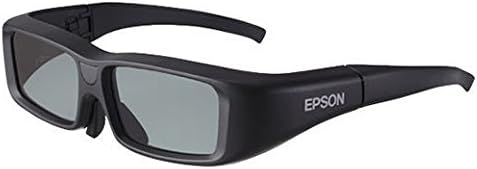
Figure 3: Example of compatible 3D glasses (not included with projector).
The projector also features 2D-to-3D conversion, allowing you to transform standard 2D images into a simulated 3D experience. This feature can be enabled through the projector's menu.
3. Split Screen Feature
The split screen feature allows you to project two images side-by-side from two different sources simultaneously. This function is not available when operating in 3D mode.
Maintenance
1. Lamp Life and Replacement
The E-TORL 230W UHE lamp has an estimated life of up to 5000 hours in ECO mode and 4000 hours in Normal mode. When the lamp reaches the end of its life, a warning message will appear, and the lamp indicator light may illuminate. Refer to the full user manual for detailed lamp replacement instructions.
2. Cleaning
Regular cleaning helps maintain optimal performance. Use a soft, dry cloth to clean the projector's exterior. For the lens, use a lens cleaning cloth and solution specifically designed for optical surfaces. Avoid abrasive cleaners or solvents.
Troubleshooting
This section addresses common issues you might encounter with your projector. For more complex problems, consult the comprehensive user manual or contact Epson support.
1. No Image or Poor Image Quality
- Check Connections: Ensure all video cables (HDMI, component, composite) are securely connected to both the projector and the source device.
- Select Correct Input: Verify that the correct input source is selected on the projector.
- Adjust Focus/Zoom: Use the lens controls to ensure the image is sharp and properly sized.
- Check Lamp: If the lamp indicator is lit or blinking, the lamp may need replacement.
2. "Auto Iris Error" or Projector Shuts Down
Some users have reported an "auto iris error" or unexpected shutdowns. This can sometimes be resolved by updating the projector's firmware. If the issue persists, it may indicate a hardware problem requiring professional service. Contact Epson support for assistance.
3. Blurriness or "Blooming" on Screen Edges (especially when ceiling mounted with vertical lens shift)
A common complaint, particularly when the projector is ceiling mounted and vertical lens shift is heavily utilized, is blurriness or light "blooming" on one side of the image. While some degree of optical aberration can occur with extreme lens shift, significant issues may indicate a unit-specific problem. Try adjusting the lens shift within its optimal range. If the problem is severe and persistent, contact Epson support.
Specifications
| Feature | Description |
|---|---|
| Projection System | Epson 3LCD, 3-chip technology |
| Projection Method | Front/rear/ceiling mount |
| Driving Method | Epson Poly-silicon TFT Active Matrix, 0.74 wide panel with MLA |
| Display Performance | 1920 x 1080 native (1080p); HD, 2D, 3D, 2D to 3D conversion |
| Pixel Number | 2M dots (1920 x 1080) x 3 |
| Light Output (Color & White) | 2400 lumens |
| Aspect Ratio | Native 16:9 |
| Lamp Type | E-TORL 230W UHE |
| Lamp Life | Up to ECO mode: 5000 hours / Normal mode: 4000 hours |
| Projected Distance Size | 30 - 300 inches |
| Contrast Ratio | Up to 200,000:1 |
| Color Reproduction | Full-color (1.7 billion colors, 10 bit) |
| Lens | 18.2 - 29.2 mm focal length (f 2.0 - 3.17) |
| Terminal Inputs | RCA (composite), 3 RCA (component), HDMI (x2), PC (VGA), RS-232C, External 3D IR, Trigger out |
| Item Weight | 18 pounds |
| Product Dimensions | 15.59 x 17.6 x 5.59 inches |
| Model Number | V11H398020 |
Warranty and Support
The Epson PowerLite Home Cinema 5010 projector comes with a two-year limited warranty. This warranty typically covers defects in materials and workmanship under normal use. For specific terms and conditions, please refer to the warranty documentation included with your product or visit the official Epson support website.
Epson offers outstanding support, including a two-business-day replacement service with free shipping for eligible warranty claims. For technical assistance, troubleshooting, or to initiate a warranty claim, please contact Epson customer support.
You can find contact information and additional resources on the Epson Store on Amazon or the official Epson website.
Related documentsV11H398020


Ask a question about this manual
Ask about setup, troubleshooting, compatibility, parts, safety, or missing instructions. Manuals+ will review the question and use this page’s manual context to help answer it.