
Introduction
This manual provides instructions for the Pentair IntelliTouch i5-3 Personality Circuit Board, model 520265. It covers essential information regarding installation, operation, maintenance, and troubleshooting to ensure proper functionality and longevity of the product within your IntelliTouch system.
Safety Information
WARNING: Always disconnect all power to the IntelliTouch system at the main breaker before performing any installation, maintenance, or service. Failure to do so can result in serious injury or death from electrical shock.
- Installation and service should only be performed by qualified personnel.
- Refer to the main IntelliTouch system manual for complete safety guidelines and warnings.
- Ensure all electrical connections comply with local codes and regulations.
- Keep the control panel enclosure dry and free from debris.
Product Overview
The Pentair IntelliTouch i5-3 Personality Circuit Board (PCB), model 520265, is a genuine replacement component designed specifically for the Pentair IntelliTouch i5-3 System. This circuit board is crucial for the proper functioning and control of your IntelliTouch automation system, enabling communication and control of various pool and spa equipment.
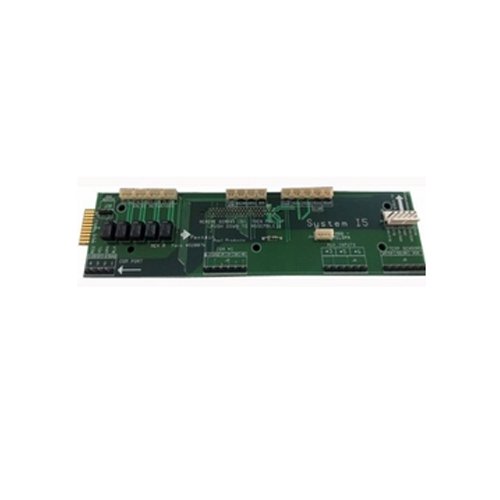
Image showing the Pentair IntelliTouch i5-3 Personality Circuit Board, model 520265. The board features various electronic components, connectors, and a green PCB.
Setup and Installation
Installation of the Pentair IntelliTouch i5-3 Personality Circuit Board should be performed by a qualified service technician. Incorrect installation can damage the system or cause electrical hazards. Always refer to the main IntelliTouch system manual for detailed wiring diagrams and specific instructions.
- Power Disconnection: Ensure all power to the IntelliTouch system is completely disconnected at the main breaker before proceeding. Verify with a voltage tester.
- Access Control Panel: Open the IntelliTouch control panel enclosure to access the existing circuit board.
- Remove Old Board: Carefully disconnect all wiring harnesses and mounting screws from the old circuit board. It is highly recommended to take photos of the existing wiring configuration for reference before removal.
- Install New Board: Position the new Pentair 520265 circuit board in the enclosure. Secure it with the mounting screws. Reconnect all wiring harnesses to their correct ports, matching the configuration noted in the previous step. Ensure all connections are firm and secure.
- Close Panel and Restore Power: Close and secure the control panel enclosure. Restore power to the IntelliTouch system at the main breaker.
- System Configuration: After installation, the system may require configuration or calibration according to the main IntelliTouch system manual to recognize the new board and ensure proper operation.
Operating Instructions
The Pentair IntelliTouch i5-3 Personality Circuit Board functions as an integral component of the IntelliTouch i5-3 System. Its operation is managed through the main IntelliTouch control panel and associated interfaces. This circuit board itself does not have direct user-operable controls.
For detailed operating instructions of the overall IntelliTouch system, including programming schedules, controlling equipment, and adjusting settings, please refer to your complete Pentair IntelliTouch System User's Manual.
Maintenance
The Pentair IntelliTouch i5-3 Personality Circuit Board generally requires minimal maintenance. Adhering to the following guidelines will help ensure its longevity and reliable performance:
- Keep Clean and Dry: Ensure the IntelliTouch control panel enclosure remains clean and dry. Dust and moisture can negatively impact electronic components.
- Inspect Periodically: During routine system checks, visually inspect the circuit board for any signs of corrosion, loose connections, or physical damage.
- Enclosure Integrity: Ensure the control panel enclosure is properly sealed to prevent moisture, insects, and other contaminants from entering.
- Avoid Harsh Chemicals: Do not use harsh cleaning agents or solvents near the circuit board.
Troubleshooting
If the IntelliTouch system experiences issues after the circuit board replacement, consider the following troubleshooting steps:
- No Power/System Not Responding:
- Verify all power connections are secure and the main breaker is on.
- Check for proper seating of all wiring harnesses on the circuit board.
- Ensure the new board is correctly installed according to the installation steps.
- System Errors/Malfunctions:
- Consult the main IntelliTouch System User's Manual for specific error codes and troubleshooting steps related to the overall system.
- Incorrect wiring or a faulty component elsewhere in the system could be the cause.
- Professional Assistance: If issues persist after performing basic checks, contact a qualified Pentair service technician for diagnosis and repair. Do not attempt repairs beyond your technical capability.
Specifications
| Brand | Pentair |
| Model Name | Intellitouch i5-3 System |
| Manufacturer Part Number | 520265 |
| ASIN | B006H3XD30 |
Warranty and Support
Specific warranty details for the Pentair IntelliTouch i5-3 Personality Circuit Board, model 520265, are not included in this manual. Please refer to the original product packaging, your purchase documentation, or the official Pentair website for comprehensive warranty information.
For technical support, service, or to locate a certified Pentair dealer, please contact Pentair customer service directly through their official channels.


