
Introduction
Thank you for choosing the Tele System TS6512HD Digital Terrestrial Receiver. This device allows you to receive digital terrestrial television broadcasts and offers additional features such as multimedia playback via USB and recording capabilities. This manual provides essential information for the safe and efficient use of your receiver, including setup, operation, maintenance, and troubleshooting.
Important Safety Information
- Power Supply: Use only the specified power adapter. Ensure the voltage matches your local power supply.
- Ventilation: Do not block ventilation openings. Place the receiver on a stable, flat surface with adequate space around it for proper airflow.
- Water and Moisture: Do not expose the receiver to rain, moisture, or liquids. Do not place objects filled with liquids, such as vases, on the receiver.
- Heat Sources: Keep the receiver away from heat sources such as radiators, heat registers, stoves, or other heat-producing appliances.
- Cleaning: Unplug the receiver from the power outlet before cleaning. Use a soft, dry cloth. Do not use liquid or aerosol cleaners.
- Servicing: Do not attempt to service this product yourself. Refer all servicing to qualified service personnel.
- Lightning: Unplug the receiver during lightning storms or when unused for long periods.
Package Contents
Please check the box for the following items:
- Tele System TS6512HD Digital Terrestrial Receiver
- Remote Control
- Power Adapter
- User Manual (this document)
Setup Guide
1. Connecting the Receiver
- Connect to TV:
- For optimal picture quality, connect an HDMI cable (not included) from the receiver's HDMI OUT port to an available HDMI IN port on your television.
- Alternatively, if your TV does not have an HDMI port, connect a SCART cable (not included) from the receiver's SCART port to the SCART IN port on your television.
- Connect Antenna: Connect your terrestrial antenna cable to the ANT IN port on the back of the receiver.
- Connect Power: Plug the power adapter into the DC IN port on the receiver, then plug the adapter into a wall outlet.
- Insert Batteries: Open the battery compartment on the remote control and insert two AAA batteries (not included), observing the correct polarity.
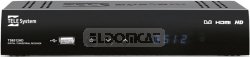
Figure 1: Front view of the Tele System TS6512HD receiver, showing its compact design and essential indicators.
2. First-Time Installation
- Turn on your TV and select the correct input source (HDMI or SCART) corresponding to where you connected the receiver.
- Power on the Tele System TS6512HD receiver.
- The first-time installation wizard should appear on your TV screen. Follow the on-screen prompts to select your language, country, and initiate an automatic channel scan.
- Once the scan is complete, the receiver will save the found channels, and you can begin watching TV.
Operating Instructions
Basic Remote Control Functions
- POWER: Turns the receiver on or off (standby mode).
- CH +/-: Changes channels up or down.
- VOL +/-: Adjusts the volume level.
- MUTE: Mutes or unmutes the audio.
- MENU: Accesses the main menu for settings and features.
- EXIT: Exits the current menu or on-screen display.
- OK: Confirms selections in menus.
- Arrow Keys (Up/Down/Left/Right): Navigates through menus and options.
- INFO: Displays current channel information.
- EPG: Accesses the Electronic Program Guide.
Channel Navigation
Use the CH +/- buttons to browse channels sequentially. To directly enter a channel number, use the numeric keypad on the remote control.
Using the Main Menu
Press the MENU button to access the receiver's main menu. Here you can configure various settings, including:
- Channel Search: Rescan for channels or perform a manual search.
- System Settings: Adjust language, time, parental control, and other system preferences.
- Picture Settings: Configure aspect ratio, resolution, and other display options.
- Audio Settings: Adjust audio output preferences.
- USB: Access multimedia files from a connected USB device or manage recordings.
Recording TV Programs (PVR Function)
The TS6512HD receiver supports recording of TV programs to an external USB storage device (e.g., USB flash drive or external hard drive, not included). Ensure your USB device is formatted correctly (FAT32 or NTFS) and has sufficient free space.
- Connect a compatible USB storage device to the USB port on the receiver.
- To record instantly, press the REC button on the remote control while watching a program. Press STOP to end the recording.
- To schedule a recording, use the EPG (Electronic Program Guide) to select a program and follow the on-screen prompts to set a timer recording. Alternatively, access the Timer settings via the main menu.
- Recorded programs can be accessed and played back through the "USB" section in the main menu.
Multimedia Playback via USB
The receiver can play various multimedia files (video, audio, photos) from a connected USB storage device.
- Connect a USB storage device containing your multimedia files to the USB port.
- Press the MENU button, navigate to the "USB" section, and select "Multimedia" or "Player".
- Browse your files and press OK to play.
- Note: The receiver supports specific file formats (e.g., H.264, MPEG2, MPEG4 for video; AAC+, LC-AAC for audio). Compatibility with all file types is not guaranteed.
Maintenance
Cleaning
To clean the receiver, first unplug it from the power outlet. Use a soft, dry, lint-free cloth to wipe the exterior surfaces. Do not use liquid cleaners, abrasive pads, or chemical solvents, as these can damage the finish or internal components.
Software Updates
Periodically, Tele System may release software updates to improve performance or add new features. Check the manufacturer's website for available updates and instructions on how to install them via USB.
Troubleshooting
| Problem | Possible Cause | Solution |
|---|---|---|
| No power / Receiver does not turn on. | Power cable not connected properly; Power outlet not working; Faulty power adapter. | Check power cable connection. Try a different power outlet. Ensure the power adapter is working. |
| No picture or sound. | Incorrect TV input selected; HDMI/SCART cable loose or faulty; Antenna not connected or signal too weak. | Select the correct TV input source. Check HDMI/SCART cable connections. Ensure antenna is connected and try rescanning channels. |
| Remote control not working. | Batteries are dead or inserted incorrectly; Obstruction between remote and receiver; Remote sensor blocked. | Replace batteries, ensuring correct polarity. Remove any obstructions. Ensure the remote sensor on the receiver is clear. |
| Poor picture quality / Pixelation. | Weak antenna signal; Antenna alignment issue; Interference. | Check antenna connection and alignment. Consider using a signal amplifier if signal is consistently weak. |
| Cannot record to USB device. | USB device not connected; USB device not formatted correctly; Insufficient storage space; USB device incompatible. | Ensure USB device is connected. Format the USB device to FAT32 or NTFS. Check available space. Try a different USB device. |
Technical Specifications
| Model Name | TS6512HD |
| Model Number | 21005197 |
| Brand | Tele System |
| Tuner Type | Terrestrial, DVB |
| Video Resolution | 1920 x 810 Pixels |
| Video Codecs | H.264, MPEG2, MPEG4 |
| Audio Codecs | AAC+, LC-AAC |
| Total USB Ports | 1 |
| Total HDMI Ports | 1 |
| Compatible Devices | Television |
| Color | Black |
| Dimensions (Package) | 24 x 23.4 x 5.2 cm |
| Weight (Package) | 421.84 g |
| GTIN (EAN/UPC) | 08024427014350 |
Warranty and Support
The Tele System TS6512HD receiver comes with a standard manufacturer's warranty. For specific warranty terms and conditions, please refer to the warranty card included with your product or visit the official Tele System website. For technical support, troubleshooting assistance beyond this manual, or service inquiries, please contact Tele System customer support through their official channels.


