
Introduction
This manual provides detailed instructions for the proper setup, operation, and maintenance of your Vivitar 120 LED Light Panel (Model VIV-VL-900). Please read this manual thoroughly before using the product to ensure optimal performance and longevity.
Package Contents
Verify that all items listed below are included in your package:
- Vivitar 120 LED Light Panel
- Lithium-Ion Rechargeable Battery
- Battery Charger
- Hot Shoe Mount Adapter
- Orange Diffuser
- White Diffuser
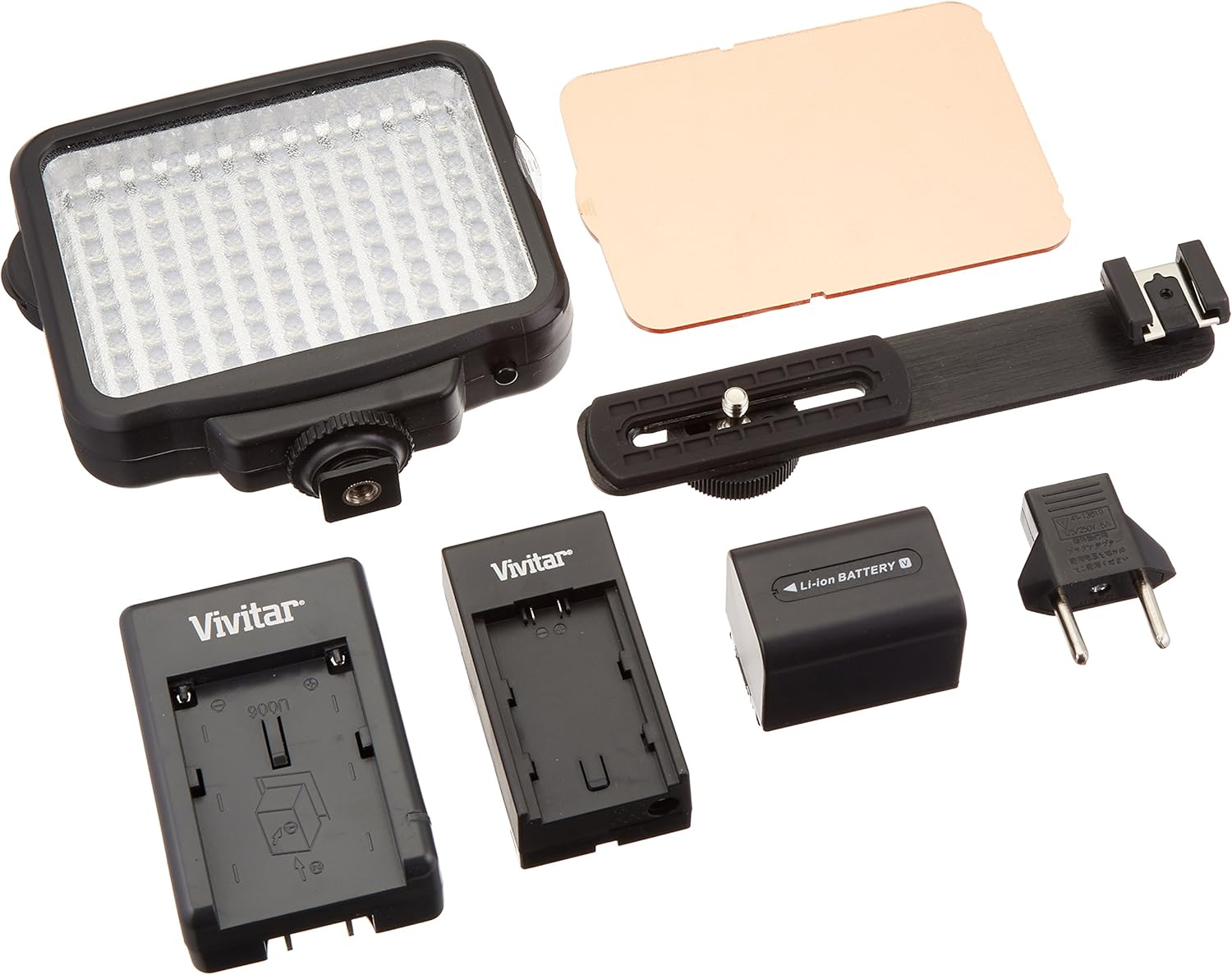
Figure 1: Vivitar 120 LED Light Panel and Included Accessories. This image displays the main light panel, a lithium-ion battery, a battery charger, a hot shoe mount adapter, and both orange and white diffusers.
Setup
- Charge the Battery: Insert the provided Lithium-Ion battery into the battery charger. Connect the charger to a power outlet. The indicator light on the charger will show the charging status. Ensure the battery is fully charged before first use.
- Install the Battery: Locate the battery compartment on the back of the Vivitar 120 LED Light Panel. Insert the charged battery, ensuring proper orientation, until it clicks into place.
- Attach the Hot Shoe Mount: Screw the hot shoe mount adapter into the threaded receiver at the bottom of the light panel. Securely tighten the adapter.
- Mount to Camera/Camcorder: Slide the hot shoe mount adapter into the hot shoe of your camera or camcorder. Tighten the locking wheel on the adapter to secure the light panel.
- Attach Diffusers (Optional): Slide either the orange or white diffuser into the slots on the front of the LED panel. The white diffuser provides softer, more natural light, while the orange diffuser adjusts the color temperature for warmer tones.
Operating Instructions
- Power On/Off: Locate the power switch on the side or back of the light panel. Flip the switch to the "ON" position to turn on the LED light. Flip it to "OFF" to power down.
- Adjust Brightness: Use the built-in adjustable dimmer dial to control the intensity of the light output. Rotate the dial clockwise to increase brightness and counter-clockwise to decrease it.
- Battery Life: A fully charged Lithium-Ion battery provides approximately 8 hours of continuous illumination. Actual battery life may vary based on brightness settings and environmental conditions.
Maintenance
- Cleaning: Use a soft, dry cloth to clean the exterior of the light panel. Do not use liquid cleaners or solvents, as they may damage the device.
- Battery Care: Store the battery in a cool, dry place when not in use. Avoid fully discharging the battery frequently to prolong its lifespan. If storing for extended periods, charge the battery to approximately 50% capacity.
- Storage: When not in use, store the light panel and its accessories in a protective case to prevent dust accumulation and physical damage.
Troubleshooting
- Light does not turn on:
- Ensure the battery is properly installed and fully charged.
- Verify the power switch is in the "ON" position.
- If using an external power source (not included), ensure it is correctly connected and functional.
- Light output is dim:
- Check the dimmer dial and rotate it clockwise to increase brightness.
- Ensure the battery is sufficiently charged. Low battery levels can reduce light output.
- Battery not charging:
- Ensure the charger is properly connected to a working power outlet.
- Verify the battery is correctly inserted into the charger.
- If the issue persists, the battery or charger may need replacement.
Specifications
| Model Number | VIV-VL-900 |
| LED Count | 120 |
| Power Source | Lithium Ion Battery (included) |
| Battery Life | Approximately 8 hours (continuous) |
| Dimensions | 6.25 x 3.75 x 5 inches |
| Item Weight | 1.2 pounds |
| Country of Origin | China |
Warranty and Support
For warranty information and customer support, please refer to the documentation provided with your purchase or contact Vivitar customer service directly. Warranty terms and conditions may vary by region and retailer.
For further assistance, visit the official Vivitar website or contact your point of purchase.