
Introduction
The Tecsun PL-505 is a compact and versatile digital portable radio designed for enthusiasts and casual listeners alike. Featuring Digital Signal Processing (DSP) technology, it offers enhanced reception and audio clarity across AM, FM, and Shortwave bands. Its Easy Tuning Method (ETM) simplifies station discovery, making it an ideal companion for travel or home use.
Key Features
- AM/FM Shortwave receiver with DSP (Digital Signal Processing) & ETM (Easy Tuning Method).
- 30" telescopic antenna extender greatly enhances FM & Shortwave reception.
- Tecsun's patented ETM tuning offers easy & comprehensive access to all local stations.
- Alarm clock + sleep timer + 550 memories.
- Compact size with outstanding sound quality.
Package Contents
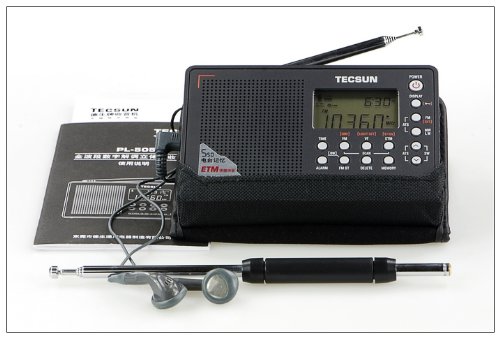
Image: The Tecsun PL-505 radio displayed with its standard accessories, including an external telescopic antenna, a pair of earphones, and the printed user manual. This image illustrates the complete package contents.
Please verify that all items are present in the package:
- Tecsun PL-505 Radio Unit
- External Telescopic Antenna
- Stereo Earphones
- USB Charging Cable (if applicable)
- User Manual
- Carrying Pouch (if included)
Setup
Powering the Radio
The Tecsun PL-505 can be powered via its USB interface. Connect the provided USB cable to the radio's USB port and to a compatible USB power adapter (not always included) or a computer's USB port. Ensure the power source provides stable voltage.
Antenna Connection
For optimal FM and Shortwave reception, extend the built-in telescopic antenna fully. For enhanced reception, especially on Shortwave bands, connect the external 30" telescopic antenna extender to the radio's antenna jack. Position the antenna away from metallic objects for best performance.

Image: A clear front view of the Tecsun PL-505 radio, showcasing its digital display and control buttons. The telescopic antenna is extended, indicating readiness for reception.
Operating Instructions
Power On/Off
Press the POWER button located on the top right of the radio to turn the unit on or off.
Band Selection
Press the FM/AM/SW button repeatedly to cycle through the available frequency bands: FM, AM (Medium Wave), and Shortwave (SW).
Tuning Methods
- Manual Tuning: Use the TUNING knob on the right side of the radio to manually adjust the frequency.
- Auto Scan Tuning: Press the SCAN button to automatically scan for and stop at strong signals.
- Easy Tuning Method (ETM): Press the ETM button. The radio will scan and store all receivable stations into a temporary ETM memory bank. You can then browse these stations using the tuning knob or memory buttons. This method is ideal for travel, as it quickly finds local stations without overwriting your main memories.
Memory Management
The PL-505 supports up to 550 memories for storing your favorite stations.
- Saving a Station: Tune to the desired station. Press and hold the MEMORY button until the memory location flashes. Use the tuning knob to select a memory slot, then press MEMORY again to confirm.
- Recalling a Station: Press the MEMORY button briefly. Use the tuning knob to scroll through stored stations, then press MEMORY or wait a few seconds for the radio to tune to the selected station.
- Deleting a Station: Recall the station you wish to delete. Press and hold the DELETE button until the station is removed from memory.
Alarm Clock and Sleep Timer
- Setting Alarm: Press the ALARM button. Use the tuning knob to set the alarm time. Press ALARM again to confirm. The radio will turn on at the set time to the last tuned station or a preset alarm tone.
- Setting Sleep Timer: Press the SLEEP button repeatedly to cycle through available sleep timer durations (e.g., 120, 90, 60, 30, 15, 5 minutes, OFF). The radio will automatically turn off after the selected duration.
Volume Control
Adjust the volume using the VOLUME knob located on the right side of the radio.
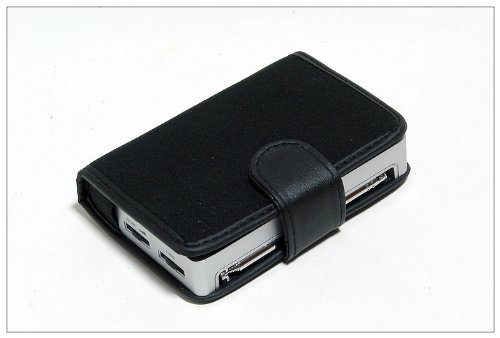
Image: A side profile of the Tecsun PL-505 radio, clearly showing the physical tuning and volume control knobs on its right side, essential for operation.
Maintenance
- Cleaning: Use a soft, dry cloth to clean the radio's exterior. Do not use abrasive cleaners, solvents, or strong chemicals, as they may damage the finish.
- Storage: When not in use for extended periods, store the radio in a cool, dry place, away from direct sunlight and extreme temperatures.
- Antenna Care: Handle the telescopic antenna gently to prevent bending or breakage. Retract it when not in use or when transporting the radio.
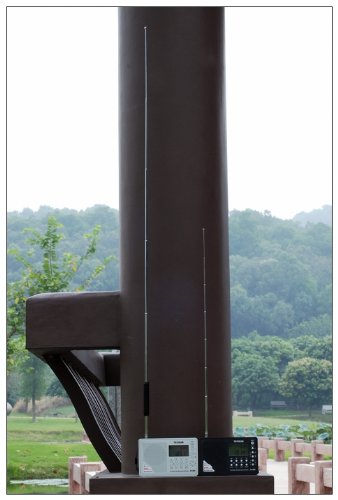
Image: The Tecsun PL-505 radio snugly fitted inside a black protective carrying case, highlighting its portability and the option for safe storage.
Troubleshooting
| Problem | Possible Cause | Solution |
|---|---|---|
| No power | Power cable not connected properly or power source issue. | Ensure USB cable is securely connected. Verify power adapter is working. |
| Poor reception / Static | Antenna not extended, weak signal, or interference. | Fully extend the telescopic antenna. Connect the external antenna. Move radio away from electronic devices or large metal objects. Try tuning to a different frequency. |
| Display not working | Low power or internal fault. | Ensure adequate power supply. If problem persists, contact support. |
| Buttons unresponsive | Temporary software glitch. | Try turning the radio off and on again. If possible, disconnect and reconnect power. |
Specifications
| Feature | Detail |
|---|---|
| Brand | Tecsun |
| Model | PL-505 |
| Product Dimensions | 12.19 x 2.03 x 7.87 cm |
| Item Weight | 176.9 g |
| Hardware Interface | USB |
| Tuner Technology | AM, FM |
| Display Type | Digital |
| Power Source | Corded Electric |
| GSM Frequencies | 108 MHz (Likely refers to maximum FM frequency) |
| Radio Bands Supported | AM, FM, Shortwave |
| Color | Black |
Warranty and Support
For warranty information and technical support, please refer to the documentation included with your purchase or contact Tecsun customer service directly. Details are typically available on the manufacturer's official website or through your retailer.
Keep your purchase receipt as proof of purchase for any warranty claims.


