Introduction
This manual provides essential information for the safe and efficient operation of your Panasonic NE-1054F Light Duty Commercial Microwave Oven. Please read it thoroughly before using the appliance and retain it for future reference.
The Panasonic NE-1054F is a robust 1000-watt commercial microwave oven designed for light-duty applications. It features a durable stainless steel exterior and interior, a single shelf, and a user-friendly Braille touch-control keypad. Key functionalities include 10 programmable memory pads, a double quantity pad, and 6 distinct power levels, all managed via a clear digital display. Its compact cavity measures 13 inches W x 13 inches D x 8-1/16 inches H, making it suitable for various countertop installations.
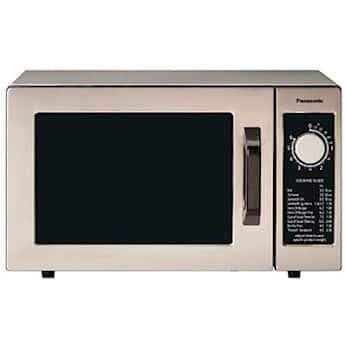
Front view of the Panasonic NE-1054F Light Duty Commercial Microwave Oven, showcasing its stainless steel exterior and control panel.
Important Safety Instructions
When using electrical appliances, basic safety precautions should be followed, including the following:
- Read all instructions before using the appliance.
- Do not operate the oven if the door or door seals are damaged.
- Do not heat liquids or other foods in sealed containers as they are liable to explode.
- Only allow children to use the oven without supervision when adequate instructions have been given so that the child is able to use the oven in a safe way and understands the hazards of improper use.
- Do not use corrosive chemicals or vapors in this appliance.
- Do not use metal utensils or foil in the microwave oven.
- Ensure proper ventilation around the appliance.
- Always supervise food being heated to prevent overheating or fire.
Setup and Installation
Unpacking
Carefully remove the microwave oven from its packaging. Inspect the oven for any damage. If the oven is damaged, do not operate it and contact your dealer immediately.
Placement
Place the microwave oven on a flat, stable, heat-resistant surface. Ensure there is adequate space for ventilation around the unit. Maintain at least 4 inches (10 cm) of clearance on the top, rear, and sides for proper airflow. Do not block any ventilation openings.
The product dimensions are approximately 13 inches D x 13 inches W x 8.13 inches H.
Power Connection
Connect the microwave oven to a dedicated 120V, 60Hz, single-phase grounded electrical outlet. The appliance requires 13.4 amps. Do not use extension cords or adapters.
Operation
Control Panel Overview
The control panel features a digital display, a Braille touch-control keypad, and dedicated buttons for power levels, programming, double quantity, start, and stop/reset functions.
Setting Power Levels
The oven offers 6 power levels to suit various cooking needs:
- HI: High power for fast cooking.
- M.HI: Medium-High power.
- MED: Medium power for general cooking.
- LOW: Low power for delicate items.
- DEF: Defrost setting.
- HOLD: Keep warm function.
Press the POWER button repeatedly to cycle through the available power levels until the desired level is displayed.
Using Preset Menu Pads
The microwave oven includes 10 programmable memory pads for quick access to frequently used cooking times:
- 10 SEC
- 20 SEC
- 30 SEC
- 45 SEC
- 60 SEC
- 1:30 MIN SEC
- 2:00 MIN
- 2:30 MIN
- 3:00 MIN
- 3:30 MIN
Simply place the food in the oven, close the door, and press the desired preset button. The oven will start automatically.
Programming Custom Settings
To program a custom cooking time and power level:
- Press the PROG button.
- Enter the desired cooking time using the number pads.
- Press the POWER button to select the power level (if different from default).
- Press START to begin cooking.
Double Quantity Function
For heating two portions of the same item, use the DOUBLE QUANTITY (x2) button. After selecting a preset or programming a time, press this button before pressing START. The oven will automatically adjust the cooking time.
Start and Stop/Reset
- Press START to begin any cooking cycle.
- Press STOP/RESET to pause or cancel a cooking cycle. Pressing it twice will clear the current settings.
Maintenance and Cleaning
Exterior Cleaning
Wipe the exterior surfaces, including the stainless steel door, with a soft, damp cloth. For stubborn stains, use a mild, non-abrasive cleaner specifically designed for stainless steel. Avoid harsh chemicals or abrasive pads that could scratch the finish.
Interior Cleaning
Clean the oven cavity regularly. Wipe spills immediately with a damp cloth. For dried-on food, place a bowl of water with a few lemon slices inside and heat for a few minutes on high power. The steam will loosen the food, making it easier to wipe away. Ensure the oven is unplugged before cleaning.
Door and Seal Care
Keep the door seals and adjacent parts clean. Use a soft cloth and mild soap. Never use abrasive cleaners or scouring pads on the door or seals, as this can damage them and affect the oven's performance.
Troubleshooting
If you encounter issues with your microwave oven, refer to the following common solutions:
| Problem | Possible Cause | Solution |
|---|---|---|
| Oven does not start | Door not closed properly; Power cord unplugged; Blown fuse/tripped circuit breaker. | Ensure door is securely closed; Check power cord connection; Check household fuse/circuit breaker. |
| Food not heating | Incorrect power level selected; Cooking time too short. | Adjust power level; Increase cooking time. |
| Display shows error code | Internal malfunction. | Unplug the oven for 30 seconds, then plug it back in. If the error persists, contact customer service. |
| Unusual noise during operation | Loose components; Foreign object inside. | Ensure no foreign objects are inside. If noise persists, discontinue use and contact customer service. |
If the problem persists after attempting these solutions, please contact Panasonic customer support for assistance.
Specifications
| Feature | Detail |
|---|---|
| Brand | Panasonic |
| Model Number | NE-1054F |
| Power Output | 1000 Watts |
| Power Levels | 6 (HI, M.HI, MED, LOW, DEF, HOLD) |
| Capacity | 0.8 Cubic Feet |
| Cavity Dimensions (W x D x H) | 13" x 13" x 8-1/16" |
| Product Dimensions (D x W x H) | 13" x 13" x 8.13" |
| Material | Stainless Steel (Exterior & Interior) |
| Controller Type | Touch (Braille Keypad) |
| Voltage | 120 Volts |
| Frequency | 60 Hz |
| Amperage | 13.4 Amps |
| Special Features | 10 Programmable Memory Pads, Double Quantity Pad, Digital Display |
| Installation Type | Countertop |
| Included Components | Turntable |
Warranty and Support
For warranty information or technical support, please refer to the warranty card included with your product or visit the official Panasonic website. You may also contact Panasonic customer service directly for assistance with any product-related inquiries or service needs.


