
1. Introduction and Overview
The Plantronics CS540 is a lightweight DECT wireless headset system designed for hands-free communication in office environments. It offers flexible wearing styles and advanced audio features to enhance productivity and call clarity.
Key Features:
- Lightweight DECT wireless headset for extended comfort.
- Multiple wearing styles: over-the-ear and over-the-head.
- Magnetic headset docking for secure storage and charging.
- Up to 7 hours of talk time on a single charge.
- Wireless mobility up to 350 feet from the base.
- DECT technology for clear audio, minimizing Wi-Fi interference.
- Noise-canceling microphone to reduce background noise.
- Enhanced Digital Signal Processing (DSP) for natural voice sound.
- One-touch controls for call answer/end, volume up/down, and mute.
2. What's in the Box
Verify that all components are present in the package:
- CS540 Wireless Headset
- Headset Base Unit
- Over-the-ear earloop kit (various sizes)
- Over-the-head headband
- Power Adapter
- Telephone Interface Cable

Figure 2.1: Plantronics CS540 Wireless Headset System showing the headset, base, and various wearing accessories.
3. Setup Instructions
3.1 Connecting the Base Unit
- Connect Power: Plug the power adapter into the base unit's power port and then into an electrical outlet. The power indicator light on the base will illuminate.
- Connect to Desk Phone:
- Disconnect the handset coil cord from your desk phone's base.
- Connect the telephone interface cable from the base unit to the handset port on your desk phone.
- Connect the desk phone's handset coil cord to the handset port on the base unit.
- Place Headset on Base: Place the CS540 headset onto the charging cradle of the base unit. Ensure it is seated correctly for charging. The charging indicator light on the base will show charging status.
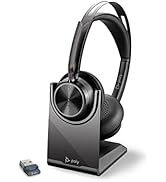
Figure 3.1: Plantronics CS540 Headset securely placed on its charging base.
3.2 Initial Pairing (if necessary)
The headset and base unit are typically pre-paired from the factory. If pairing is lost or you are pairing a new headset, follow these steps:
- Ensure the headset is charged.
- Place the headset into the charging cradle of the base unit.
- Press and hold the pairing button on the base unit until the indicator light flashes.
- The headset and base will automatically pair. The indicator light on the base will turn solid when pairing is successful.
4. Operating Instructions
4.1 Making and Answering Calls
- To Answer a Call: Press the Call Control button on the headset.
- To End a Call: Press the Call Control button on the headset.
- To Make a Call: Lift the handset from your desk phone, dial the number, and then press the Call Control button on the headset. You can then place the handset back on the phone.
4.2 Adjusting Volume
- Headset Listening Volume: Use the Volume Up (+) and Volume Down (-) buttons on the headset.
- Microphone Volume: Adjust the microphone volume dial on the base unit.
4.3 Mute Function
Press the Mute button on the headset to mute or unmute your microphone during a call.
4.4 Wireless Range
The CS540 provides wireless mobility up to 350 feet from the base unit. Range may vary depending on environmental factors and obstacles.
5. Wearing Styles
The CS540 headset offers two primary wearing styles for user comfort and preference:
- Over-the-Ear: Utilizes an earloop to secure the headset behind the ear. Various earloop sizes are included for a customized fit.
- Over-the-Head: Uses a lightweight headband to position the headset over the head, providing stability.
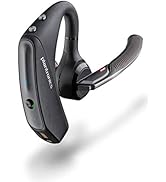
Figure 5.1: Plantronics CS540 Headset configured for over-the-ear wearing, showing the earloop attachment.
6. Charging the Headset
The CS540 headset charges when placed on its base unit. An adaptive power system optimizes for range and talk time, providing up to 7 hours of talk time on a full charge.
- Charging Time: A full charge typically takes approximately 1.5 hours.
- Battery Life: Up to 7 hours of talk time.
- Charging Indicator: Refer to the base unit's indicator lights for charging status.
7. Maintenance
To ensure optimal performance and longevity of your Plantronics CS540 headset system, follow these maintenance guidelines:
- Cleaning: Use a soft, dry cloth to clean the headset and base unit. Avoid using liquid cleaners or aerosols.
- Storage: When not in use, always place the headset on its charging base. Store the system in a cool, dry place away from direct sunlight and extreme temperatures.
- Battery Care: For best battery life, avoid fully discharging the headset battery regularly. Charge it frequently.
8. Troubleshooting
If you encounter issues with your CS540 headset system, try the following troubleshooting steps:
- No Dial Tone/Poor Audio:
- Ensure all cables are securely connected between the base, phone, and power outlet.
- Check the compatibility switch on the base unit; try different settings.
- Adjust the listening and speaking volumes on both the headset and the base.
- Ensure the headset is fully charged.
- Headset Not Pairing:
- Follow the initial pairing steps in Section 3.2.
- Ensure the headset is placed correctly on the charging base during pairing.
- Limited Range:
- Ensure the base unit is not obstructed by large metal objects or other electronic devices that may cause interference.
- Move closer to the base unit.
- Headset Not Holding Charge:
- Ensure the headset is properly seated in the charging cradle.
- The battery may be nearing the end of its lifespan and might require replacement.
9. Specifications
| Feature | Specification |
|---|---|
| Model Name | CS540 (84693-01) |
| Connectivity Technology | Wireless (DECT) |
| Wireless Range | Up to 350 feet |
| Talk Time | Up to 7 hours |
| Charging Time | Approximately 1.5 hours |
| Noise Control | Noise reduction (microphone) |
| Wearing Styles | Over-the-ear, Over-the-head |
| Control Type | Touch (Call answer/end, Volume, Mute) |
| Compatible Devices | Desk Phones, Office Communication Devices |
| Item Weight | 1.1 pounds (system) |
| Product Dimensions | 7.5 x 6.5 x 6.5 inches (packaging) |
10. Warranty and Support
For detailed warranty information, please refer to the warranty card included with your product or visit the official Plantronics (Poly) website. For technical support, product registration, or additional resources, please visit the manufacturer's support portal.
Manufacturer: Plantronics Inc.
Website: www.poly.com


