
1. Introduction
The HT Instruments COMBI419 is an innovative multifunction installation tester designed to perform comprehensive safety tests on electrical installations. It complies with recent standards such as VDE0100 and BS7671, and is capable of measuring leakage currents. This instrument is user-friendly, featuring a multi-language menu and a wide array of internal functions.
The COMBI419 allows for principal measurements to be initiated using an optional remote probe (PR400 accessory), which is particularly useful for quick tests. It also includes an internal AUTO function for sequential measurements of Global Earth Resistance, RCD tests, and Insulation directly on civil installation sockets. A contextual help menu is available for each measurement function, providing valuable information regarding meter connection to the installation. Its robust electronic function selector ensures durability for field use. The device includes a large internal memory for saving measurements, which can be transferred to a PC via a serial port using dedicated software. Each saved measurement includes all sub-results and test parameters, with up to two user-selectable ID locators for precise identification of the test location.
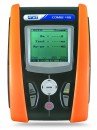
Figure 1: Front view of the HT Instruments COMBI419 Multifunction Safety Tester, showing its orange and black casing, display screen, and control buttons.
2. Setup
Before operating the COMBI419, ensure it is properly set up for your testing environment.
2.1 Power Supply
The COMBI419 is Battery Powered. Ensure fresh batteries are installed according to the battery compartment markings. Refer to the battery compartment cover for correct polarity and battery type.
2.2 Initial Connections
Connect the necessary test leads and probes to the instrument's input terminals. For specific tests, refer to the contextual help menu on the device's display for detailed connection diagrams.
2.3 Optional Accessories
For enhanced functionality and ease of use, consider utilizing the optional PR400 remote probe. Connect the PR400 to the designated port on the COMBI419 as per the accessory's instructions.
3. Operating Instructions
The COMBI419 offers a range of testing capabilities. Navigate through the multi-language menu using the instrument's controls to select the desired test function.
3.1 Test Functions
- Continuity Test: Performs continuity testing with a 200mA current. Select this function to verify the integrity of electrical circuits.
- Insulation Test: Conducts insulation resistance measurements with selectable voltages of 50V, 100V, 250V, 500V, and 1000V DC. Choose the appropriate voltage based on the installation's requirements.
- RCD Trip Time Test: Measures the trip-out time for RCDs (Residual Current Devices) of type AC and A, including Standard and Selective types.
- RCD Trip Current Test: Determines the trip-out current for RCDs of type AC and A, Standard and Selective, up to 1A.
- AUTO Function: This integrated function performs a sequential series of tests including Global Earth Resistance (Ra), RCD test, and Insulation test directly on civil installation sockets. This streamlines the testing process for common scenarios.
3.2 Data Storage and Transfer
The COMBI419 features a wide internal memory to save all measurement results. To transfer data to a PC, connect the instrument via its serial port and use the dedicated software provided by HT Instruments. Each saved measurement includes all sub-results and test parameters, along with up to two user-defined ID locators for easy identification of the test point.
4. Maintenance
Proper maintenance ensures the longevity and accuracy of your COMBI419 tester.
4.1 Cleaning
Keep the instrument clean by wiping it with a soft, dry cloth. Do not use abrasive cleaners or solvents. Ensure no moisture enters the device.
4.2 Battery Replacement
When the low battery indicator appears, replace all batteries with new ones of the specified type. Always dispose of old batteries responsibly according to local regulations.
4.3 Storage
Store the COMBI419 in a cool, dry place, away from direct sunlight and extreme temperatures, when not in use for extended periods.
5. Troubleshooting
If you encounter issues with your COMBI419, try the following basic troubleshooting steps:
- Instrument Not Powering On: Check the batteries. Ensure they are correctly inserted and have sufficient charge. Replace if necessary.
- Inaccurate Readings: Verify that all test leads and probes are securely connected to both the instrument and the circuit under test. Ensure the correct test function is selected for the measurement being performed.
- Display Issues: If the display is dim or flickering, it may indicate low battery power.
- Data Transfer Problems: Ensure the serial cable is properly connected to both the COMBI419 and the PC. Verify that the dedicated software is correctly installed and configured.
If problems persist after attempting these steps, contact HT Instruments customer support for further assistance.
6. Specifications
| Specification | Detail |
|---|---|
| Brand | HTI |
| Manufacturer | HT Instruments |
| Model Number (Manufacturer Reference) | 90318080 |
| ASIN | B005YZAY4S |
| Power Source | Battery Powered |
| Maximum Operating Voltage | 1000 Volts |
| Date First Available | Aug. 31 2017 |
7. Warranty and Support
For information regarding product warranty, service, or technical support, please contact HT Instruments directly. Refer to the official HT Instruments website or product packaging for the most current contact details and warranty terms.