
Introduction
Thank you for choosing the Cherub WST-900 Clip Evo Tuner. This compact and versatile tuner is designed for accurate tuning of various instruments, including guitar and bass, as well as chromatic tuning. Its wide, dual-color LCD display and sensitive sensors ensure precise and easy tuning.
Key features include:
- Wide, dual-color LCD display for clear visibility.
- Support for Chromatic, Guitar, and Bass tuning modes.
- Built-in microphone and piezo vibration sensor for versatile input.
Product Overview
The Cherub WST-900 Clip Evo Tuner features a rotatable display head and a sturdy clip for attachment to your instrument's headstock or other suitable surfaces. The display provides clear feedback on pitch and tuning accuracy.
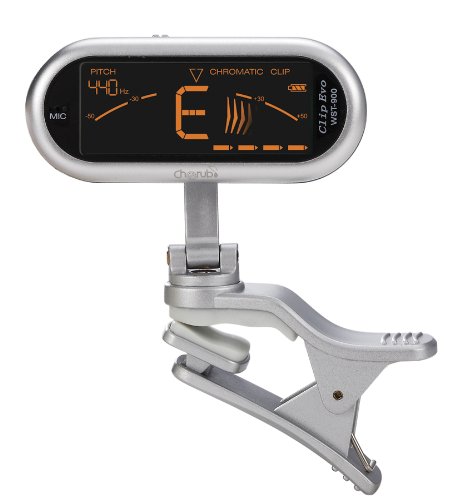
Image: The Cherub WST-900 Clip Evo Tuner. It is a silver-colored device with a large black LCD screen displaying tuning information. It features a flexible arm connecting the display unit to a spring-loaded clip, designed for attaching to musical instruments. The screen shows "PITCH 440Hz" and "CHROMATIC CLIP" with a large "E" note indicator.
Setup
Battery Installation
The Cherub WST-900 requires one CR2 battery (included). To install or replace the battery:
- Locate the battery compartment on the back of the tuner's display unit.
- Open the battery compartment cover.
- Insert the CR2 battery, ensuring the correct polarity (+/-) as indicated inside the compartment.
- Close the battery compartment cover securely.
Attaching the Tuner
The clip design allows for easy attachment to various instruments:
- Gently press the two ends of the clip to open its jaws.
- Attach the clip firmly to a suitable vibration-transmitting part of your instrument, such as the headstock of a guitar or bass. Ensure the clip is secure but does not damage the instrument's finish.
- Adjust the display angle for optimal viewing by rotating the flexible arm.
Operating Instructions
Power On/Off
Press and hold the power button (usually located on the side or back of the display unit) to turn the tuner on or off. The display will illuminate when powered on.
Selecting Tuning Mode
The WST-900 supports Chromatic, Guitar, and Bass tuning modes. Press the mode button (if available, otherwise it may auto-detect or cycle through modes with the power button) to switch between these modes. The selected mode will be indicated on the display.
- Chromatic Mode: Tunes to any note (A, A#, B, C, C#, D, D#, E, F, F#, G, G#).
- Guitar Mode: Optimized for standard guitar tuning.
- Bass Mode: Optimized for standard bass guitar tuning.
Tuning Your Instrument
Once the tuner is attached and powered on, play a single note on your instrument. The tuner will detect the pitch and display the note name and an indicator of whether the note is flat, sharp, or in tune.
- The large central letter indicates the detected note.
- The meter or bars on the display will show if the note is flat (left of center), sharp (right of center), or in tune (center).
- The display color may change (e.g., red for out of tune, green for in tune) to provide visual feedback.
- Adjust your instrument's string until the note is centered and the display indicates it is in tune.
A4 Calibration (Pitch)
The default A4 calibration is typically 440Hz. If you need to adjust this reference pitch, refer to the tuner's specific button for A4 calibration (often labeled "A4" or "Pitch"). Press this button to cycle through available A4 frequencies.
Maintenance
- Keep the tuner clean by wiping it with a soft, dry cloth. Avoid using abrasive cleaners or solvents.
- Store the tuner in a dry place, away from extreme temperatures and direct sunlight.
- Remove the battery if the tuner will not be used for an extended period to prevent battery leakage.
- Handle the clip and display arm gently to avoid damage.
Troubleshooting
Tuner does not power on:
- Check if the battery is inserted correctly with the correct polarity.
- Replace the battery with a new CR2 battery.
Tuner is not detecting notes accurately:
- Ensure the tuner is securely clipped to the instrument, preferably on the headstock, to maximize vibration detection.
- Check for excessive background noise if using the microphone sensor.
- Ensure you are playing a single, clear note.
- Verify that the correct tuning mode (Chromatic, Guitar, or Bass) is selected.
Display is dim or flickering:
- The battery may be low. Replace the CR2 battery.
Specifications
| Feature | Detail |
|---|---|
| Model Number | WST-900 |
| Tuning Modes | Chromatic, Guitar, Bass |
| Detection Method | Vibration (Clip) / Microphone |
| Display | Wide, Dual-Color LCD |
| Power Supply | 1 x CR2 Battery (included) |
| Item Weight | 0.64 ounces |
| Product Dimensions | 2.76 x 2.09 x 1.26 inches |
| First Available Date | October 5, 2011 |
Warranty and Support
For warranty information and technical support, please refer to the documentation provided with your purchase or contact Cherub customer service directly. Details can often be found on the official Cherub website or through your product retailer.
For further assistance, please visit the official Cherub website or contact your local distributor.