1. Introduction
The Onkyo SBX-300 iOnly BASS Dock Music System is designed to provide high-quality audio playback for your iPod, iPhone, or iPad devices. This system features digital amplifier circuitry, full-range bass-reflex speakers, and advanced bass control functions to enhance your listening experience. This manual provides essential information for the proper setup, operation, and maintenance of your SBX-300 unit.
Video 1: Onkyo Brand Overview. This video provides a general overview of the Onkyo brand's commitment to sound quality for home and life. While not specific to the SBX-300, it illustrates the brand's focus on audio excellence.
2. Important Safety Information
- Read all instructions carefully before operating the unit.
- Keep this manual for future reference.
- Do not expose the unit to rain or moisture to prevent fire or electric shock.
- Ensure proper ventilation. Do not block ventilation openings.
- Use only attachments/accessories specified by the manufacturer.
- Unplug the unit during lightning storms or when unused for long periods.
- Refer all servicing to qualified service personnel.
3. Setup Guide
3.1 Package Contents
Verify that your package contains the following items:
- Onkyo SBX-300 iOnly BASS Dock Music System
- AC Power Adapter
- Remote Control (RC-832S)
- Instruction Manual (this document)
3.2 Connecting Power
- Connect the AC power adapter cable to the DC IN jack on the rear of the SBX-300 unit.
- Plug the AC power adapter into a standard wall outlet.
- The unit will enter standby mode.
3.3 Placing the Unit
Place the SBX-300 on a stable, flat surface. Ensure there is adequate space around the unit for proper ventilation, especially at the rear where the reflex woofer ducts are located.
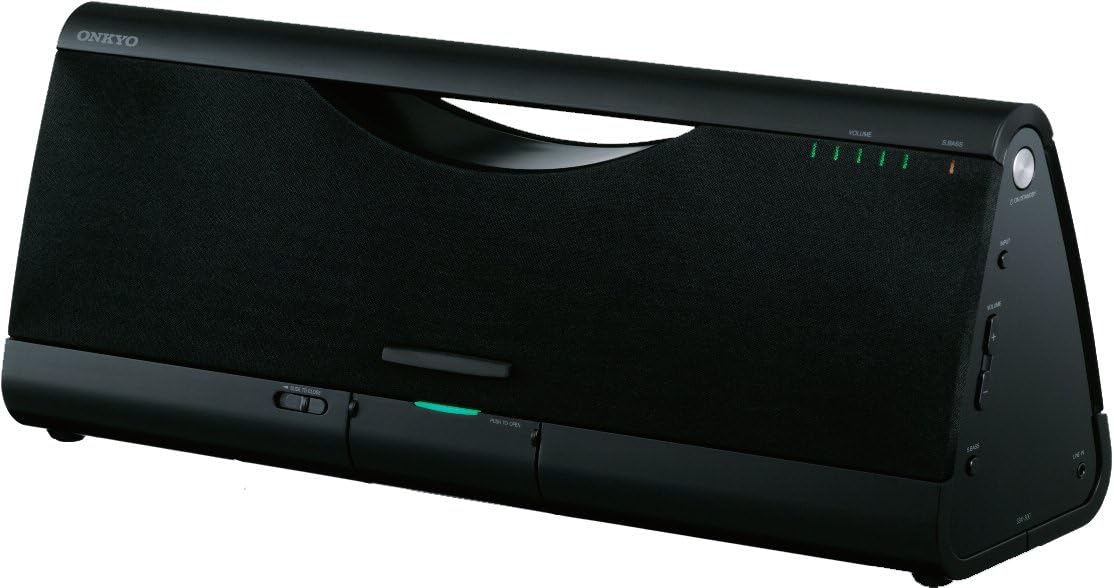
Image 1: Front view of the Onkyo SBX-300. This image displays the front of the SBX-300 unit, showing the speaker grille, volume indicators, and the dock area.
3.4 Docking an iPod/iPhone/iPad
The SBX-300 features a dust-free digital dock for compatible Apple devices. To dock your device:
- Gently press the "PUSH TO OPEN" button located on the front panel to reveal the dock connector.
- Carefully align your iPod, iPhone, or iPad with the 30-pin connector in the dock.
- Gently push your device down onto the connector until it is securely seated.
- The device will begin charging and can be used for audio playback.
Compatible Models: iPod touch (1st, 2nd, 3rd, and 4th Generation), iPod classic, iPod nano (2nd, 3rd, 4th, 5th, and 6th Generation), iPhone 4, iPhone 3GS, iPhone 3G, iPhone, iPad 2, iPad.
3.5 Connecting External Audio Devices (AUX Input)
To connect other audio devices:
- Locate the AUX IN jack on the rear of the SBX-300 unit.
- Connect an audio cable (not supplied) from your external audio device's headphone output or line output to the AUX IN jack.
- Select the AUX input source on the SBX-300 (refer to Section 4.3).
4. Operating Instructions
4.1 Powering On/Off
- To turn on the unit: Press the POWER button on the unit or the remote control.
- To turn off the unit (standby): Press the POWER button again.
4.2 Volume Control
- On the unit: Rotate the VOLUME knob clockwise to increase volume, counter-clockwise to decrease.
- On the remote control: Press the VOLUME + or VOLUME - buttons.
- To mute: Press the MUTING button on the remote control. Press again to unmute.
4.3 Source Selection
Press the INPUT button on the remote control to cycle through available input sources (Dock, AUX).
4.4 Super Bass Function
The Super Bass function enhances low-frequency sound. Press the S.BASS button on the remote control to activate or deactivate this feature.
4.5 Active Bass Control
Active Bass Control ensures perfectly balanced bass at low volume levels. This feature is automatically managed by the unit to optimize bass response.
4.6 Using the Remote Control
The supplied remote control (RC-832S) allows convenient operation of the SBX-300 from a distance. Ensure the remote control has a working battery and is pointed towards the unit's front panel.

Image 2: Onkyo RC-832S Remote Control. This image shows the layout of the remote control, including buttons for power, input selection, menu navigation, volume, and bass control.
Refer to the button labels on the remote for specific functions such as Play/Pause, Skip Track, Menu, and Enter, which control your docked Apple device.
5. Maintenance
5.1 Cleaning the Unit
- Before cleaning, unplug the power cord from the wall outlet.
- Use a soft, dry cloth to wipe the exterior surfaces of the unit.
- Do not use abrasive cloths, waxes, polishes, or chemical cleaning agents, as these may damage the finish.
5.2 Dust-Free Digital Dock Care
The dock connector is designed to be dust-free when closed. If dust or debris accumulates around the connector when open, use a soft, dry brush or compressed air to gently clean the area. Avoid touching the connector pins directly.
6. Troubleshooting
If you experience issues with your SBX-300, refer to the following common problems and solutions:
| Problem | Possible Cause | Solution |
|---|---|---|
| No power | Power cord not connected; Wall outlet not active | Ensure power cord is securely connected. Test the wall outlet with another device. |
| No sound | Volume too low; Mute activated; Incorrect input source; Device not docked properly | Increase volume. Deactivate mute. Select correct input source (Dock/AUX). Re-dock your Apple device. |
| Distorted sound | Volume too high; Audio source issue; Device not seated correctly | Lower the volume. Check the audio source for distortion. Re-dock your Apple device. |
| iPod/iPhone/iPad not charging or recognized | Device not properly docked; Incompatible device; Dock connector dirty | Ensure device is firmly seated in the dock. Verify device compatibility. Clean the dock connector if necessary. |
| Remote control not working | Battery depleted; Obstruction between remote and unit; Remote not pointed correctly | Replace the remote control battery. Remove any obstructions. Point the remote directly at the unit's front panel. |
7. Specifications
- Model: SBX-300
- Speakers: 4 1/8" (10.5 cm) Full-Range Bass-Reflex Speakers
- Amplifier: Digital Amplifier Circuitry
- Bass Enhancement: Super Bass Function, Active Bass Control
- Input: iPod/iPhone/iPad Digital Audio Connection, AUX IN (3.5mm stereo mini-jack)
- Power Supply: AC 100-240V, 50/60Hz (via AC adapter)
- Dimensions (W x H x D): 17.69 x 5.19 x 6.94 inches (44.9 x 13.2 x 17.6 cm)
- Weight: 7.7 pounds (3.5 kg)
- Compatible Devices: iPod touch (1st, 2nd, 3rd, 4th Gen), iPod classic, iPod nano (2nd, 3rd, 4th, 5th, 6th Gen), iPhone, iPhone 3G, iPhone 3GS, iPhone 4, iPad, iPad 2.
8. Warranty and Support
8.1 Limited Warranty
Onkyo products are manufactured to high quality standards and are backed by a limited warranty. The specific terms and duration of your warranty may vary by region and purchase date. Please retain your proof of purchase for warranty claims. For detailed warranty information, refer to the warranty card included with your product or visit the official Onkyo website.
8.2 Customer Support
For technical assistance, service, or inquiries regarding your Onkyo SBX-300, please contact Onkyo customer support. Contact information can typically be found on the official Onkyo website or in the documentation provided with your product.
Online Support: Visit the official Onkyo website for FAQs, support articles, and contact forms.
Telephone Support: Refer to your regional Onkyo website for local customer service telephone numbers.