
1. Introduction
This instruction manual provides essential information for the proper installation, operation, maintenance, and troubleshooting of the Gerber Plumbing Ceramic Disc Cartridge, Model DA507906N. This cartridge is designed for use in single handle faucets. Please read this manual thoroughly before beginning any installation or maintenance procedures to ensure safe and correct usage.
2. Product Overview
The Gerber Ceramic Disc Cartridge (Model DA507906N) is a replacement component for single handle faucets. It features a durable construction designed for reliable water flow control and temperature mixing. The ceramic disc technology provides a smooth operation and helps prevent leaks, contributing to the longevity of your faucet.
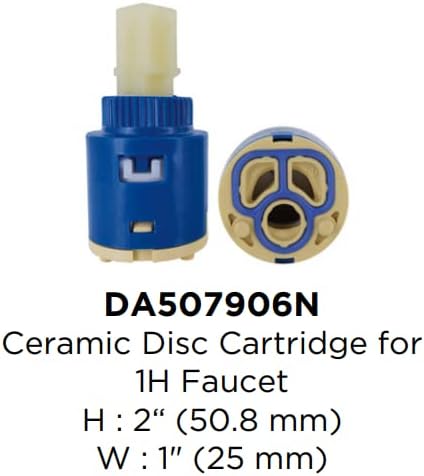
Image 2.1: Gerber Ceramic Disc Cartridge Model DA507906N. This image displays the cartridge itself, showing its design and indicating approximate dimensions: Height 2 inches (50.8 mm), Width 1 inch (25 mm).
Key Features:
- Replacement Component: Specifically designed for single handle faucets.
- Durable Material: Constructed with ceramic discs for long-lasting performance.
- Easy Installation: Engineered for straightforward replacement.
3. Safety Information
Always observe the following safety precautions when working with plumbing fixtures:
- Turn off the main water supply to the faucet before beginning any work.
- Wear appropriate personal protective equipment, such as safety glasses, to prevent injury.
- Ensure the work area is well-lit and clear of obstructions.
- If you are unsure about any step, consult a qualified plumber.
4. Setup and Installation
This section outlines the general steps for replacing a ceramic disc cartridge in a single handle faucet. Specific faucet designs may vary, so refer to your faucet's original manual if available.

Image 4.1: Illustrative view of a single handle faucet. This image shows a typical single handle faucet design, with a transparent view of the internal components, including the cartridge location, for reference during installation.
Tools Required:
- Adjustable wrench or pliers
- Screwdriver (Phillips or flathead, depending on faucet model)
- Hex key (if required for handle removal)
- Rag or towel
- Bucket (to catch residual water)
Installation Steps:
- Turn Off Water Supply: Locate the hot and cold water supply valves under the sink and turn them off completely. Turn on the faucet to drain any remaining water.
- Remove Faucet Handle: Depending on your faucet model, you may need to pry off a decorative cap to expose a screw (often a hex screw or Phillips head). Unscrew it and carefully remove the handle.
- Remove Retaining Nut/Cap: Once the handle is off, you will see a retaining nut or cap that holds the cartridge in place. Use an adjustable wrench or pliers to carefully unscrew and remove it.
- Extract Old Cartridge: Gently pull the old cartridge straight up and out of the faucet body. You may need to twist it slightly to loosen it. Note its orientation for reference.
- Clean Faucet Body: Inspect the faucet body for any debris or mineral deposits. Clean the area thoroughly before inserting the new cartridge.
- Insert New Cartridge: Align the new Gerber DA507906N ceramic disc cartridge with the openings in the faucet body. Ensure it is seated correctly and fully inserted. The orientation should match the old cartridge.
- Secure Cartridge: Reinstall the retaining nut or cap, tightening it securely with your wrench or pliers. Do not overtighten.
- Reattach Handle: Place the faucet handle back onto the cartridge stem and secure it with the screw. Replace any decorative caps.
- Restore Water Supply: Slowly turn on the hot and cold water supply valves. Check for any leaks around the faucet base and connections.
- Test Faucet: Turn on the faucet and check for proper water flow and temperature control.
5. Operating Instructions
After successful installation of the Gerber Ceramic Disc Cartridge, operate your single handle faucet as follows:
- Water Flow: Lift the handle to increase water flow. Lower the handle to decrease or stop water flow.
- Temperature Control: Move the handle left for hot water and right for cold water. Adjust the handle position to achieve the desired water temperature.
6. Maintenance
To ensure optimal performance and longevity of your Gerber Ceramic Disc Cartridge and faucet:
- Regular Cleaning: Clean the exterior of your faucet regularly with a soft cloth and mild soap. Avoid abrasive cleaners or harsh chemicals, as these can damage the finish.
- Check for Leaks: Periodically inspect the faucet for any signs of leaks. Address minor leaks promptly to prevent further damage.
- Water Quality: In areas with hard water, mineral buildup can affect cartridge performance. Consider installing a water softener if mineral deposits are a recurring issue.
7. Troubleshooting
If you encounter issues with your faucet after cartridge replacement, refer to the following common problems and solutions:
| Problem | Possible Cause | Solution |
|---|---|---|
| Faucet leaks from the spout | Cartridge not seated correctly, damaged O-rings, or debris in cartridge. | Turn off water, remove cartridge, inspect for debris or damage, re-seat firmly. Replace O-rings if necessary. |
| Faucet leaks from handle base | Retaining nut loose, or O-rings around cartridge stem are worn. | Tighten retaining nut. If leak persists, replace O-rings. |
| Low water flow | Aerator clogged, or water supply valves not fully open. | Clean or replace faucet aerator. Ensure water supply valves are fully open. |
| Difficulty adjusting temperature | Cartridge installed incorrectly or debris affecting mixing. | Recheck cartridge orientation. Clean cartridge if debris is suspected. |
If these troubleshooting steps do not resolve the issue, it may be necessary to consult a professional plumber or contact Gerber customer support.
8. Specifications
| Feature | Detail |
|---|---|
| Brand | Gerber |
| Model Number | DA507906N |
| Product Type | Ceramic Disc Cartridge |
| Recommended Use | Bathroom Single Handle Faucets |
| Material | Brass (internal components/housing) |
| Number of Handles | 1 (for single handle faucets) |
| Item Weight | Approximately 0.64 ounces (0.04 Pounds) |
| Installation Type | Single Hole (for compatible faucets) |
| Special Feature | Easy to Install |
| UPC | 719934005073 |
9. Warranty Information
For detailed warranty information regarding the Gerber Plumbing Ceramic Disc Cartridge (Model DA507906N), please refer to the official Gerber website or contact Gerber customer service directly. Warranty terms and conditions may vary.
10. Support and Contact Information
If you require further assistance, have questions about installation, or need to report an issue, please contact Gerber customer support:
- Official Website: Visit www.gerberonline.com for product information, FAQs, and support resources.
- Customer Service: Refer to the contact section on the official website for phone numbers or email support.


