
Introduction
Thank you for choosing the SENSE7 Knight Ergonomic Gaming Chair. This manual provides essential information for the assembly, operation, and maintenance of your new chair. Designed for comfort and support during long hours at your desk or intense gaming sessions, the Knight chair combines ergonomic structure with elegant style and advanced features to care for your spine and enhance your experience.

Image: The SENSE7 Knight ergonomic gaming chair, showcasing its sleek design and comfortable appearance.
Safety Warnings
Please read carefully before use:
- Ensure your weight does not exceed the maximum recommended weight limit of 150 kg (330 lbs) to maintain the chair's stability and safety.
- Always use the chair as intended for gaming or office work.
- Follow all maintenance instructions to extend the chair's lifespan and prevent accidents.
- Keep small parts away from children during assembly.
Product Features
The SENSE7 Knight chair is equipped with several features designed for your comfort and ergonomic support:
- FlowTech Swing Rocking Function: Activate with one hand for a relaxing rocking motion.
- Adjustable Lumbar Cushion: Provides maximum back relief, essential for long work or gaming sessions.
- Gas Lift System: Allows for precise height adjustment, crucial for maintaining proper posture and comfort.
- Soft Armrests: Designed to ensure proper hand and arm positioning, reducing the risk of muscle tension and pain.
- Multi-directional Nylon Casters: Equipped with a rubber coating for silent movement and protection against floor marks.
- Wider Seat Cushion: The broader, flat cushion minimizes pressure on the legs for enhanced comfort.

Image: Detail of the chair's wider seat cushion, designed to minimize pressure on the legs.
Setup and Assembly
Your SENSE7 Knight chair requires assembly. Please follow these general steps. For detailed instructions, refer to the included assembly guide.
Included Components:
- Backrest
- Seat
- Butterfly Mechanism
- Gas Lift Lever
- Base (5-star)
- 5 Wheels
- Plastic Cover
- Screw Set
- Armrests
- 1 Cushion (Lumbar)
General Assembly Steps:
- Attach the wheels to the 5-star base.
- Insert the gas lift into the center hole of the base.
- Attach the butterfly mechanism to the underside of the seat using the provided screws.
- Place the seat onto the gas lift.
- Attach the armrests to the seat and backrest.
- Secure the backrest to the seat and armrests.
- Install the lumbar cushion.

Image: Key components for assembly, including the gas lift, stable nylon base, and 60mm PU wheels.
Operating Instructions
Adjust your SENSE7 Knight chair to achieve optimal comfort and ergonomic support.
Height Adjustment:
To adjust the chair's height, locate the gas lift lever (typically on the right side under the seat). Pull the lever up while seated to lower the chair, or pull it up while standing to raise it. Release the lever at your desired height.
Recline/Rocking Function (FlowTech Swing):
The chair features a rocking mechanism. Use the lever on the side (often the same as the height adjustment or a separate one) to enable or disable the rocking function. Adjust the tension knob underneath the seat to control the resistance of the rocking motion.
Lumbar Support Adjustment:
The lumbar cushion can be adjusted to provide targeted support for your lower back. Position it to align with the natural curve of your spine for maximum comfort.
Armrest Positioning:
The soft armrests are designed to support your forearms. Ensure they are positioned to allow your elbows to rest at a comfortable 90-degree angle to your keyboard or desk.

Image: Ergonomic design providing precise support for the neck and lower back, with adjustable lumbar cushion and headrest.

Image: The stable armrest design, ensuring the elbow can be supported in any position without easy movement or damage.
Maintenance
Proper care and maintenance will extend the life and appearance of your SENSE7 Knight chair.
Cleaning Instructions:
- Regularly wipe the synthetic leather surfaces with a soft, damp cloth.
- For tougher stains, use a mild soap solution and wipe clean immediately, then dry thoroughly.
- Avoid using harsh chemicals, abrasive cleaners, or solvents, as these can damage the material.
- Vacuum fabric areas (if applicable) to remove dust and debris.
General Care:
- Periodically check all screws and bolts to ensure they are tight. Retighten if necessary.
- Avoid exposing the chair to direct sunlight for prolonged periods to prevent fading and material degradation.
- Do not stand on the chair or use it as a step stool.

Image: The PU synthetic leather fabric, offering high durability, easy cleaning, scratch resistance, and elasticity.
Troubleshooting
If you encounter any issues with your SENSE7 Knight chair, refer to the following common troubleshooting tips:
- Chair Squeaks: Check all connections and tighten any loose screws. A small amount of silicone lubricant can be applied to moving parts if the squeaking persists.
- Chair Does Not Adjust Height: Ensure the gas lift lever is fully engaged. If the issue persists, the gas lift cylinder may need replacement.
- Chair Feels Unstable: Verify that all wheels are securely attached to the base and that the base is properly connected to the gas lift. Ensure the maximum weight limit is not exceeded.
- Wheels Not Rolling Smoothly: Check for debris (hair, dust) caught in the casters and clean them.
If these steps do not resolve the issue, please contact customer support for further assistance.
Specifications
Detailed specifications for the SENSE7 Knight Ergonomic Gaming Chair:
| Model Name | Knight |
| Item Model Number | 5907783039683 |
| Brand | SENSE7 |
| Color | Black |
| Material | Synthetic Leather, Rubber, Foam |
| Frame Material | Alloy Steel |
| Product Dimensions (L x W x H) | 58 x 68 x 110 cm (22.8 x 26.8 x 43.3 inches) |
| Item Dimensions D x W x H | 60P x 70l x 126H centimeters (23.6D x 27.6W x 49.6H inches) |
| Item Weight | 15 Kilograms (33 lbs) |
| Recommended Maximum Load | 150 Kilograms (330 lbs) |
| Assembly Required | Yes |
| Special Features | Armrest, Swivel Joint, Padded Leather, Ergonomic, Adjustable Height |
| Care Instructions | Clean |
| Recommended Uses | Gaming |
| Number of Cushions Included | 1 (Lumbar) |
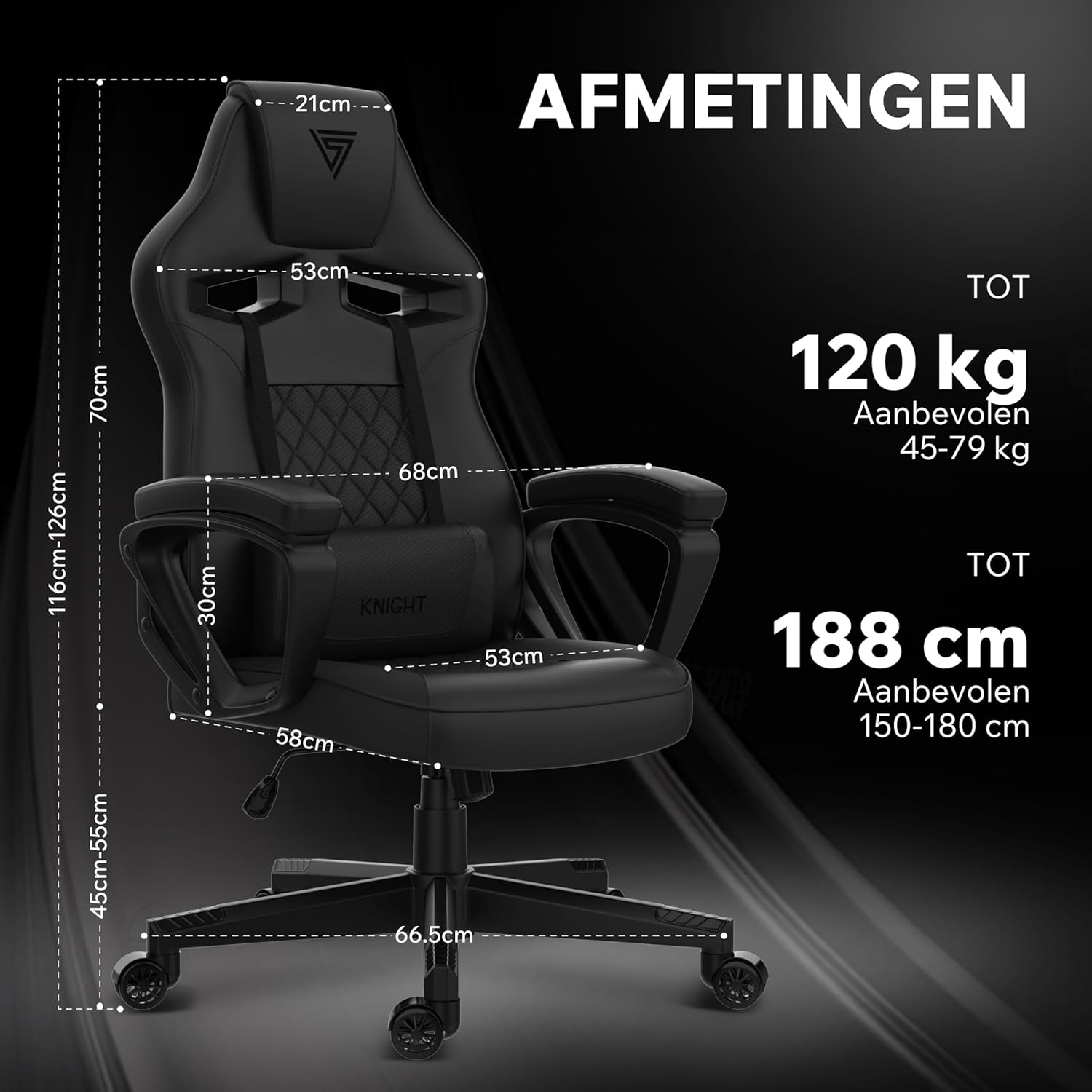
Image: Detailed dimensions of the SENSE7 Knight chair, including height, width, and depth measurements.
Warranty and Support
SENSE7 products are manufactured to high-quality standards. For information regarding warranty coverage, please refer to the warranty card included with your product or visit the official SENSE7 website.
If you require technical assistance, have questions about assembly, or need to report a defect, please contact SENSE7 customer support. Contact details can typically be found on the product packaging or the official brand website.
Please have your model number (5907783039683) and proof of purchase ready when contacting support.


