
Introduction
This manual provides essential information for setting up, operating, maintaining, and troubleshooting your ASUS G53SX-DH71 Full HD 15.6-Inch Gaming Laptop. Please read this manual thoroughly to ensure proper use and to maximize the performance and longevity of your device.
Product Overview
The ASUS G53SX-DH71 is a high-performance gaming laptop designed for immersive gaming experiences. It features an Intel Core i7 processor, NVIDIA GeForce GTX 560M graphics, and a 15.6-inch Full HD display.
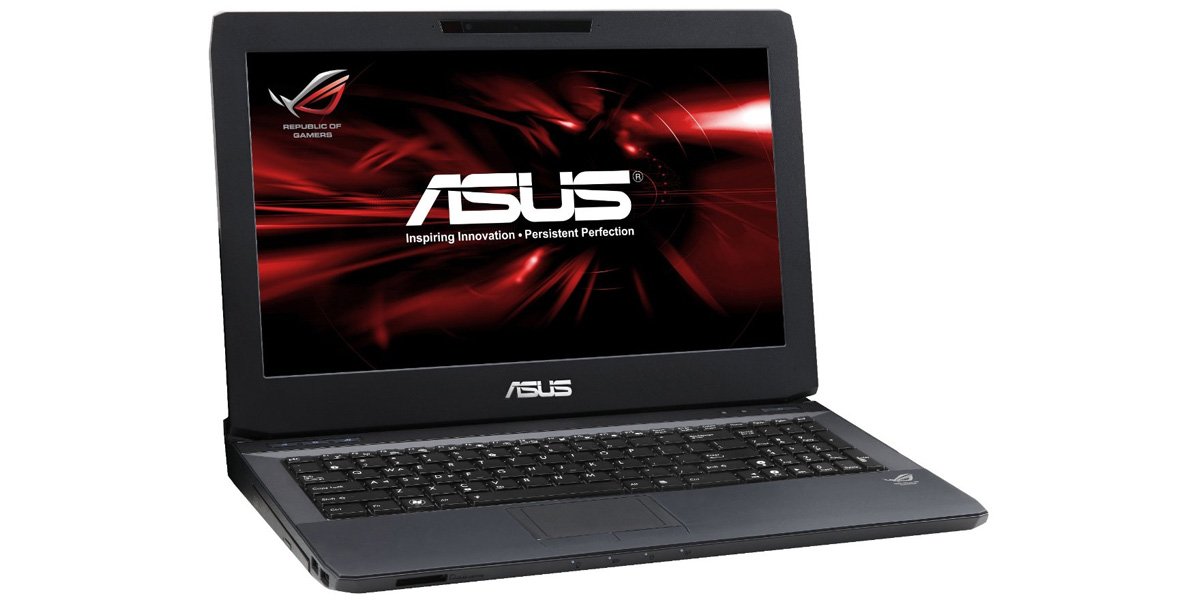
Figure 1: ASUS G53SX-DH71 Gaming Laptop.
Setup Guide
1. Unpacking and Initial Inspection
- Carefully remove the laptop and all accessories from the packaging.
- Verify that all components are present: laptop, power adapter, power cord, and any included documentation.
- Inspect the laptop for any physical damage. If damage is found, contact your retailer immediately.
2. Connecting the Power Adapter
- Connect the power cord to the AC adapter.
- Plug the AC adapter into a grounded electrical outlet.
- Connect the DC output plug of the AC adapter to the power input port on your laptop.
- Allow the battery to charge for at least 3 hours before initial use, even if the battery indicator shows a full charge.
3. First Boot and Operating System Setup
- Open the laptop lid and press the power button.
- Follow the on-screen instructions to complete the Windows 7 Home Premium 64-bit operating system setup. This typically involves selecting language, region, accepting license agreements, and creating a user account.
- Connect to a Wi-Fi network when prompted to ensure the system can download necessary updates.
Operating Your Laptop
Keyboard and Touchpad
The laptop features a full-sized keyboard and a multi-touch touchpad. The keyboard includes a numeric keypad and backlit keys for use in low-light conditions. The touchpad supports gestures for navigation and control.

Figure 2: Keyboard and Touchpad detail.
- Function Keys (Fn): Combine the Fn key with F1-F12 keys for various functions such as adjusting brightness, volume, or disabling the touchpad (Fn+F9).
- Touchpad: Use the touchpad for cursor control. Two physical buttons below the touchpad serve as left and right mouse clicks.
Power Management Modes
Your laptop offers several power modes to optimize performance or battery life. These can typically be accessed via a dedicated button or through the operating system's power options.
- High Performance: Maximizes system speed and responsiveness, ideal for gaming and demanding applications.
- Quiet Office: Reduces fan noise and power consumption for general productivity tasks.
- Entertainment (Theater): Optimizes display and audio settings for media consumption.
- Battery Saver: Extends battery life by reducing performance and background activity.
Audio and Graphics
The ASUS G53SX-DH71 is equipped with advanced audio and NVIDIA GeForce GTX 560M graphics for an immersive experience. Ensure drivers are up-to-date for optimal performance.
Video 1: Republic of Gamers product overview. This video highlights the laptop's gaming capabilities, 3D audio, and powerful graphics processing unit (GPU) with Intel Core i7 processor.
Maintenance and Care
- Cleaning: Use a soft, lint-free cloth to clean the screen and exterior. Avoid harsh chemicals.
- Battery Care: To prolong battery life, avoid fully discharging the battery frequently. Store the laptop in a cool, dry place if not used for extended periods.
- Ventilation: Ensure the laptop's ventilation openings are not blocked to prevent overheating.
Troubleshooting
Common Issues and Solutions
- No Power:
- Ensure the AC adapter is securely connected to both the laptop and a working power outlet.
- Verify the power outlet is functional by plugging in another device.
- Check if the battery is completely drained. Allow it to charge for a while before attempting to power on.
- Screen Display Issues (e.g., white screen, black screen, pixelation):
- Restart the laptop.
- Connect an external monitor to determine if the issue is with the laptop's display or the graphics card.
- Ensure graphics drivers are updated.
- If the issue persists, it may indicate a hardware problem with the display cable or panel. Contact ASUS support for assistance.
- Overheating:
- Ensure ventilation vents are clear of obstructions.
- Use the laptop on a hard, flat surface rather than soft surfaces like beds or couches.
- Consider using a cooling pad.
- Clean dust from the vents using compressed air.
- Slow Performance:
- Check power management settings and ensure the laptop is in "High Performance" mode when needed.
- Close unnecessary background applications.
- Run a virus scan.
- Ensure sufficient free space on the hard drive.
Specifications
| Feature | Specification |
|---|---|
| Brand | ASUS |
| Model Number | G53SX-DH71 |
| Screen Size | 15.6 Inches |
| Screen Resolution | 1920 x 1080 pixels (Full HD) |
| Processor | Intel Core i7-2670QM (2.2 GHz) |
| RAM | 12 GB DIMM (1333 MHz) |
| Hard Drive | 750 GB 7200 RPM Serial ATA |
| Graphics Coprocessor | NVIDIA GeForce GTX 560M 2GB GDDR5 |
| Operating System | Windows 7 Home Premium 64-bit |
| Wireless Type | 802.11bgn |
| USB 2.0 Ports | 3 |
| USB 3.0 Ports | 1 |
| Audio-out Ports | 1 |
| Item Weight | 2.1 pounds |
| Product Dimensions | 11.7 x 15.6 x 0.8 inches |
| Color | Black |
| Batteries | 1 Lithium Ion battery (included) |
Warranty and Support
For warranty information and technical support, please refer to the documentation included with your product or visit the official ASUS support website. Keep your proof of purchase for warranty claims.
- ASUS Support Website: www.asus.com/support/
- Product Registration: Register your product online to receive updates and support.