
1. Introduction
This manual provides comprehensive instructions for the assembly, operation, and maintenance of your AmScope D200 Two-Observing Compound Microscope. This instrument is designed for teaching and training purposes, featuring a unique double binocular head for simultaneous observation by two users.
Key features include:
- Two Binocular Heads for simultaneous observation.
- Fully Coated Optical System ensuring high resolution and sharp images.
- Magnification range: 40X, 100X, 400X, and 1000X.
- 45-degree inclined, 360-degree swiveling compensation-free binocular heads.
- Large Double Layer Mechanical Stage with slide clips for precise sample positioning.

Figure 1.1: AmScope D200 Two-Observing Compound Microscope, showing its dual viewing heads and main body.
2. Safety Information
Please read and understand all safety precautions before operating the microscope. Failure to do so may result in injury or damage to the instrument.
- Electrical Safety: Ensure the microscope is connected to a grounded power outlet with the correct voltage (240 Volts). Do not operate with wet hands. Disconnect power before cleaning or servicing.
- Handling: Always carry the microscope by its arm and base. Avoid sudden impacts or vibrations.
- Optical Components: Do not touch optical surfaces with bare hands. Use lens paper or a soft, lint-free cloth for cleaning.
- Light Source: The halogen light source can become hot during operation. Avoid direct contact with the bulb or lamp housing.
- Chemicals: When working with chemical samples, ensure proper ventilation and use appropriate personal protective equipment. Avoid spilling corrosive liquids on the microscope.
- Children: This microscope is not a toy. Supervise children closely if they are using the instrument.
3. Component Identification
Familiarize yourself with the various parts of your AmScope D200 microscope before assembly and operation.
- Eyepieces (Oculars): The lenses through which you view the specimen. The D200 features two sets of binocular heads.
- Binocular Heads: The upper part of the microscope containing the eyepieces, designed for comfortable viewing.
- Arm: Connects the head to the base and stage, used for carrying the microscope.
- Revolving Nosepiece: Holds the objective lenses and allows for easy switching between magnifications.
- Objective Lenses: Lenses located just above the specimen, providing the primary magnification. The D200 includes 4X, 10X, 40X, and 100X achromatic objectives.
- Stage: The flat platform where the specimen slide is placed. The D200 has a large double-layer mechanical stage.
- Stage Clips: Secure the specimen slide on the stage.
- Mechanical Stage Knobs: Allow precise movement of the specimen slide (X-Y axis).
- Coarse Focus Knob: Large knob for rapid focusing adjustments.
- Fine Focus Knob: Smaller knob for precise focusing adjustments.
- Condenser: Located beneath the stage, it focuses light onto the specimen.
- Iris Diaphragm: Adjustable aperture within the condenser to control the amount of light reaching the specimen.
- Illuminator (Light Source): Built-in halogen lamp providing illumination from below the stage.
- Light Intensity Control: Rheostat knob to adjust the brightness of the illuminator.
- Base: The bottom support of the microscope, housing the illuminator and electronics.
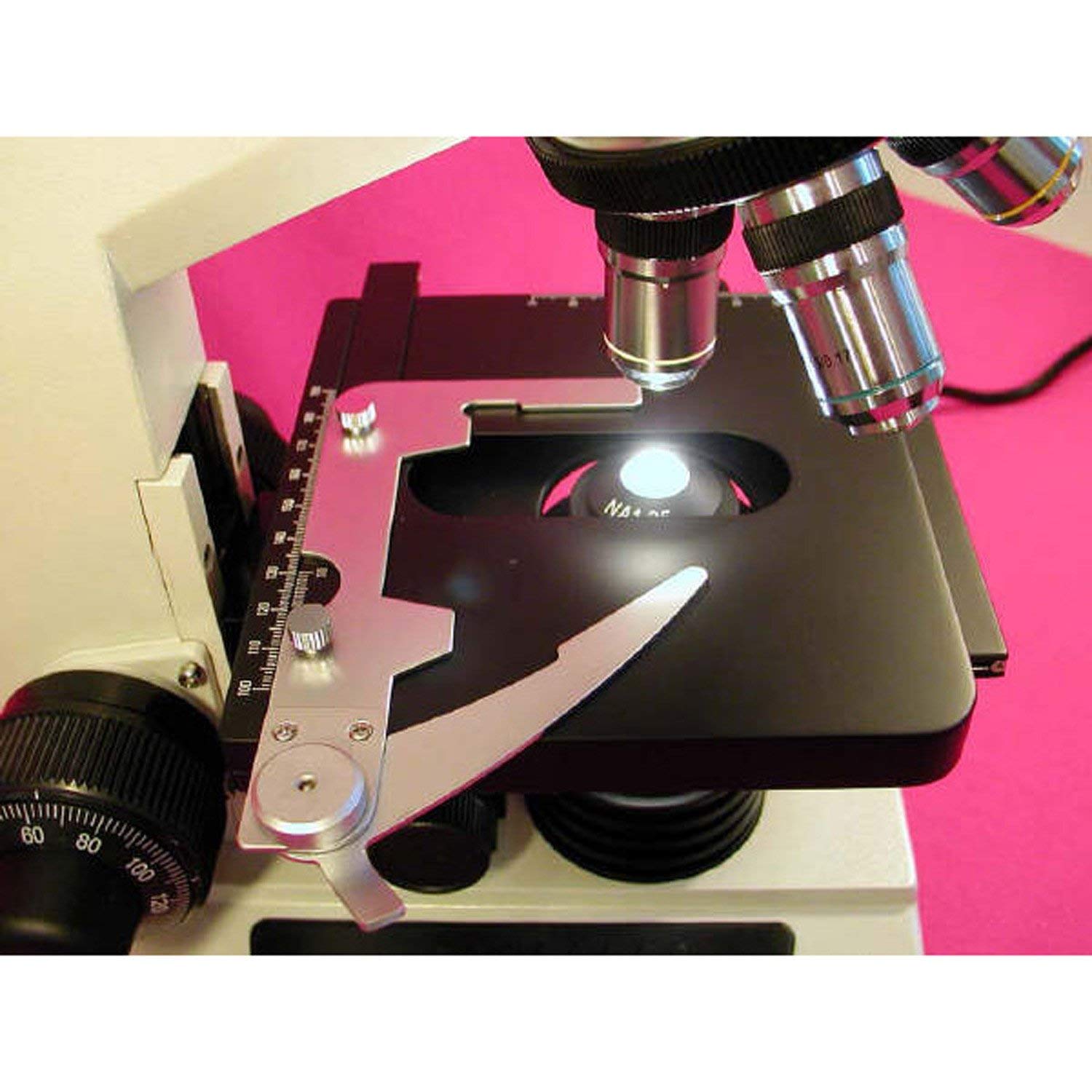
Figure 3.1: Close-up view of the mechanical stage, objective lenses, and illuminator of the AmScope D200 microscope.
4. Setup
Follow these steps to set up your AmScope D200 microscope:
- Unpacking: Carefully remove all components from the packaging. Retain the original packaging for future transport or storage.
- Placement: Place the microscope on a stable, level surface, away from direct sunlight, excessive heat, dust, and vibrations.
- Head Installation: Gently place the binocular heads onto the top of the microscope arm. Secure them by tightening the set screw, if present.
- Eyepiece Installation: Insert the eyepieces into the eyepiece tubes of both binocular heads.
- Power Connection: Connect the power cord to the microscope's power input and then to a grounded 240V AC power outlet.
- Illumination Check: Turn on the power switch and adjust the light intensity control to ensure the illuminator is functioning.
5. Operating Instructions
5.1 Preparing a Specimen
- Place the prepared microscope slide onto the mechanical stage.
- Use the stage clips to gently secure the slide in place.
- Use the mechanical stage knobs to position the specimen directly over the center of the illuminator opening.
5.2 Focusing and Viewing
- Start with Lowest Magnification: Rotate the revolving nosepiece to select the 4X objective lens. Ensure it clicks firmly into place.
- Adjust Illumination: Turn on the illuminator and adjust the light intensity to a comfortable level. Adjust the iris diaphragm for optimal contrast.
- Lower Stage: Using the coarse focus knob, lower the stage as far as it will go.
- Raise Stage and Focus: While looking through the eyepieces, slowly raise the stage using the coarse focus knob until the specimen comes into rough focus.
- Fine Focus: Use the fine focus knob to achieve a sharp, clear image.
- Adjust Interpupillary Distance: Adjust the distance between the two eyepiece tubes to match the distance between your eyes for comfortable binocular viewing.
- Adjust Diopter (if applicable): If one eyepiece has a diopter adjustment ring, adjust it to compensate for differences in vision between your eyes.
- Change Magnification: To increase magnification, rotate the revolving nosepiece to the next higher objective (e.g., 10X, 40X, 100X). The microscope is parfocal, meaning only minor fine focus adjustments should be needed when changing objectives.
- Using 100X Oil Immersion Objective: For the 100X objective, a drop of immersion oil must be placed on the specimen slide directly over the area to be viewed. Lower the objective into the oil until it makes contact. After use, clean the 100X objective and slide thoroughly with lens paper and lens cleaning solution.
6. Maintenance and Care
Proper maintenance ensures the longevity and optimal performance of your microscope.
- Cleaning Optical Components:
- Use a soft brush or air blower to remove loose dust.
- For smudges or fingerprints, use lens paper lightly moistened with lens cleaning solution. Wipe gently in a circular motion from the center outwards.
- Never use abrasive cloths or harsh chemicals.
- Clean the 100X oil immersion objective immediately after use to prevent oil from hardening.
- Cleaning Body: Wipe the exterior surfaces with a soft, damp cloth. Avoid getting moisture into electrical components.
- Storage: When not in use, cover the microscope with a dust cover to protect it from dust and debris. Store in a cool, dry place.
- Lamp Replacement: If the illuminator lamp burns out, disconnect power, allow it to cool, and replace it with a compatible halogen bulb (refer to specifications for bulb type).
7. Troubleshooting
| Problem | Possible Cause | Solution |
|---|---|---|
| No illumination | Power cord disconnected; Power switch off; Bulb burnt out; Light intensity too low. | Check power connection; Turn on power switch; Replace bulb; Increase light intensity. |
| Image is blurry/out of focus | Incorrect focus adjustment; Slide upside down; Objective not clicked into place. | Adjust coarse/fine focus; Flip slide; Rotate nosepiece until objective clicks. |
| Dark field of view | Iris diaphragm closed; Condenser too low; Light intensity too low. | Open iris diaphragm; Raise condenser; Increase light intensity. |
| Dust/spots in view | Dust on eyepiece, objective, or slide. | Clean optical components and slide. Rotate eyepiece to determine if dust is on eyepiece. |
| Cannot see through both eyepieces clearly | Interpupillary distance incorrect; Diopter not adjusted. | Adjust interpupillary distance; Adjust diopter on eyepiece. |
8. Specifications
| Feature | Detail |
|---|---|
| Model Number | D200 |
| Magnification Range | 40X, 100X, 400X, 1000X |
| Objective Lenses | Achromatic (4X, 10X, 40X, 100X Oil) |
| Eyepieces | Widefield (specific magnification not provided, typically 10X) |
| Head Type | Two Binocular Heads, 45-degree inclined, 360-degree swiveling |
| Stage | Large Double Layer Mechanical Stage with Slide Clips |
| Focusing | Coaxial Coarse & Fine Focus |
| Illumination | Halogen, Brightfield, with Light Intensity Control |
| Power Source | Corded Electric |
| Voltage | 240 Volts |
| Item Weight | 30 Pounds (approx. 13.6 kg) |
| Manufacturer | AmScope |
| ASIN | B005OSCR0Y |
| UPC | 013964560619 |
9. Warranty and Support
For specific warranty information regarding your AmScope D200 microscope, please refer to the documentation included with your purchase or contact AmScope customer support directly. Warranty terms and conditions may vary.
For technical support, parts, or service inquiries, please visit the official AmScope website or contact their customer service department. When contacting support, please have your model number (D200) and ASIN (B005OSCR0Y) available.
You can find more information and contact details on the AmScope Store on Amazon.