
Introduction
This manual provides essential information for the proper use, adjustment, and maintenance of your Giro Omen helmet. The Giro Omen helmet is engineered for demanding winter sports, offering advanced features for comfort and protection. Please read this manual thoroughly before using your helmet to ensure optimal performance and safety.
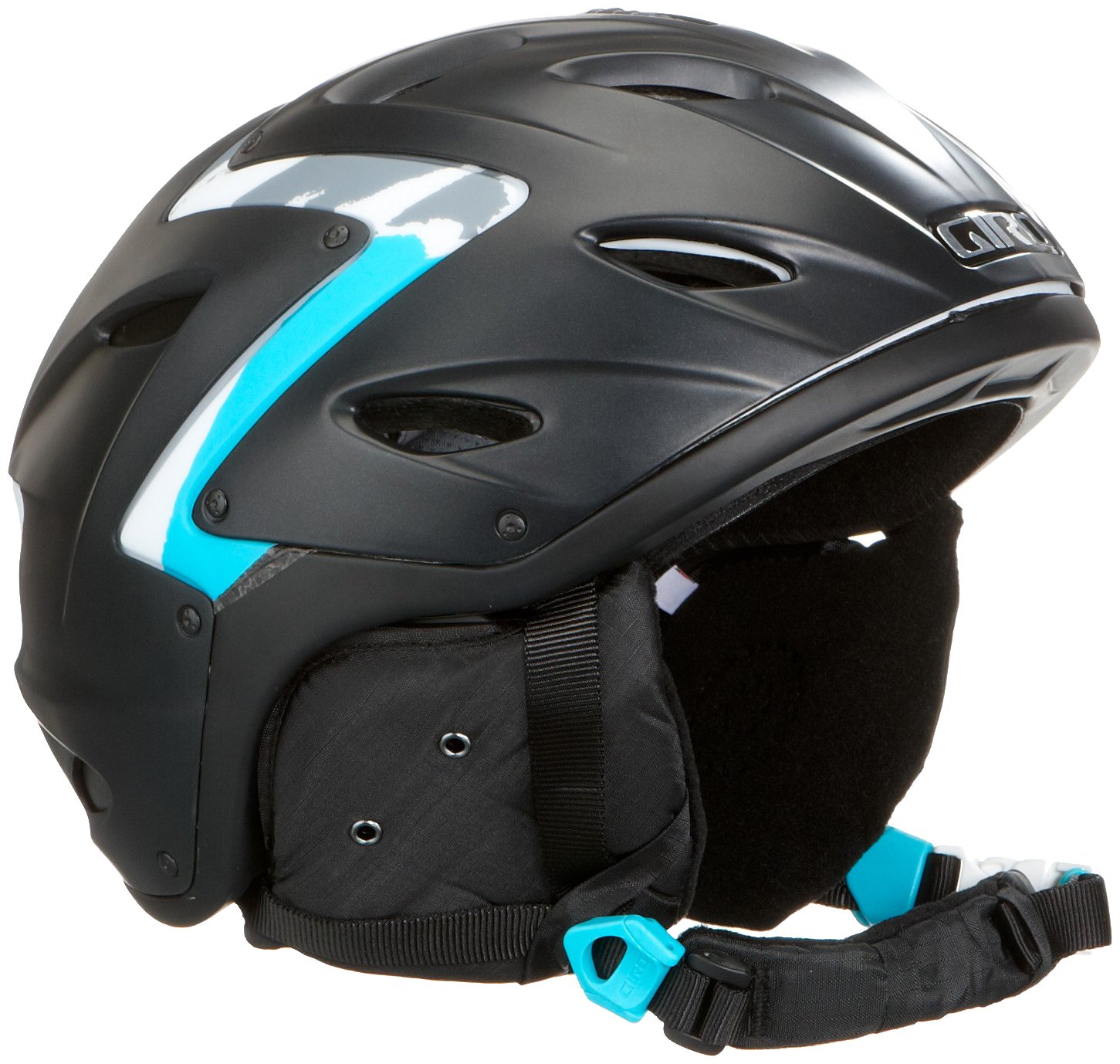
Image: Rear view of the Giro Omen helmet, showcasing its matte black finish with distinctive blue and grey graphic accents. The adjustable strap and buckle are visible at the bottom left.
Safety Information
Your Giro Omen helmet is designed to reduce the risk of head injury. However, no helmet can protect against all possible impacts. For your safety, always:
- Ensure the helmet fits properly and is securely fastened before each use.
- Inspect the helmet for any damage before each use. If damaged, replace it immediately.
- Do not modify the helmet in any way, as this may compromise its protective capabilities.
- Avoid exposing the helmet to extreme temperatures or harsh chemicals.
- Replace your helmet after any significant impact, even if visible damage is not apparent.
Product Features
The Giro Omen helmet incorporates several advanced features for enhanced protection and comfort:
- In-Mold Hardbody Shell: This construction fuses the helmet's tough outer shell to the impact-absorbing EPS foam liner, creating a lighter, more durable helmet.
- PC/ABS High-Impact Zones: Strategically placed polycarbonate and ABS zones provide additional impact resistance in critical areas.
- EPS Shell: The Expanded Polystyrene (EPS) foam liner is designed to absorb energy from impacts.
- Anti-bacterial X-Static Inner Lining: The interior lining features X-Static fibers, which provide anti-microbial properties to keep the helmet fresh and odor-free.
- 14 Ventilation Openings: A sophisticated ventilation system with 14 adjustable openings allows for precise temperature regulation.
Setup
1. Fitting the Helmet
Proper fit is crucial for helmet safety and comfort. The Omen helmet features an in-form system for easy adjustment:
- Place the helmet on your head, ensuring it sits level and covers your forehead.
- Locate the ergonomic adjustment dial at the base of the helmet.
- Turn the dial clockwise to tighten the fit until the helmet feels snug but comfortable, without excessive pressure points. The system allows for up to 6 cm of adjustment.
- Turn the dial counter-clockwise to loosen the fit.
2. Vertical Adjustment for Goggles
The vertical adjustment feature allows for seamless integration with various ski or snowboard goggles, eliminating gaps between the helmet and goggles:
- With your goggles on, adjust the helmet's vertical position to achieve a comfortable fit and eliminate any gap.
- Ensure the goggle strap is securely placed in the goggle retainer clip at the rear of the helmet.
3. Chin Strap Adjustment
- Fasten the chin strap buckle.
- Adjust the strap length so that it is snug under your chin, allowing only one or two fingers to fit between the strap and your chin.
- Ensure the strap dividers are positioned just below your ears.
Operating
Ventilation System
The Giro Omen helmet features a variable ventilation system with 14 openings, allowing you to control airflow and temperature:
- Locate the ventilation sliders on the top of the helmet.
- Slide the controls forward to open the vents for maximum airflow, ideal for warmer conditions or high exertion.
- Slide the controls backward to close the vents, reducing airflow and retaining warmth in colder conditions.
- The system can be adjusted even with gloves on, providing convenience on the slopes.
Maintenance
Cleaning the Helmet
- Clean the helmet shell with a soft cloth, mild soap, and water only.
- Do not use abrasive cleaners, solvents, or harsh chemicals, as these can damage the helmet's materials and compromise its protective properties.
- The inner lining can be removed for hand washing with mild soap and water. Allow it to air dry completely before reinserting.
Storage
- Store your helmet in a cool, dry place, away from direct sunlight and extreme temperatures.
- Avoid storing the helmet near heat sources or in areas where it might be crushed or damaged.
Troubleshooting
- Helmet feels loose after adjustment: Re-check the adjustment dial and chin strap. Ensure they are tightened appropriately.
- Goggles do not fit properly: Utilize the vertical adjustment feature to align the helmet with your goggles. Ensure the goggle strap is secured.
- Excessive heat or cold: Adjust the ventilation sliders to regulate airflow according to ambient conditions and activity level.
- Unusual noises or discomfort: Stop using the helmet and inspect it for any damage or foreign objects. If issues persist, contact customer support.
Specifications
| Model Name | Giro Omen |
| Model Number | 2026437 |
| Brand | Giro |
| Outer Material | Polycarbonate (PC) |
| Inner Material | EPS |
| Color | Matte Black Stripes |
| Size | L (59 - 62.5 cm) |
| Age Range | Adult |
| Ventilation | 14 adjustable openings |
| Weight | Approximately 1.1 kg (based on package dimensions) |
| UPC | 361857334923 |
Warranty and Support
For warranty information or technical support regarding your Giro Omen helmet, please refer to the official Giro website or contact their customer service directly. Keep your proof of purchase for any warranty claims.
For further assistance, you may visit the official Giro website: www.giro.com