
1. Introduction
The Pelican 0550 Transport Case is engineered for extreme protection during the transport and storage of valuable equipment. Its robust construction and customizable interior foam provide a secure environment for various items. This manual provides essential information for the proper setup, operation, and maintenance of your Pelican 0550 case.

Figure 1: Pelican 0550 Transport Case. This image shows the exterior of the black Pelican 0550 case, highlighting its durable construction and latches.
2. Setup
2.1 Unpacking
Carefully remove the Pelican 0550 case from its packaging. Inspect the case for any signs of damage that may have occurred during shipping. Report any damage to the retailer immediately.
2.2 Foam Customization
The case includes customizable foam inserts. To customize the foam:
- Lay your equipment on the foam to determine the desired layout.
- Carefully pluck or cut out the foam sections to create snug compartments for your items. Ensure sufficient padding around all sides of your equipment.
- Test the fit by placing your equipment in the customized foam and closing the lid. The items should be secure and not shift.
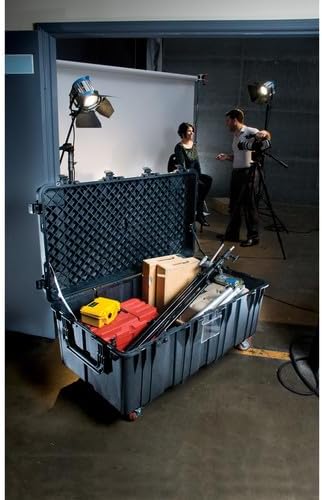
Figure 2: Pelican 0550 Case with customized foam interior. This image shows the large Pelican 0550 case open, revealing various pieces of equipment securely stored within its customized foam interior.
2.3 Optional Accessories Installation
The Pelican 0550 case supports optional accessories for enhanced mobility and stacking.
- Caster Wheel Kit: If you have purchased the optional Caster Wheel Kit, follow the instructions provided with the kit for installation. This kit includes brakes for secure positioning.
- Pallet Riser Kit: For improved stacking and forklift compatibility, the optional Pallet Riser Kit can be installed. Refer to the kit's instructions for proper attachment.
3. Operation
3.1 Opening and Closing the Case
To open the case, disengage all latches by lifting the release mechanism and pulling the latch upwards. To close, align the lid with the base and firmly press down on each latch until it clicks into place. Ensure all latches are securely fastened to maintain the case's protective seal.
3.2 Stacking and Transport
The Pelican 0550 case features four extra-deep base-to-lid locking cleats designed for maximum stacking stability. When stacking multiple cases, ensure the cleats on the base of the upper case align with the lid of the lower case. This design allows for secure stacking, such as fitting six 0550 cases per 463L military pallet, or 18 when stacked three high.

Figure 3: Multiple Pelican 0550 cases arranged on a pallet. This image illustrates how several Pelican 0550 cases can be efficiently arranged and stacked on a standard pallet for transport or storage.

Figure 4: Overhead view of Pelican 0550 cases on a pallet. This top-down perspective shows the precise arrangement and interlocking design of multiple Pelican 0550 cases when placed on a pallet, demonstrating their stacking efficiency.
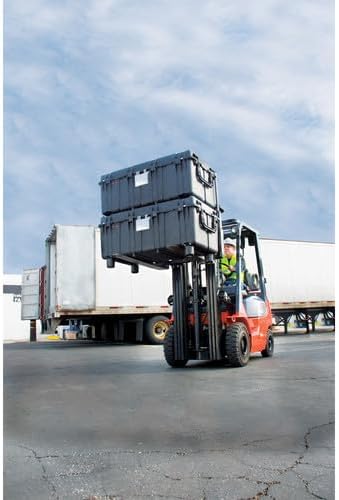
Figure 5: Forklift transporting stacked Pelican 0550 cases. This image depicts a forklift lifting and moving two stacked Pelican 0550 cases, illustrating their compatibility with industrial handling equipment for efficient logistics.
4. Maintenance
4.1 Cleaning
Clean the exterior of the case with mild soap and water. Avoid harsh chemicals or abrasive cleaners, as these may damage the case material. For the interior foam, use a vacuum cleaner to remove dust and debris. If the foam becomes soiled, it can be spot cleaned with a damp cloth and mild detergent, then allowed to air dry completely before reinserting equipment.
4.2 Seal Inspection
Periodically inspect the O-ring seal around the lid for any signs of wear, cracks, or debris. A clean, intact O-ring is crucial for maintaining the case's water-resistant properties. If the seal appears damaged, contact Pelican customer support for a replacement.
4.3 Latch and Hinge Check
Ensure all latches and hinges operate smoothly and are free from obstruction. Lubricate moving parts with a silicone-based lubricant if necessary. Do not force latches or hinges if they are stiff.
5. Troubleshooting
- Difficulty Closing Latches: Ensure the lid is properly aligned with the base and that no items inside the case are obstructing the seal. Check for any debris in the latch mechanism.
- Water Intrusion: Verify that the O-ring seal is clean, properly seated, and undamaged. Ensure all latches are fully engaged. Avoid submerging the case beyond its specified water resistance level.
- Case Not Stacking Securely: Confirm that the base-to-lid locking cleats are correctly aligned between stacked cases.
- Damaged Components: For any broken latches, hinges, or other structural components, contact Pelican customer support for replacement parts or repair services.
6. Specifications
| Feature | Detail |
|---|---|
| Model Number | 0550-000-110 |
| Brand | Pelican |
| Product Dimensions | 51.05 x 22.79 x 27.54 inches |
| Item Weight | 95 pounds |
| Storage Space | Over 11 cubic feet |
| Color | Black |
| Water Resistance Level | Water Resistant |
| Stacking Features | Four extra-deep base-to-lid locking cleats for maximum stability. Fits six cases per 463L military pallet (18 when stacked). |
| Included | 0550 Case, Foam (WL/WF), Black |
7. Warranty and Support
7.1 Warranty Information
Pelican Products, Inc. offers a Lifetime Guarantee on its cases. For specific warranty terms and conditions, please refer to the official Pelican website or the warranty documentation included with your product. This guarantee typically covers defects in materials and workmanship.
7.2 Customer Support
For technical assistance, replacement parts, or warranty claims, please contact Pelican customer support. You can find contact information on the official Pelican website: www.pelican.com/us/en/support.
When contacting support, please have your model number (0550-000-110) and purchase details available.


