
Introduction
The STP Pc Motherboard USB & PCI Analyser Diagnostic Card Tester, also known as a POST Card, is a diagnostic tool designed to identify and troubleshoot hardware problems in desktop PCs and compatible notebooks. This card assists technicians and administrators in quickly pinpointing issues related to the CPU, memory, display card, and other motherboard components by displaying Power On Self Test (POST) codes.

An image of the STP diagnostic card, showing its green circuit board, PCI connector, USB port, parallel port, and a two-digit LED display.
Setup
Package Contents
- 1 x PC Diagnostic Card
- 1 x USB cable
Installation for Desktop PCs (PCI Slot)
- Power off your desktop PC and disconnect all power cables.
- Open the computer case and locate an available PCI slot on the motherboard.
- Carefully insert the diagnostic card into the PCI slot, ensuring it is fully seated.
- Close the computer case and reconnect power cables.
Installation for Laptops (USB & LPT Port)
- Power off your laptop and disconnect all power cables.
- Connect the diagnostic card to your laptop using the 25-pin parallel printer port (LPT). An adapter cable (not included) may be required if your laptop does not have a direct LPT port.
- Connect the included USB cable from the diagnostic card to an available USB port on your laptop for power.
- Reconnect power cables to the laptop.
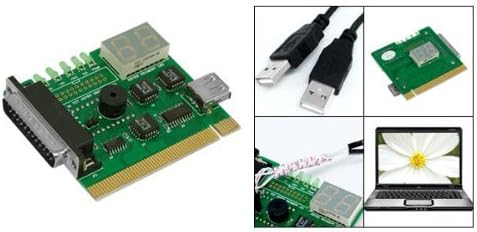
A collage image showing the diagnostic card, two USB cables, and a laptop, illustrating the components and potential use case for laptop diagnostics.
Operation
Power On Self Test (POST)
Once the diagnostic card is installed and the computer is powered on, the card will begin to display a series of two-digit hexadecimal codes on its LED display. These codes represent the various stages of the Power On Self Test (POST) process performed by the computer's BIOS.
Interpreting Diagnostic Codes
Each code corresponds to a specific test or initialization step. If the system encounters an error, the diagnostic card will typically stop on the code associated with the failure. To understand the meaning of a specific code, you will need to consult a POST code reference manual specific to your computer's BIOS (e.g., AMI BIOS, Award BIOS, Phoenix BIOS). These manuals are often available online from the BIOS manufacturer or motherboard manufacturer.
The diagnostic card can help identify problems with:
- CPU (Central Processing Unit)
- Memory (RAM)
- Display Card (Graphics Card)
- Other critical motherboard components
Maintenance
The STP diagnostic card requires minimal maintenance. Keep the card clean and free from dust. Store it in a dry, static-free environment when not in use. Avoid exposing the card to extreme temperatures or humidity. Handle the card by its edges to prevent damage to components or static discharge.
Troubleshooting
No Display on Diagnostic Card
- Ensure the card is fully seated in the PCI slot or that the USB power cable is securely connected for laptop use.
- Verify the computer is receiving power and attempting to boot.
- Check for proper connection of the LPT port for laptop diagnostics.
Incorrect or Unfamiliar Codes
- Confirm the BIOS type of your motherboard (e.g., AMI, Award, Phoenix).
- Refer to a POST code lookup table specific to your BIOS version. Generic code lists may not be accurate for all systems.
Card Not Fitting Properly
- Ensure you are attempting to insert the card into the correct slot (PCI for desktops, LPT/USB for laptops). Forcing the card into an incompatible slot can cause damage to both the card and the motherboard.
General Diagnostic Tips
- If the card displays a code and stops, research that specific code for your BIOS to identify the failing component.
- Try removing non-essential components (e.g., extra RAM sticks, expansion cards) one by one to isolate the issue if the POST code is ambiguous.
Specifications
| Feature | Detail |
|---|---|
| Brand | STP |
| Model Number | 10 |
| Hardware Interface | PCI, USB |
| Product Dimensions (L x W x H) | 3.35" x 2.76" x 0.55" (8.5cm x 7.0cm x 1.4cm) |
| Item Weight | 2.4 ounces (80g) |
| Compatible Devices | Desktop PCs, Laptops |
| UPC | 634585112676, 768430613817 |
Warranty and Support
For warranty information or technical support regarding your STP Pc Motherboard USB & PCI Analyser Diagnostic Card Tester, please contact the manufacturer directly. Refer to the product packaging or the manufacturer's official website for contact details and specific warranty terms.


