1. Introduction
This manual provides instructions for the installation and maintenance of the Hayward DEX2400DA Filter Element. This element is designed as a replacement part for the Hayward DE2420 Pro Grid D.E. Filter system. Proper installation and regular maintenance are essential for optimal filter performance and longevity.
2. Product Overview
The Hayward DEX2400DA is a diatomaceous earth (D.E.) filter element designed to capture fine particles from pool water, ensuring clarity and cleanliness. It is a critical component of the DE2420 Pro Grid D.E. Filter assembly.
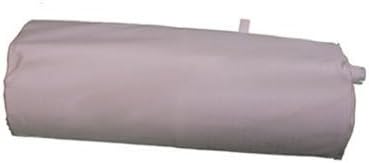
Figure 1: The Hayward DEX2400DA filter element in its compact, rolled-up state. This is how the element appears before being expanded for installation.
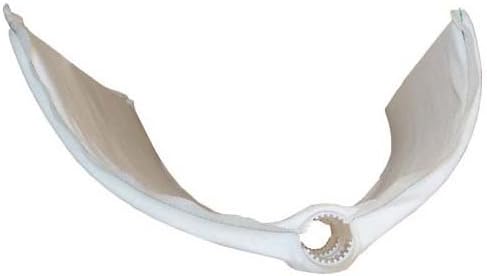
Figure 2: The filter element expanded, showing its internal pleated structure designed for efficient filtration. The central opening is for connection to the filter manifold.

Figure 3: A detailed view of the connection point or hub on the filter element. This part securely attaches the element to the filter's central manifold.
3. Compatibility
This Hayward DEX2400DA filter element is specifically designed for use with the Hayward DE2420 Pro Grid D.E. Filter model. Verify your filter model number before installation to ensure proper fit and function.
4. Installation Instructions
Follow these steps to replace the filter element in your Hayward DE2420 Pro Grid D.E. Filter. Always refer to your specific filter system's manual for detailed safety precautions and disassembly instructions.
- Safety First: Turn off the pool pump and any other electrical equipment connected to the filter system. Close all valves to isolate the filter.
- Drain the Filter: Open the air relief valve on top of the filter and the drain plug at the bottom to completely drain the water from the filter tank.
- Open the Filter Tank: Remove the clamp or locking mechanism that secures the top and bottom halves of the filter tank. Carefully lift the top half of the tank.
- Remove Old Element: Gently lift the entire filter grid assembly out of the tank. Disconnect the old DEX2400DA filter element from the manifold. Note how it was attached for reassembly.
- Clean the Tank: Thoroughly clean the inside of the filter tank and inspect the manifold and other components for wear or damage. Replace any worn O-rings or gaskets.
- Install New Element: Carefully attach the new Hayward DEX2400DA filter element to the manifold. Ensure it is seated correctly and securely.
- Reassemble Filter: Lower the grid assembly with the new element back into the filter tank. Ensure it is properly aligned. Replace the top half of the tank and secure the clamp or locking mechanism according to your filter's instructions.
- Prepare for Operation: Open the valves to the filter system. With the air relief valve open, turn on the pump. Allow the filter tank to fill with water until a steady stream of water emerges from the air relief valve, then close the valve.
- Add D.E. Powder: Follow your filter system's instructions for adding the appropriate amount of D.E. powder through the skimmer.

Figure 4: The filter element viewed from the side, illustrating its height and curved profile, which allows it to fit within the cylindrical filter tank.
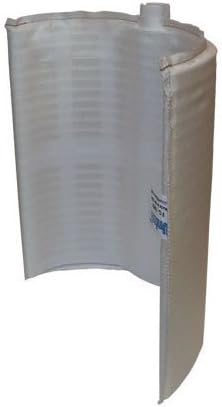
Figure 5: Another side view of the filter element, showing the full extent of its filtration surface and the top connection point.
5. Maintenance
- Backwashing: Regularly backwash your D.E. filter according to your pool system's instructions or when the pressure gauge indicates a rise of 7-10 PSI above the clean operating pressure.
- D.E. Recharge: After backwashing, always recharge the filter with the appropriate amount of fresh D.E. powder.
- Element Cleaning: Periodically, or at least once per season, remove the filter element and thoroughly clean it. This typically involves rinsing with a hose and soaking in a specialized filter cleaning solution to remove oils and scale.
- Inspection: Inspect the filter element for tears, holes, or damage during cleaning. Replace the element if any damage is found, as a damaged element will compromise filtration effectiveness.
6. Troubleshooting
- Element Does Not Fit:
Ensure you have the correct model number (DEX2400DA) for your Hayward DE2420 Pro Grid D.E. Filter. Some filter models may have similar appearances but require different element dimensions. Verify the dimensions of the element against your existing one if possible.
- Poor Filtration/Cloudy Water:
Check if the D.E. powder was added correctly and in the right amount after backwashing. Inspect the filter element for tears or damage. Ensure all O-rings and gaskets are properly seated and not damaged, preventing water bypass.
- High Filter Pressure:
This indicates the filter element is dirty and requires backwashing or a thorough cleaning. If pressure remains high after cleaning, the element may be clogged with oils or scale and require chemical cleaning or replacement.
7. Specifications
| Specification | Detail |
|---|---|
| Model Number | DEX2400DA |
| Compatibility | Hayward DE2420 Pro Grid D.E. Filter |
| Product Dimensions | 10.53 x 8.77 x 6.43 inches |
| Item Weight | 15.2 ounces |
| Manufacturer | Hayward |
8. Warranty and Support
For warranty information and technical support regarding your Hayward DEX2400DA Filter Element or Hayward DE2420 Pro Grid D.E. Filter, please contact Hayward customer service directly or visit the official Hayward website. Keep your purchase receipt as proof of purchase.
For further assistance, you may visit the Hayward Store on Amazon.


