
1. Introduction
This manual provides detailed instructions for the safe and efficient installation, operation, and maintenance of the Intermatic V45472CR30 Mechanical Time Switch. The V45472CR30 is an astronomic time switch designed for precise control of electrical loads, featuring a skipper function and a spring-wound carryover mechanism.
Please read this manual thoroughly before attempting any installation or operation. Keep this manual for future reference.
2. Safety Information
WARNING: Risk of Electric Shock or Fire.
- Installation and servicing must be performed by a qualified electrician in accordance with all national and local electrical codes.
- Always disconnect power at the circuit breaker or fuse box before installing or servicing this device.
- Ensure all wiring connections are secure and properly insulated.
- Do not exceed the electrical ratings of the device (208-277 VAC; 40 Amps per pole).
- This product should only be installed in Zone 30 for proper astronomic function. Refer to the geographic zone map for details.
3. Product Overview
The Intermatic V45472CR30 is a robust mechanical time switch engineered for reliable control of 3-phase lighting systems. Key features include:
- Astronomic Function: Automatically adjusts ON/OFF times based on seasonal changes (sunrise/sunset), similar to a photo control.
- Skipper Feature: Allows specific days of the week to be omitted from the control schedule. Three skipper screws are included for this purpose.
- Spring-Wound Carryover: Provides up to 16 hours of operation during power outages, maintaining accurate load control. The carryover automatically rewinds when power is restored (1 hour rewind for every 2 hours of outage).
- Independent Clock Motor Terminals: Facilitates separate wiring for the clock motor.
- 3PST Switch: Designed for controlling 3-phase lighting applications.

Figure 1: Intermatic V45472CR30 Mechanical Time Switch. This image displays the Intermatic V45472CR30 Mechanical Time Switch. The metal enclosure is open, revealing the internal components, including the astronomic time dial, ON/OFF levers, and wiring terminals. Important safety labels are visible on the inside of the door.
4. Installation and Setup
IMPORTANT: Ensure power is disconnected before proceeding with installation.
- Mounting: Mount the time switch securely to a pole or suitable surface using appropriate hardware. Ensure the mounting location is within Zone 30 for correct astronomic functionality.
- Geographic Zone Verification: Confirm your installation location is within Zone 30. This is critical for the astronomic feature to function accurately.
- Wiring:
- Connect the incoming power supply (208-277 VAC) to the designated input terminals.
- Connect the load (e.g., 3-phase lighting) to the output terminals.
- Wire the independent clock motor terminals as per the wiring diagram provided with the unit (not shown in this manual, refer to product packaging).
- Ensure all connections are tight and secure.
- Setting the Time: Rotate the dial to align the current time with the time indicator.
- Setting ON/OFF Times (Astronomic): The astronomic dial automatically adjusts for sunrise/sunset. Specific ON/OFF trippers can be set for additional control if needed.
- Setting Skipper Days: Insert the three included skipper screws into the desired day slots on the dial to omit operation on those days.
- Power Restoration: Once all connections are verified and the enclosure is closed, restore power at the circuit breaker.
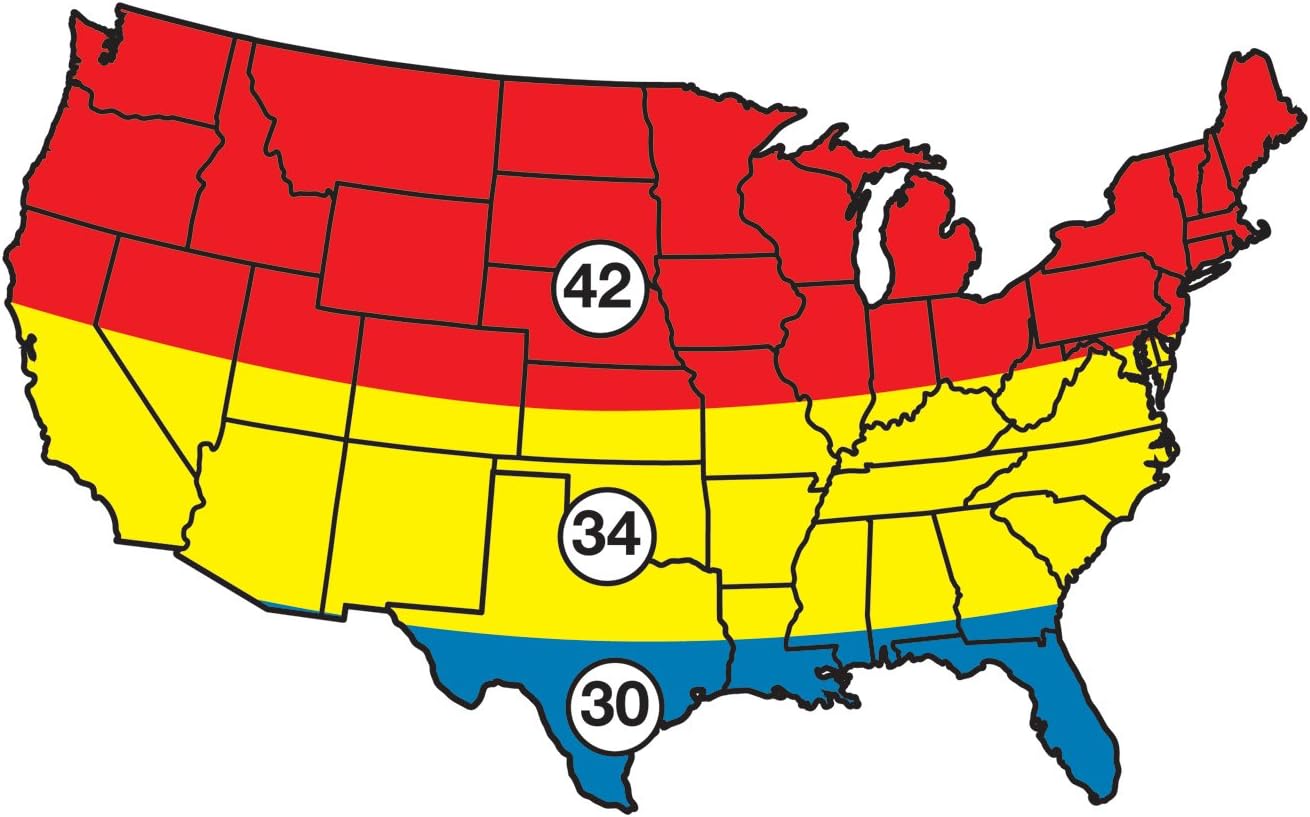
Figure 2: Geographic Zone Map. This map illustrates the geographic zones relevant for the installation of Intermatic time switches. Zone 30, highlighted in blue, indicates the specific region where the V45472CR30 model is designed to be installed for optimal astronomic function. Other zones, such as 34 (yellow) and 42 (red), are also shown.
5. Operating Instructions
The V45472CR30 operates automatically once programmed. Manual override is typically available via a switch on the unit (refer to specific unit markings).
- Automatic Operation: The time switch will activate and deactivate connected loads according to the set astronomic schedule and any programmed ON/OFF trippers, respecting skipper days.
- Manual Override: If a manual override switch is present, it allows temporary ON or OFF control, bypassing the programmed schedule until the next scheduled event.
- Carryover Function: In the event of a power failure, the spring-wound carryover will maintain the time and schedule for up to 16 hours. Once power is restored, the carryover mechanism will automatically rewind.
6. Maintenance
The Intermatic V45472CR30 is designed for minimal maintenance. However, periodic checks are recommended:
- Annual Inspection: Annually, inspect the unit for any signs of wear, damage, or loose connections. Ensure the enclosure is sealed to prevent ingress of dust and moisture.
- Cleaning: If necessary, gently clean the exterior of the unit with a dry, soft cloth. Do not use abrasive cleaners or solvents.
- Power Outage Check: After extended power outages, verify that the time switch has reset to the correct time and is operating according to its schedule.
CAUTION: Disconnect power before performing any maintenance inside the unit.
7. Troubleshooting
| Problem | Possible Cause | Solution |
|---|---|---|
| Device not turning ON/OFF at scheduled times. |
|
|
| No power to the load. |
|
|
| Carryover not functioning. |
|
|
8. Specifications
| Model Number | V45472CR30 |
| Brand | Intermatic |
| Voltage | 208-277 VAC |
| Amperage | 40 Amps per pole |
| Switch Type | 3PST (Three Pole Single Throw) |
| Carryover | 16 hours minimum (spring-wound) |
| Mounting Type | Pole |
| Dimensions (L x W x H) | 24.13 x 16.51 x 13.34 cm |
| Weight | 2.36 kg |
| Batteries Required | No |
| Included Components | Mechanical Time Switch, Three Skipper screws |
9. Warranty and Support
For warranty information, technical support, or service inquiries, please contact Intermatic customer service directly. Refer to the official Intermatic website or product packaging for the most current contact details and warranty terms.
Manufacturer: Intermatic Incorporated
Website: www.intermatic.com (Example link, verify official site)