
Introduction
This manual provides comprehensive instructions for the safe and effective use, installation, and maintenance of your MIPRO MB-70 Replacement Rechargeable 12V Battery. Please read this manual thoroughly before using the product to ensure optimal performance and longevity.
Important Safety Information
Always observe the following safety precautions to prevent injury or damage to the battery and connected equipment:
- Do not short-circuit the battery terminals.
- Do not expose the battery to extreme temperatures, direct sunlight, or fire.
- Do not immerse the battery in water or other liquids.
- Do not attempt to open, disassemble, or modify the battery.
- Keep the battery out of reach of children and pets.
- Dispose of depleted batteries according to local regulations.
- Use only chargers specified for 12V lead-acid batteries.
Product Overview
The MIPRO MB-70 is a high-quality, rechargeable 12V lead-acid battery designed as a replacement for compatible MIPRO audio equipment and other devices requiring a 12V power source. It provides reliable and consistent power for extended operation.
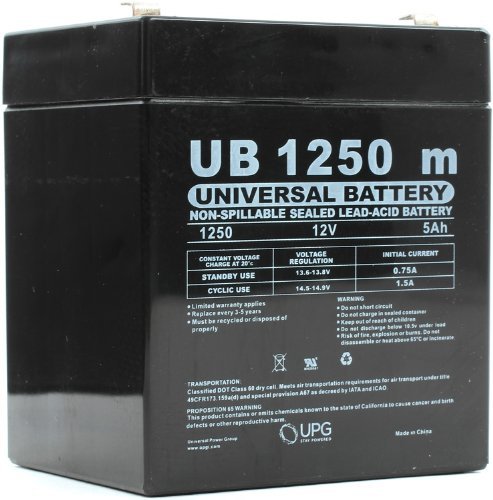
Image 1: The MIPRO MB-70 Replacement Rechargeable 12V Battery. This image shows the compact, rectangular form factor of the battery, typically black or dark gray, with visible terminals for connection.
Installation Instructions
Follow these steps to safely install the MIPRO MB-70 battery into your compatible device:
- Power Off Device: Ensure the device requiring the battery replacement is completely powered off and disconnected from any power sources.
- Locate Battery Compartment: Identify and open the battery compartment on your device. Refer to your device's manual for specific instructions.
- Remove Old Battery: Carefully disconnect the old battery, noting the polarity (positive and negative terminals). Remove the old battery from the compartment.
- Insert New Battery: Insert the MIPRO MB-70 battery into the compartment, ensuring the terminals align correctly with the device's connectors. Connect the positive (+) terminal first, then the negative (-) terminal.
- Secure Compartment: Close and secure the battery compartment.
- Initial Charge: It is recommended to fully charge the battery before its first use. Refer to the "Charging the Battery" section.
Charging the Battery
To ensure optimal performance and battery life, follow these charging guidelines:
- Use a compatible 12V lead-acid battery charger. Using an incorrect charger can damage the battery or pose a safety risk.
- Connect the charger to the battery terminals, ensuring correct polarity (positive to positive, negative to negative).
- Plug the charger into a suitable power outlet.
- Allow the battery to charge until the charger indicates a full charge (refer to your charger's instructions).
- Avoid overcharging, as this can reduce battery life. Disconnect the charger once the battery is fully charged.
- Charge the battery in a well-ventilated area.
Battery Maintenance and Storage
Proper maintenance and storage will extend the life of your MIPRO MB-70 battery:
- Regular Charging: If the battery is not used for extended periods, recharge it every 3-6 months to prevent deep discharge, which can permanently damage lead-acid batteries.
- Clean Terminals: Keep the battery terminals clean and free of corrosion. Use a dry cloth to wipe them if necessary.
- Storage Conditions: Store the battery in a cool, dry place, away from direct sunlight and extreme temperatures. The ideal storage temperature is between 20°C and 25°C (68°F and 77°F).
- Avoid Deep Discharge: Do not allow the battery to completely discharge. Recharge it as soon as possible after use.
Troubleshooting
| Problem | Possible Cause | Solution |
|---|---|---|
| Battery not charging | Charger not connected properly; Faulty charger; Deeply discharged battery; Damaged battery. | Check charger connections; Try a different charger; Allow extended charging time for deeply discharged batteries (if applicable); Replace battery if damaged. |
| Short operating time after full charge | Battery capacity degradation; Incomplete charge; High power consumption by device. | Ensure full charge cycle; Consider battery replacement if capacity is significantly reduced; Check device for abnormal power draw. |
| Battery terminals corroded | Exposure to moisture or improper storage. | Clean terminals with a dry cloth or a soft brush. Ensure proper storage conditions. |
If you encounter issues not listed here or if solutions do not resolve the problem, please contact customer support.
Specifications
| Brand | MIPRO |
| Model Number | D5741 (MB-70) |
| Voltage | 12 Volts |
| Battery Cell Composition | Lead Acid |
| Battery Capacity | 4.5 Amp Hours |
| Item Weight | 3 pounds (approx. 1.36 kg) |
| UPC | 806593457418 |
| First Available Date | November 14, 2012 |
Warranty and Support
For warranty information and technical support, please refer to the documentation provided with your original MIPRO product or visit the official MIPRO website. Keep your purchase receipt as proof of purchase for warranty claims.
For further assistance, you may contact the seller directly via the platform where the purchase was made.
Product Videos
No official product videos are available for embedding at this time.