1. Product Overview
The Datalogic PowerScan PM8300 is a robust handheld laser bar code reader designed for industrial applications. This device features a display, a 16-key keypad, and a removable battery, offering versatility and ease of use in various environments. It operates on a 910MHz frequency for wireless communication.
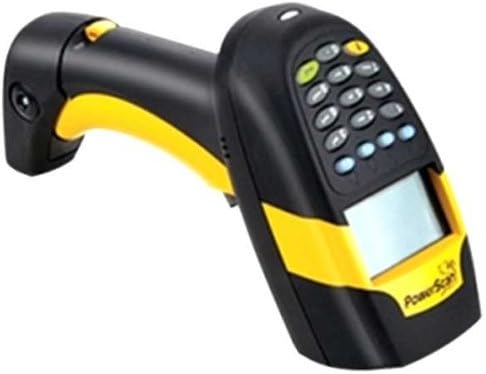
Image 1: The Datalogic PowerScan PM8300 handheld laser bar code reader. This device is black and yellow, featuring an ergonomic handle, a display screen, and a numeric keypad with function buttons.
Key Features:
- Laser scanning technology for accurate bar code reading.
- Integrated display for immediate feedback and data entry.
- 16-key keypad for manual data input and navigation.
- Removable battery for extended operation and easy replacement.
- 910MHz wireless communication for flexible deployment.
2. Setup
This PowerScan PM8300 unit is a scanner-only model. It does not include a cradle, necessary cables, or other accessories required for full operation. These items must be acquired separately.
2.1 Battery Installation
- Ensure the scanner is powered off.
- Locate the battery compartment cover, typically on the underside of the handle.
- Open the cover and insert the removable battery, ensuring correct polarity.
- Securely close the battery compartment cover.
- Charge the battery using a compatible charging cradle or cable (sold separately) before first use.
2.2 Connecting to a Host Device
The PowerScan PM8300 is compatible with desktop and laptop computers. Connection typically involves a communication cradle (sold separately) that interfaces with the host device via USB or serial cable.
- Connect the communication cradle to your host device (e.g., PC) using the appropriate cable.
- Place the PowerScan PM8300 scanner into the cradle.
- Ensure the host device recognizes the scanner. Driver installation may be required, typically available from the Datalogic website.
- Refer to the cradle's specific instruction manual for detailed setup and pairing procedures.
3. Operating Instructions
3.1 Basic Scanning
- Ensure the scanner is powered on and connected to the host system.
- Point the scanner's laser aperture at the bar code you wish to read.
- Press and hold the trigger button. A laser line will appear.
- Position the laser line across the entire bar code.
- Upon successful read, the scanner will typically emit an audible beep and/or a visual indicator (e.g., green light). The decoded data will be transmitted to the host device.
3.2 Using the Display and Keypad
The integrated display provides feedback on scanning status, battery level, and allows for configuration or data entry depending on the scanner's programming. The 16-key keypad enables manual data input, menu navigation, and function execution.
- Navigation: Use the arrow keys on the keypad to move through menu options on the display.
- Data Entry: Use the numeric and function keys to input data or select options as prompted by the display.
- Confirmation: A dedicated 'Enter' or 'OK' key typically confirms selections.
Refer to the detailed programming guide for specific functions and menu structures.
4. Maintenance
4.1 Battery Care
- Always use genuine Datalogic replacement batteries.
- Charge the battery fully before first use and whenever the low battery indicator appears.
- Avoid exposing the battery to extreme temperatures.
- If the scanner will not be used for an extended period, remove the battery and store it in a cool, dry place.
4.2 Cleaning the Scanner
- Power off the scanner before cleaning.
- Use a soft, lint-free cloth lightly dampened with water or a mild, non-abrasive cleaning solution.
- Gently wipe the exterior of the scanner, including the scanning window and display.
- Do not spray cleaning solutions directly onto the scanner.
- Avoid using harsh chemicals, solvents, or abrasive materials, as these can damage the device.
5. Troubleshooting
If you encounter issues with your PowerScan PM8300, try the following basic troubleshooting steps:
- Scanner Not Powering On: Check battery charge level. Ensure the battery is correctly installed.
- Scanner Not Reading Bar Codes: Ensure the laser is active when the trigger is pressed. Verify the bar code is not damaged or poorly printed. Check if the scanner is configured to read the specific bar code symbology.
- No Data Transmission to Host: Confirm the scanner is properly connected to its communication cradle and the cradle is connected to the host device. Verify drivers are installed correctly on the host device.
- Intermittent Connectivity: Check for obstructions or interference if operating wirelessly. Ensure the scanner is within range of its base station.
For more complex issues or technical support, please visit the official Datalogic support website or contact their customer service.
6. Specifications
| Feature | Specification |
|---|---|
| Manufacturer | Datalogic ADC |
| Brand | Datalogic |
| Model Number | PM8300-DKAR910RB |
| Item Weight | 13.9 ounces |
| Package Dimensions | 10.2 x 6.9 x 4.9 inches |
| Compatible Devices | Desktop, Laptop |
| Power Source | Battery Powered |
| UPC | 053926383368 |
| Date First Available | July 18, 2009 |
7. Warranty and Support
7.1 Warranty Information
Specific warranty details for the Datalogic PowerScan PM8300 are typically provided with the product at the time of purchase or can be found on the official Datalogic website. Please retain your proof of purchase for warranty claims.
7.2 Customer Support
For further assistance, technical support, or to access additional documentation, please visit the official Datalogic website:
You may also find contact information for Datalogic customer service in your region on their website.


