Introduction
This manual provides essential information for the safe and effective installation, operation, and maintenance of the Siemens HF221N 30-Amp 2 Pole 240-volt 3 Wire Fused Heavy Duty Safety Switch. Please read all instructions carefully before proceeding with installation or use. Retain this manual for future reference.
Safety Information: Always disconnect power before working on electrical equipment. Installation and servicing should only be performed by qualified personnel in accordance with all national and local electrical codes.
Product Overview
The Siemens HF221N is a 30-Amp, 2-pole, 240-volt, 3-wire fused heavy-duty safety switch designed for reliable power disconnection. Key features include a quick-make, quick-break operating mechanism, arc chutes for heat dissipation, and visible blade construction for clear indication of switch status.
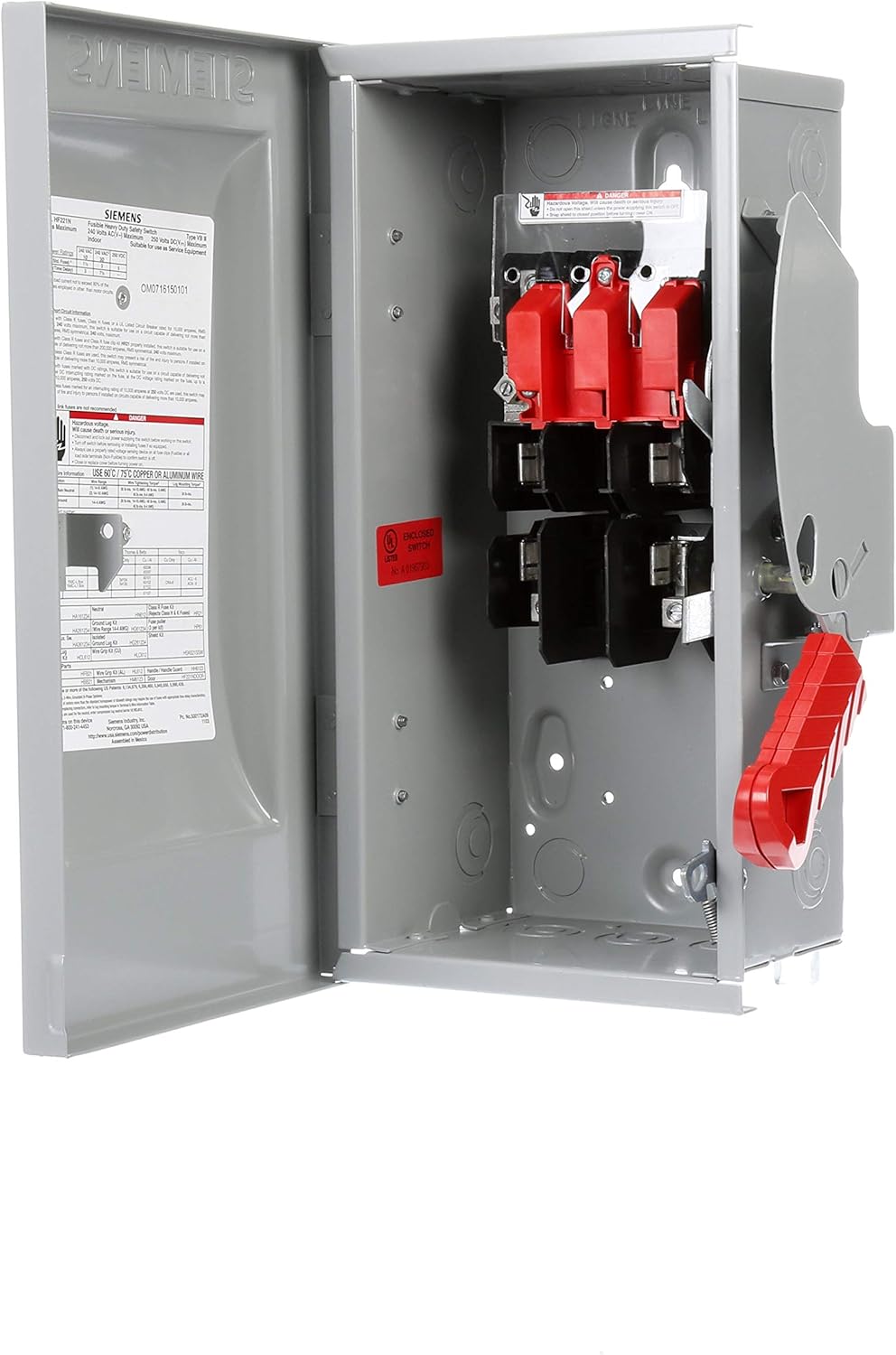

Specifications
| Feature | Detail |
|---|---|
| Model Number | HF221N |
| Amperage Capacity | 30 Amps |
| Poles | 2 Pole |
| Voltage | 240 Volts |
| Wire Configuration | 3 Wire |
| Type | Fused Heavy Duty Safety Switch |
| Material | Alloy Steel |
| Mounting Type | Pole |
| Certification | UL Certified |
| Product Dimensions | 18.3 x 11.2 x 7.7 inches |
| Item Weight | 8 pounds |
Setup and Installation
Important: All installation procedures must be performed by a qualified electrician and comply with the National Electrical Code (NEC) and local codes.
Safety Precautions:
- Ensure all power to the circuit is disconnected and locked out before beginning work.
- Verify absence of voltage using a suitable voltage tester.
- Wear appropriate personal protective equipment (PPE), including safety glasses and insulated gloves.
Mounting:
- Select a suitable mounting location that is easily accessible and provides adequate clearance for operation and maintenance.
- Use appropriate fasteners to securely mount the safety switch enclosure to a rigid surface. The enclosure is designed for pole mounting.
- Ensure the enclosure is level and plumb.
Wiring:
- The HF221N is designed for use with 60°C / 75°C copper or aluminum wire.
- Refer to the wiring diagram located inside the switch enclosure for specific connection points.
- Connect incoming power lines to the "LINE" terminals and outgoing load lines to the "LOAD" terminals.
- Ensure all connections are tight and secure to prevent loose connections and potential arcing.
- Install appropriate Class R or J fuses as specified for the application.

Operating Instructions
The Siemens HF221N safety switch is designed for straightforward operation to connect or disconnect power to a circuit.
Turning Power ON:
- Ensure all connected equipment is ready to receive power.
- Move the operating handle (typically red) from the "OFF" position to the "ON" position. The visible blades inside the switch will close, establishing the electrical connection.
- Confirm power is supplied to the load.
Turning Power OFF:
- If possible, turn off the connected equipment before disconnecting power at the switch.
- Move the operating handle from the "ON" position to the "OFF" position. The visible blades will open, safely disconnecting the power.
- Verify that power to the load is disconnected using a voltage tester if necessary.

Maintenance
Regular maintenance helps ensure the longevity and safe operation of your Siemens HF221N safety switch. All maintenance should be performed by qualified personnel with power disconnected and locked out.
Routine Checks (Annually or as needed):
- Visual Inspection: Check for any signs of physical damage, corrosion, or overheating (discoloration).
- Terminal Connections: Verify that all wiring connections are tight. Loose connections can cause overheating and arcing.
- Enclosure Integrity: Ensure the enclosure is free from dust, dirt, and moisture. Check that all covers and seals are intact.
- Operating Mechanism: Operate the switch handle a few times to ensure smooth and positive "quick-make, quick-break" action.
- Fuse Inspection: Inspect fuses for any signs of damage or discoloration. Replace fuses only with those of the correct type and rating (Class R or J, 30 Amp).
Fuse Replacement:
- Disconnect Power: Always move the switch handle to the "OFF" position and verify power is disconnected.
- Open Enclosure: Open the switch enclosure cover.
- Remove Fuses: Carefully remove the blown or faulty fuses.
- Install New Fuses: Insert new fuses of the identical type and rating (e.g., 30A, 240V, Class R or J).
- Close Enclosure: Securely close the enclosure cover.
- Restore Power: Move the switch handle to the "ON" position.
Troubleshooting
This section provides guidance for common issues. For complex problems, contact a qualified electrician or Siemens technical support.
| Problem | Possible Cause | Solution |
|---|---|---|
| No power to load when switch is ON | Blown fuse(s) Loose wiring connection Upstream power issue | Check and replace blown fuses (see Maintenance section). Inspect and tighten all terminal connections (with power OFF). Verify power supply from the main panel. |
| Switch handle does not move freely | Obstruction Internal mechanism damage | Inspect for foreign objects obstructing the handle. If mechanism is damaged, contact a qualified electrician for inspection and potential replacement. Do not force the handle. |
| Overheating or burning smell | Overload Loose connections Incorrect fuse rating | Immediately disconnect power. Investigate the load for overcurrent conditions. Inspect and tighten all connections (with power OFF). Ensure correct fuse rating is used. Consult a qualified electrician. |
Warranty and Support
For warranty information or technical support regarding your Siemens HF221N safety switch, please refer to the official Siemens website or contact Siemens customer service directly. Keep your purchase receipt for warranty claims.
Siemens Contact Information:
- Website: www.siemens.com
- Customer Service: Refer to the Siemens website for regional contact numbers.


