
Introduction
This manual provides instructions for the proper use and care of your Dynex Micro USB Cable, model DX-C114201. This cable is designed for connecting devices with a Micro USB port to a standard USB port for both charging and data transfer purposes.
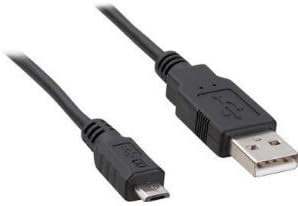
Image: Dynex Micro USB Cable. This image displays the cable with its two distinct connectors: a smaller Micro USB connector on one end, typically used for mobile devices, and a larger standard USB-A connector on the other end, commonly found on computers or wall chargers. The cable itself is black.
Setup
- Identify Ports: Locate the Micro USB port on your device (e.g., smartphone, tablet, camera) and a standard USB-A port on your power source (e.g., wall adapter, computer, power bank).
- Connect Micro USB: Gently insert the Micro USB connector end of the cable into the Micro USB port on your device. Ensure the connector is oriented correctly to avoid damage. Do not force the connection.
- Connect Standard USB: Insert the standard USB-A connector end of the cable into the USB-A port on your power source or computer.
- Verify Connection: For charging, your device should indicate that it is receiving power. For data transfer, your computer should recognize the connected device.
Operating Instructions
Charging Devices
- Connect the cable as described in the "Setup" section.
- Ensure the power source (wall adapter, computer USB port) is active.
- Monitor your device's screen for charging indicators. Charging times may vary depending on the device and power source.
Data Transfer
- Connect your device to a computer using the cable.
- On your device, you may need to select a "File Transfer" or "MTP" (Media Transfer Protocol) mode from the notification panel.
- Your computer should display the connected device as a removable drive or media device. You can then drag and drop files between your computer and the device.
- Always safely eject or disconnect your device from the computer before physically removing the cable to prevent data corruption.
Maintenance
- Storage: Store the cable in a cool, dry place away from direct sunlight and extreme temperatures. Avoid tightly coiling or bending the cable sharply, which can damage internal wires.
- Cleaning: If necessary, gently wipe the cable and connectors with a soft, dry, lint-free cloth. Do not use liquid cleaners or solvents.
- Handling: Always grasp the connector head when plugging or unplugging the cable, rather than pulling on the cable itself. This prevents strain on the cable-connector junction.
- Inspection: Periodically inspect the cable for any signs of wear, fraying, or damage to the insulation or connectors. Discontinue use if damage is observed.
Troubleshooting
- Device not charging:
- Ensure both ends of the cable are securely connected.
- Try a different USB port or power adapter.
- Verify that your device's charging port is clean and free of debris.
- Test the cable with another compatible device if possible to determine if the issue is with the cable or the device/power source.
- Computer not recognizing device for data transfer:
- Ensure the cable is firmly connected to both the device and the computer.
- On your device, check the notification panel for USB connection options and select "File Transfer" or "MTP".
- Try a different USB port on your computer.
- Restart both your device and computer.
- Ensure necessary drivers are installed on your computer for the connected device.
- Loose connection:
- If the cable feels loose in the port, gently check for debris in the device's port.
- Avoid excessive wiggling or bending of the cable while connected, as this can damage the port or cable.
Specifications
| Brand | Dynex |
| Model Number | DX-C114201 (Item Model Number: 4326668128) |
| Connector Type | USB-A (Male) to Micro USB (Male) |
| Cable Type | Micro USB |
| Recommended Uses | Charging and data transfer for devices with Micro USB ports |
| Compatible Devices | Smartphone, Tablet, Power Bank, Camera, Laptop, Personal Computer, Router, Mouse, GPS Navigation System, Docking Station, Television, Scanner, etc. |
| Number of Pins | 5 |
| Product Dimensions | 7 x 4 x 4 inches (packaging dimensions) |
| Item Weight | 1.6 ounces |
| UPC | 600603141058 |
| ASIN | B005EYMQ2C |
Warranty and Support
For warranty information or technical support regarding your Dynex Micro USB Cable DX-C114201, please refer to the documentation included with your purchase or visit the official Dynex website. Contact information for customer service is typically available on the manufacturer's product packaging or website.