
DEWALT DW743N-QS
DeWalt DW743N-QS Reversible Table and Miter Saw User Manual
Model: DW743N-QS
Introduction
This manual provides essential information for the safe and efficient operation, maintenance, and troubleshooting of your DeWalt DW743N-QS Reversible Table and Miter Saw. Please read this manual thoroughly before using the tool and keep it for future reference.
The DeWalt DW743N-QS is a versatile power tool designed for both table saw and miter saw applications, offering quick and tool-free transformation between modes. It features a robust induction motor, efficient dust extraction, and integrated handles for easy transport.
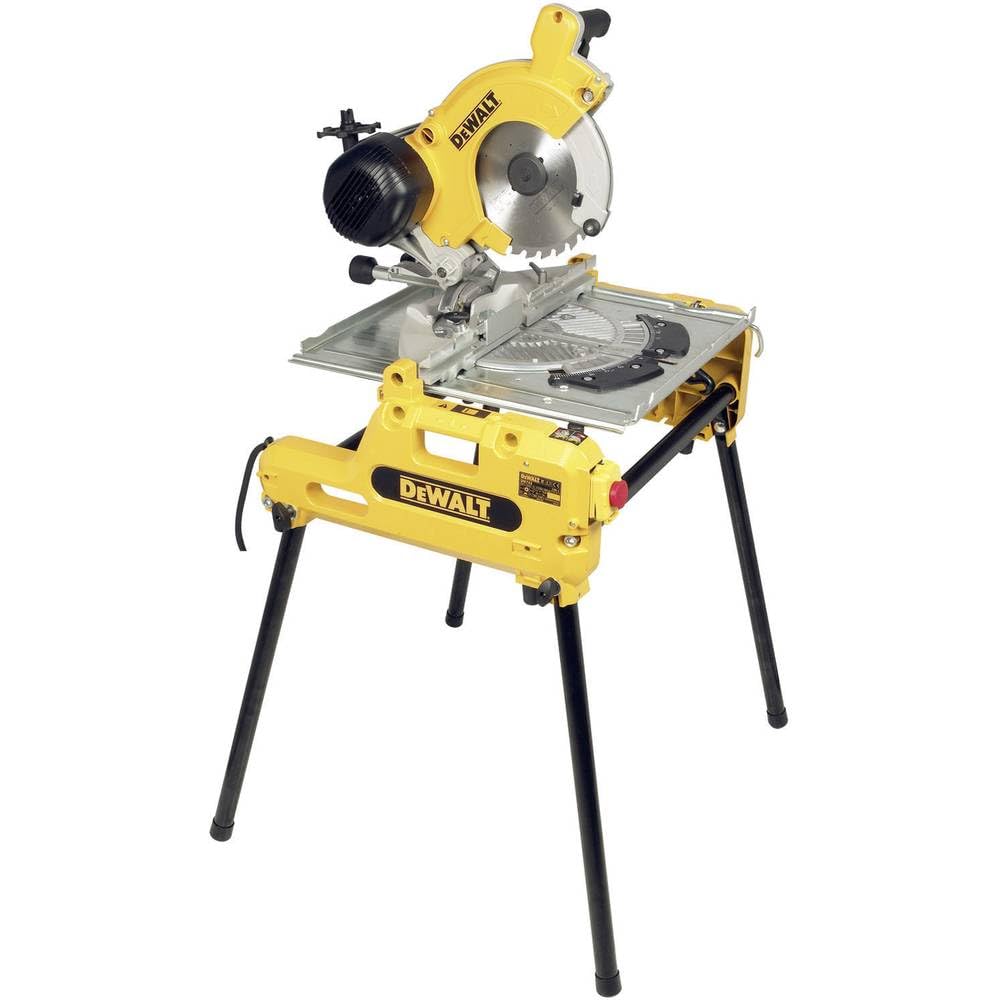
Figure 1: DeWalt DW743N-QS Reversible Table and Miter Saw in its operational setup.
Safety Instructions
Always prioritize safety when operating power tools. Failure to follow these instructions may result in serious injury or damage to the tool.
- Personal Protective Equipment (PPE): Always wear safety glasses, hearing protection, and a dust mask. Use appropriate gloves when handling rough materials.
- Work Area: Ensure your work area is clean, well-lit, and free from obstructions. Do not operate the saw in damp or wet conditions.
- Tool Inspection: Before each use, inspect the saw for any damage, loose parts, or worn components. Ensure the blade is sharp and correctly installed.
- Material Securement: Always secure the workpiece firmly before cutting. Never attempt to cut freehand.
- Blade Guard: Ensure all blade guards are in place and functioning correctly. The automatic blade guard lift mechanism enhances user safety during cross-cutting.
- Dust Extraction: Connect the saw to a suitable dust extraction system to minimize airborne dust and maintain a clear view of the cutting line. The saw features three dust extraction ports for efficient debris removal.
- Electrical Safety: Ensure the power supply matches the tool's requirements. Do not operate with damaged cords or plugs.
- Children and Bystanders: Keep children and bystanders at a safe distance from the operating area.
Setup
Proper setup is crucial for safe and accurate operation.
- Unpacking: Carefully remove all components from the packaging. Verify that all included items are present: 1 x TCT blade, 1 x parallel guide, 1 x push stick, 1 x 4 detachable feet, 1 x blade guard, 1 x assembly tool, 1 x clamping vice.
- Assembly:
- Attach the four detachable feet to the saw base for stability.
- Install the TCT blade using the provided assembly tool, ensuring it is oriented correctly for cutting.
- Mount the blade guard securely.
- Workstation Preparation: Place the saw on a stable, level surface capable of supporting its weight (37 kg). Ensure adequate space for material handling and safe operation.
- Dust Collection Connection: Connect a vacuum cleaner or dust extractor to the saw's three dust extraction ports for optimal chip and dust removal.
Operating Instructions
The DeWalt DW743N-QS offers two primary modes of operation: Miter Saw and Table Saw.
Switching Between Miter Saw and Table Saw Modes
The saw features a quick and tool-free transformation system. Refer to the specific mechanism on your saw for detailed steps. Generally, this involves releasing a locking mechanism and rotating the saw head assembly.
Miter Saw Operation
- Adjusting Miter Angle: Loosen the miter lock handle and pivot the saw table to the desired angle (up to 45° left/right). Securely tighten the handle.
- Adjusting Bevel Angle: For bevel cuts, tilt the saw head to the desired angle (up to 45° inclination). Lock it in place.
- Workpiece Placement: Place the workpiece firmly against the fence and the saw table. Use the clamping vice to secure it if necessary.
- Cutting:
- Ensure the blade is clear of the workpiece.
- Start the motor and allow the blade to reach full speed (2850 rpm).
- Slowly lower the saw head through the workpiece with a steady, controlled motion. The blade guard will automatically retract.
- Once the cut is complete, allow the blade to stop before raising the saw head.
Cutting Capacities (Miter Saw Mode):
- 90°/90° (Max Height x Max Width): 140×68 mm
- 90°/90° (Max Width): 180×20 mm
- 45°/90° (Max Height - Left Inclination): 95×70 mm
- 45°/90° (Max Height - Left Inclination): 120×46 mm
- 90°/45° (Max Width - Right Miter): 70×95 mm
- 90°/45° (Max Width - Left Miter): 150×20 mm
Table Saw Operation
- Blade Height Adjustment: Use the blade height adjustment mechanism to set the desired cutting depth (0 - 70 mm at 90°/90°, 0 - 32 mm at 90°/45°).
- Parallel Guide: Position the parallel guide to the desired width for rip cuts. Ensure it is locked securely.
- Workpiece Feeding:
- Start the motor and allow the blade to reach full speed.
- Using the push stick, feed the workpiece slowly and steadily into the rotating blade, keeping it firmly against the parallel guide.
- Never use your hands to push the workpiece directly into the blade.
Maintenance
Regular maintenance ensures the longevity and safe operation of your saw.
- Cleaning: After each use, disconnect the power and clean the saw thoroughly. Remove sawdust and debris from the blade area, motor housing, and adjustment mechanisms.
- Blade Care: Keep the blade clean and sharp. A dull blade can cause kickback and strain the motor. Replace worn or damaged blades promptly.
- Lubrication: Periodically lubricate moving parts and pivot points as indicated in the detailed product diagram (if available, otherwise general advice).
- Carbon Brushes: Check carbon brushes regularly and replace them when worn to maintain motor performance.
- Storage: Store the saw in a dry, secure location, away from moisture and extreme temperatures.
Troubleshooting
| Problem | Possible Cause | Solution |
|---|---|---|
| Saw does not start | No power supply; damaged power cord; faulty switch | Check power connection; inspect cord for damage; consult qualified technician for switch replacement |
| Blade binds or smokes | Dull blade; incorrect blade for material; improper feed rate; misaligned fence | Replace or sharpen blade; use appropriate blade; reduce feed rate; check fence alignment |
| Excessive vibration or noise | Loose blade; damaged blade; worn bearings; loose components | Tighten blade; replace damaged blade; consult technician for bearing replacement; check and tighten all fasteners |
| Poor dust extraction | Clogged ports; dust bag/extractor full; improper connection | Clear dust ports; empty dust bag/extractor; ensure secure connections |
Specifications
| Feature | Specification |
|---|---|
| Model Number | DW743N-QS |
| Power Input | 2000 Watts |
| Useful Power Output | 1550 Watts |
| Blade Speed | 2850 rpm |
| Blade Diameter | 250 mm |
| Blade Bore | 30 mm |
| Blade Inclination | 45° |
| Weight | 37 kg |
| Dimensions (L x W x H) | 700 mm x 670 mm x 750 mm (approx. 75.5 x 70.5 x 38.5 cm packaged) |
| Sound Power Level | 106.5 dBA |
| Vibration Level (Hand/Arm - Wood) | 1.9 m/s² |
| Included Components | 1 x TCT blade, 1 x parallel guide, 1 x push stick, 1 x 4 detachable feet, 1 x blade guard, 1 x assembly tool, 1 x clamping vice |
Warranty and Support
This DeWalt DW743N-QS Reversible Table and Miter Saw comes with a 1-year manufacturer's warranty. For warranty claims, technical support, or spare parts inquiries, please contact your authorized DeWalt service center or the retailer from whom you purchased the product.
For further assistance, you may visit the official DeWalt website or contact their customer service department. Always provide your model number (DW743N-QS) and serial number (if applicable) when seeking support.
Related documentsDW743N-QS


Ask a question about this manual
Ask about setup, troubleshooting, compatibility, parts, safety, or missing instructions. Manuals+ will review the question and use this page’s manual context to help answer it.