Introduction
The Kohler K-527-1SN DTV Prompt Digital Shower 2-Outlet Interface Control provides precise and convenient management of your shower experience. This system allows for accurate temperature control and selection between multiple water outlets, enhancing user comfort and functionality. This manual outlines the necessary steps for installation, operation, and maintenance to ensure optimal performance and longevity of your digital shower interface.
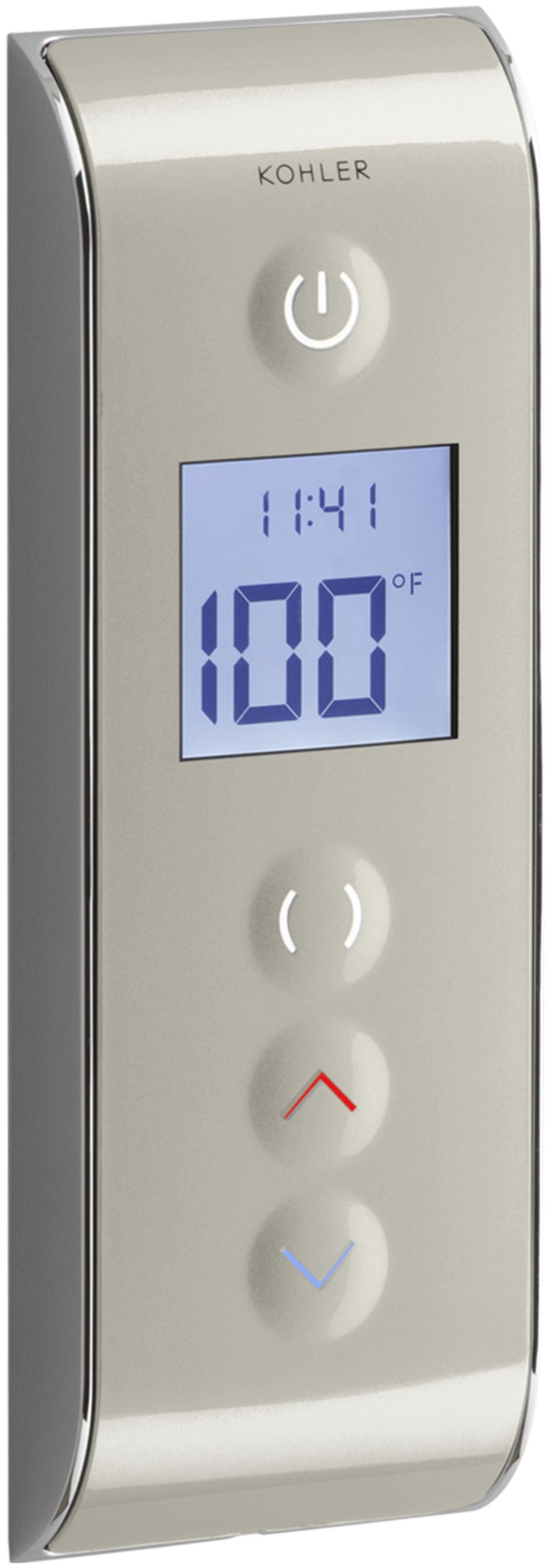
Figure 1: Kohler K-527-1SN DTV Prompt Digital Shower Interface, showing the control panel with digital display and buttons.
Setup and Installation
Installation of the Kohler K-527-1SN DTV Prompt Digital Shower Interface requires connection to a Kohler K-528-K digital thermostatic valve (sold separately). Due to the complexity of plumbing and electrical connections, professional installation by a qualified plumber or technician is highly recommended. Ensure all local plumbing and electrical codes are followed during installation.
Key Installation Considerations:
- Valve Placement: The K-528-K digital thermostatic valve should be installed in an accessible location, such as behind an access panel in a closet or wall, to facilitate future maintenance.
- Wiring: Proper wiring connections between the interface and the thermostatic valve are crucial for functionality. Refer to the detailed wiring diagrams provided with the K-528-K valve and the interface.
- Water Supply: Ensure hot and cold water supply lines are correctly connected to the thermostatic valve.
- Outlet Connections: Connect the shower outlets (e.g., main showerhead, rainhead, hand shower) to the appropriate ports on the thermostatic valve. This interface supports up to two outlets.

Figure 2: The digital shower interface mounted on a tiled shower wall, demonstrating typical installation.
Operating Instructions
The DTV Prompt interface is designed for intuitive control of your shower. Familiarize yourself with the buttons and display for a customized showering experience.
Basic Operation:
- Power On/Off: Press the Power button (top button with circle and vertical line icon) to turn the shower on or off. The display will illuminate upon activation.
- Adjusting Temperature:
- Use the Up arrow button (red arrow) to increase the water temperature.
- Use the Down arrow button (blue arrow) to decrease the water temperature.
- The digital display shows the current water temperature. When adjusting, the temperature will flash until the desired temperature is reached and stabilized, then it will become solid.
- Selecting Water Outlets: The interface supports up to two water outlets.
- Press the Diverter button (button with two curved lines) to cycle through the available outlets:
- First press: Activates Outlet 1 (e.g., main showerhead).
- Second press: Activates Outlet 2 (e.g., rainhead).
- Third press: Activates both Outlet 1 and Outlet 2 simultaneously.
- Subsequent presses will cycle through these options.
- Press the Diverter button (button with two curved lines) to cycle through the available outlets:
- Time Display: The interface also displays the current time, allowing you to monitor your shower duration.
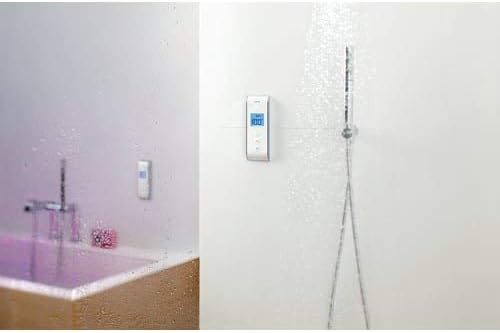
Figure 3: A shower environment showcasing the digital interface controlling both a standard showerhead and a rainhead.
Maintenance
To ensure the longevity and aesthetic appeal of your Kohler DTV Prompt Digital Shower Interface, follow these simple maintenance guidelines:
- Cleaning: Clean the interface regularly with a soft, damp cloth. Avoid abrasive cleaners, solvents, or harsh chemicals, as these can damage the finish and electronic components.
- Water Spots: To prevent water spots and mineral buildup, wipe the surface dry after each use.
- No Battery Replacement: The unit is not battery-operated, eliminating the need for battery replacement.
Troubleshooting
If you encounter issues with your Kohler K-527-1SN DTV Prompt Digital Shower Interface, consider the following common troubleshooting steps:
- No Power/Display Off:
- Check the electrical supply to the digital thermostatic valve (K-528-K). Ensure it is properly connected and receiving power.
- Verify that the interface is securely connected to the valve.
- Incorrect Temperature/Temperature Fluctuations:
- Ensure the hot and cold water supply lines to the K-528-K valve are fully open.
- Confirm that the temperature setting on the interface is correct. The display should show a solid temperature reading once stabilized.
- If issues persist, there may be a problem with the thermostatic valve or water heater. Consult a professional plumber.
- Water Not Flowing from Selected Outlet:
- Verify that the correct outlet is selected using the Diverter button.
- Check for any obstructions in the showerhead or rainhead.
- Ensure the water supply to the valve is adequate.
- Interface Unresponsive:
- Try turning the power to the entire shower system off at the circuit breaker for a few minutes, then restore power. This can reset the system.
- Ensure the interface is clean and dry, and there are no foreign objects interfering with the buttons.
For persistent issues or complex problems, it is recommended to contact Kohler customer support or a certified plumbing professional.
Specifications
| Feature | Detail |
|---|---|
| Model Number | K-527-1SN |
| Brand | Kohler |
| Product Dimensions | 0.75 x 2.69 x 7.75 inches |
| Item Weight | 1.95 pounds |
| Color/Finish | Satin Nickel with Polished Nickel |
| Material | Metal, Plastic (Handle Material: Brass) |
| Mounting Type | Wall Mount |
| Number of Handles | 1 (Digital Control) |
| Required Valve | K-528-K Digital Thermostatic Valve (not included) |
| Outlet Support | Single- or Dual-outlet applications |
Warranty & Support
Warranty Information:
The Kohler K-527-1SN DTV Prompt Digital Shower Interface is covered by a Lifetime Limited Warranty. This warranty typically covers defects in material and manufacturing under normal use and service. For specific details regarding coverage, limitations, and how to make a claim, please refer to the official warranty documentation included with your product or visit the Kohler website.
Customer Support:
For technical assistance, installation questions, troubleshooting beyond the scope of this manual, or warranty claims, please contact Kohler customer support. You can find contact information on the official Kohler website or in the product packaging.
Kohler Official Website: www.kohler.com


