
1. Introduction
This manual provides instructions for the VTech ATT-CL80100 DECT 6.0 accessory handset. This handset is designed to expand your existing compatible VTech/ATT DECT 6.0 cordless phone system. It is compatible with ATT models CL81100, CL81200, CL81300, CL82100, CL82200, CL82300, CL82350, CL82400, CL82500, CL82600, CL84100, and CL84200. Please read this manual thoroughly before using your new accessory handset.
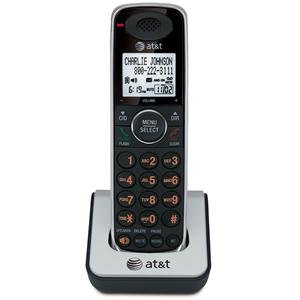
Image 1.1: The VTech ATT-CL80100 accessory handset. This image shows the front view of the cordless handset, typically including the display, keypad, and speaker.
2. Setup
Before using your new accessory handset, it must be registered to your existing compatible base unit and its battery must be charged.
2.1 Package Contents
Ensure your package contains the following items:
- ATT-CL80100 Accessory Handset
- Handset Battery Pack
- Handset Charger with Power Adapter
- User's Manual (this document)
2.2 Battery Installation
- Open the battery compartment cover on the back of the handset.
- Connect the battery pack connector securely into the jack inside the compartment.
- Place the battery pack into the compartment.
- Slide the battery compartment cover back into place until it clicks.
2.3 Charging the Handset
- Plug the small end of the charger's power adapter into the back of the handset charger.
- Plug the large end of the power adapter into a standard electrical outlet.
- Place the handset face forward into the charger cradle. The charge indicator light on the handset should illuminate, indicating proper charging.
- Allow the handset to charge for at least 12 hours before initial use. A full charge ensures optimal battery performance.
2.4 Registering the Handset
This accessory handset must be registered to your existing base unit to function. Refer to your main system's user manual for specific registration instructions, as procedures may vary slightly between base models (CL81xxx, CL82xxx, CL84xxx series). Generally, the process involves:
- Placing the accessory handset in its charger.
- Initiating a registration sequence on the base unit (often by pressing and holding a "PAGE" or "HANDSET LOCATOR" button).
- Confirming registration on the accessory handset.
If registration is successful, the handset display will show "Registered" or a similar confirmation message.
3. Operating the Handset
Once registered and charged, your accessory handset operates similarly to your primary handsets.
3.1 Making and Receiving Calls
- To Make a Call: Press TALK/FLASH or SPEAKER, then dial the phone number.
- To Answer a Call: Press any key (Any Key Answer feature) or press TALK/FLASH or SPEAKER.
- To End a Call: Press OFF/CLEAR or place the handset back in the charger.
3.2 Using the Directory
The handset shares the main system's 50-name/number directory. To access:
- Press MENU/SELECT.
- Scroll to "Directory" and press MENU/SELECT.
- Scroll through entries or use the keypad to search by name.
- Press TALK/FLASH to dial a selected entry.
3.3 Redialing
The handset stores the last 20 numbers dialed. To redial:
- Press REDIAL/PAUSE.
- Scroll through the list of recent calls.
- Press TALK/FLASH to dial the selected number.
3.4 Handset Settings
You can customize various settings on your handset, including selectable ringer tones and menu language (English/Spanish/French setup menu). Access these options via the MENU/SELECT button and navigate to the "Settings" or "Handset Setup" menu.
4. Maintenance
Proper care ensures the longevity of your accessory handset.
- Cleaning: Wipe the handset and charger with a soft, damp cloth. Do not use cleaning sprays or harsh chemicals.
- Battery Care: Replace the battery pack when its performance significantly degrades. Use only the specified replacement battery.
- Environment: Keep the handset away from excessive heat, direct sunlight, and moisture.
5. Troubleshooting
If you experience issues with your accessory handset, try the following solutions:
5.1 No Dial Tone or Cannot Make/Receive Calls
- Ensure the handset is properly registered to the base unit.
- Check that the handset battery is charged.
- Verify the main base unit is powered on and connected to the telephone line.
5.2 Handset Display is Blank or Not Working
- Place the handset in its charger to ensure it is charging.
- Check the battery connection inside the handset.
- If the issue persists, the battery may need replacement.
5.3 Poor Audio Quality
- Move closer to the base unit to improve signal strength.
- Ensure there are no large metal objects or other electronic devices interfering with the signal.
- Check for any physical damage to the handset or base unit.
5.4 Handset Not Registering
- Ensure you are following the registration steps outlined in your main system's user manual.
- Try resetting the base unit by unplugging its power for a few minutes, then plugging it back in.
- Ensure the accessory handset is within range of the base unit during registration.
6. Specifications
| Feature | Specification |
|---|---|
| Brand | VTech |
| Model | ATT-CL80100 |
| Power Source | Corded Electric (for charger) |
| Dialer Type | Single Keypad |
| Item Dimensions (L x W x H) | 2.36 x 4.96 x 7.08 inches |
| Answering System Type | Digital (system dependent) |
| Item Weight | 1 Kilogram |
| Caller Identification | No (as per product specifications, system dependent) |
| UPC | 172302632910, 132017996028, 168141379444, 650530020506 |
7. Warranty Information
VTech products are manufactured with high-quality components and are designed to provide years of trouble-free operation. For specific warranty details, including duration and coverage, please refer to the warranty card included with your original base unit purchase or visit the official VTech support website. Keep your purchase receipt as proof of purchase.
8. Customer Support
For technical assistance, product registration, or to order replacement parts, please contact VTech customer support. You can typically find contact information (phone numbers, website, email) on the VTech official website or in the documentation provided with your main phone system.
Online resources may include:
- Frequently Asked Questions (FAQs)
- Product Support Documents
- Software/Firmware Updates (if applicable)
When contacting support, please have your product model number (ATT-CL80100) and purchase date available.


